Page 72
501 SE Columbia Shores Boulevard, Suite 500, Vancouver, Washington 98661, USA l +1 360 859 1780
SmartRG Inc. Propriety and Condential. All Rights Reserved. Copyright © 2014 smartrg.com
IP Tunnel
IP Tunneling is typically used as a means to establish a path between two independent networks. Your SmartRG gateway sup-
ports connecting islands of IPv6 networks across the IPv4 internet or IPv4 in IPv6 as well.
IPv6inIPv4
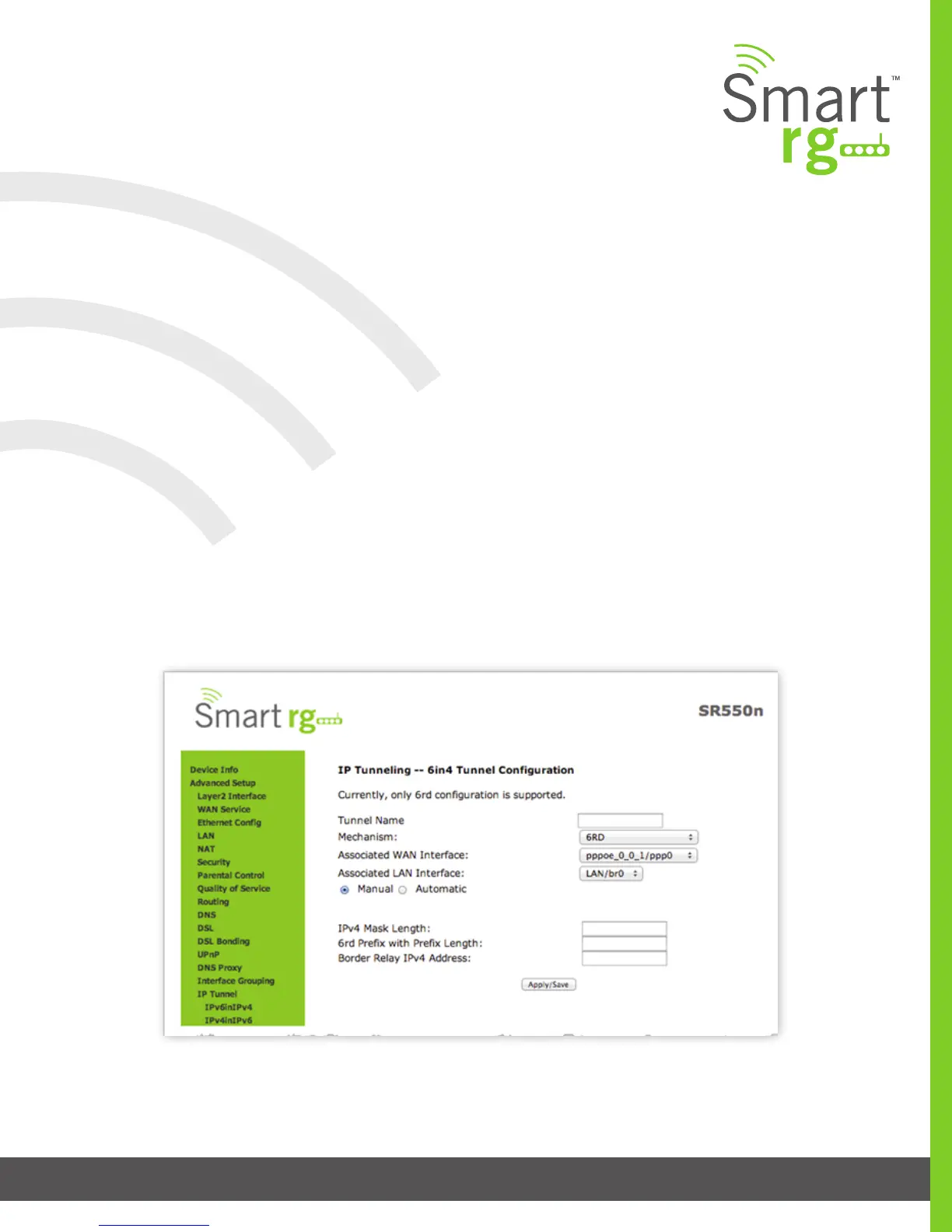
After selecting Advanced Setup -> IP Tunnel -> IPv6inIPv4 from the left navigation bar, click the Add button. The screen shown on
the next page will appear.
1. Enter a Tunnel Name
2. Currently, only the 6rd Mechanism is supported
3. Select the appropriate LAN and WAN interfaces from the drop-down lists associated with the tunnel you wish to estab-
lish.
4. IPv4 Mask Length, 6rd Prex with Prex Length and Border Relay IPv4 Address can be congured automatically. Select
the Manual radio button to specify your desired settings for these elds.
Click Apply/Save to commit your changes.



 To Next Page