Sonos Multi-Room Music System User Guide
2-4
Setting Up a New Sonos System
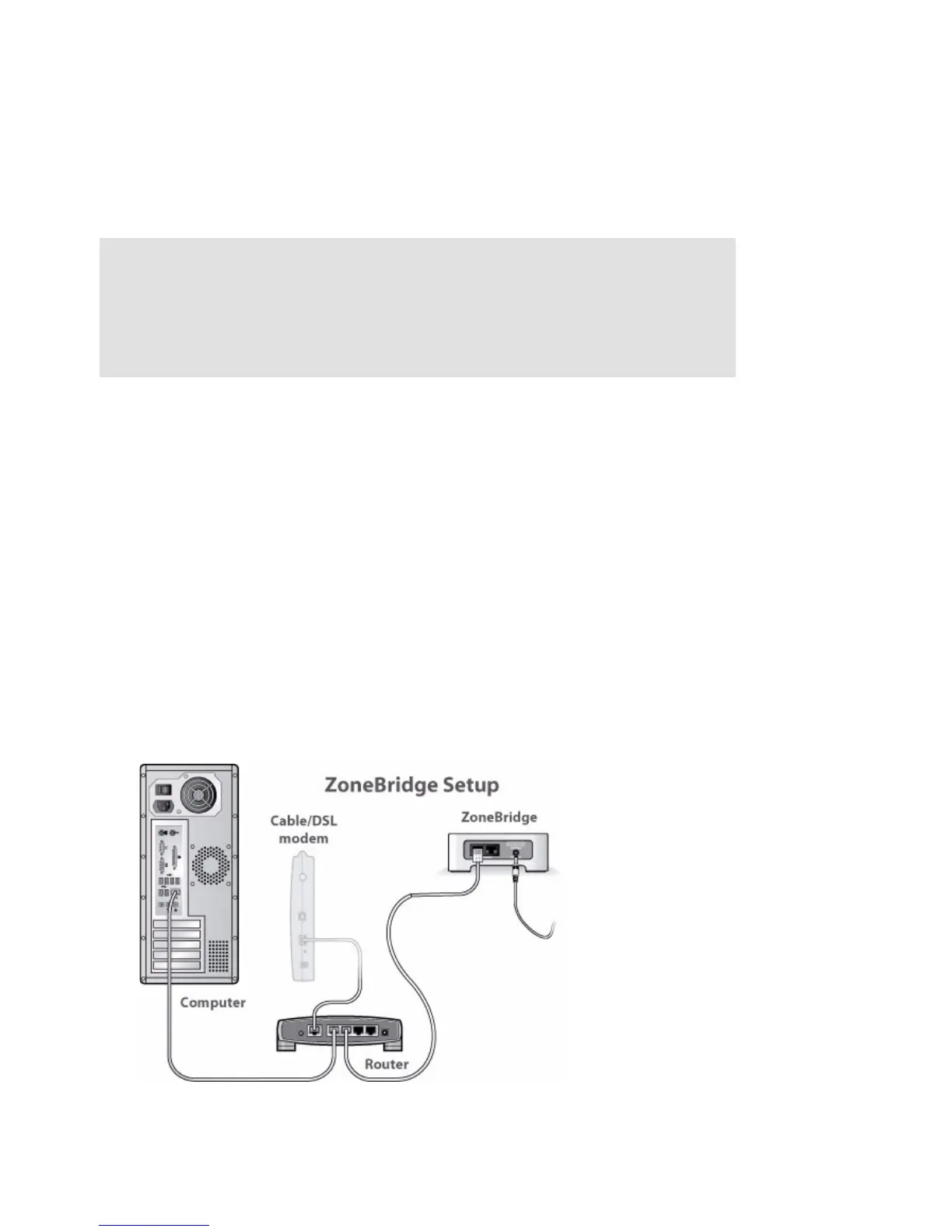
Step 1: Connect one Sonos component to your router
Connect an Ethernet cable (supplied) from any of the Ethernet switch connectors on
the back of a ZonePlayer or ZoneBridge to an open port on your router. Do not
connect the Sonos component directly to your cable or DSL modem unless your
modem has a built-in router.
• The first Sonos component you install must connect to your home network us-
ing an Ethernet cable. If you only have a wireless network, you can go to
http://faq.sonos.com/wireless for assistance.
• If you have structured (built-in) wiring that connects to a router located
elsewhere in your home, you can connect from a live wall plate to any of the
Ethernet switch connectors on the back of a Sonos component.
Setup illustrations (into router)
Note: Which Sonos component should I connect to my broadband
router
? If you are going to use speakers in this music zone, you can connect a
ZonePlayer 120 to your router. If you are going to connect to an external
amplifier, or to your computer’s powered speakers, you can connect a
ZonePlayer 90. If you do not wish to play music in this room, you can connect
a Sonos ZoneBridge.



 To Next Page