Chapter 3: Imaging 41
Imaging
Chapter 3: Imaging
Patient Information
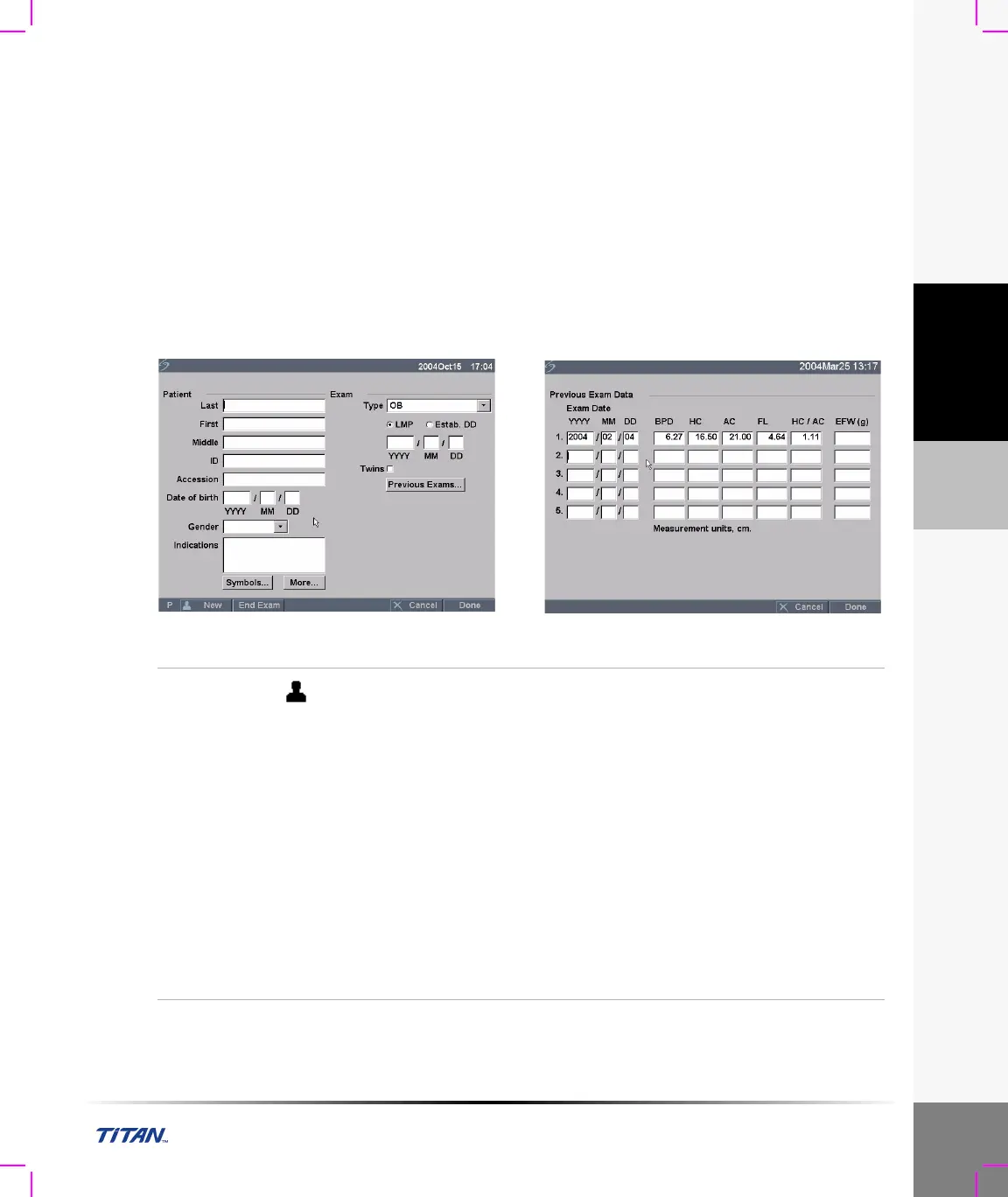
The patient information form allows information to be entered into the system for the patient exam.
Information which can be entered includes patient demographics, exam information, and clinical
information. This information is automatically placed on the last page of the patient report. Once a
patient is entered, all saved images will be linked to that patient. To end the exam, a New Patient
can be created or End Exam can be selected.
Note: Patient information can be edited during the exam by pressing the Patient key. However, if the
patient name, ID, or Accession changes, a new patient is created.
Figure 1 Patient Information Form
New
Patient
1 Press the Patient key.
2 Select New from the on-screen menu.
This clears the existing patient information.
Note: New patient will erase any previously entered information,
including any calculations and report pages. To save this information, save
the screen for each item, e.g. report pages, patient information, calculations,
and graphs.
3 Enter information into appropriate fields.
The patient information fields vary based on the selected exam type.
• Patient
• Patient: Enter Last, First, Middle, and ID.
• Accession: Enter number, if applicable.
• Date of birth: Enter (YYYY/MM/DD).
• Gender: Select Female, Male, other, or leave blank.
• Indications: Enter desired text.



 To Next Page