Shooting with the LCD Screen
You can also record the picture while looking at the LCD screen.
When using the LCD screen, the viewfinder screen turns off automatically.
You cannot monitor the sound from the speaker during recording.
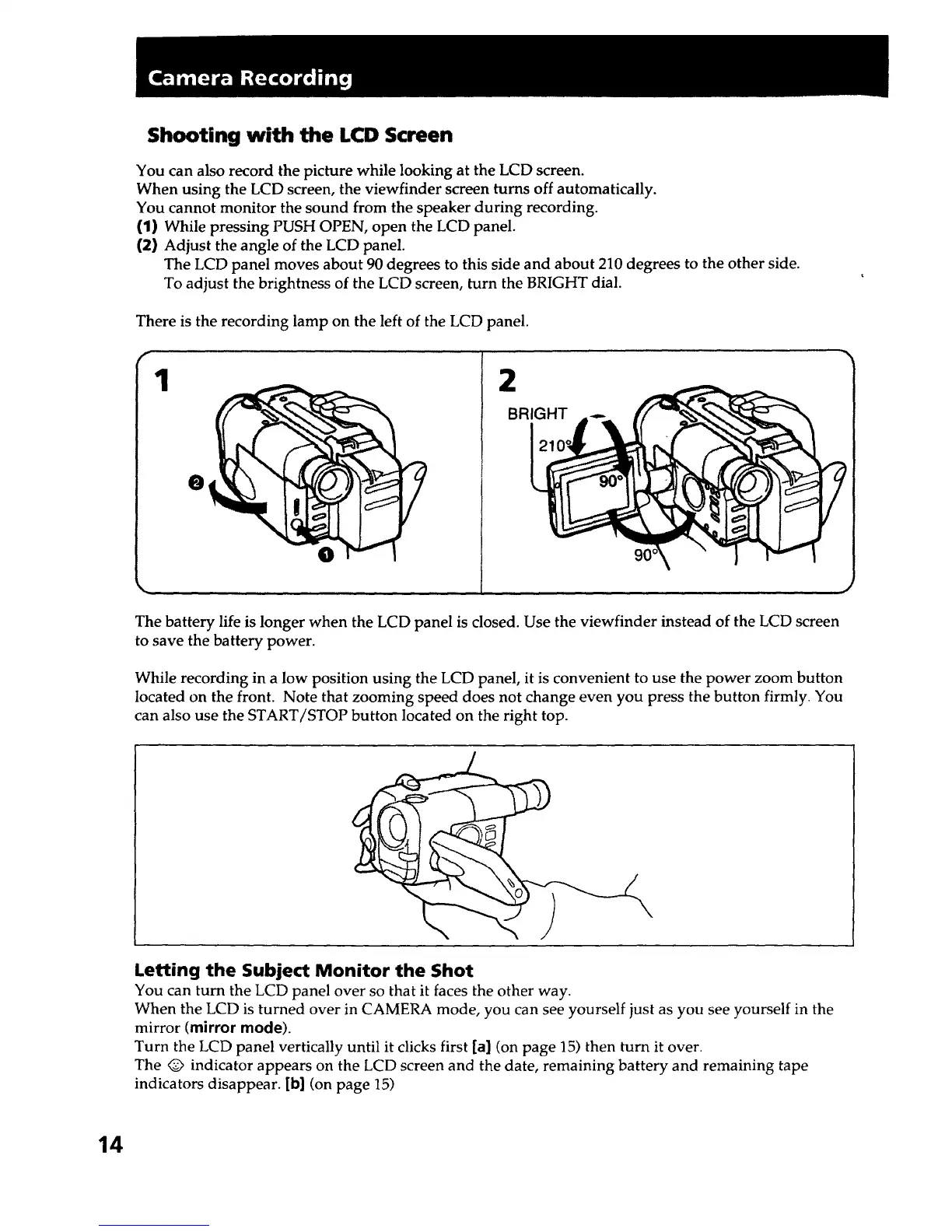
(1) While pressing PUSH OPEN, open the LCD panel.
(2) Adjust the angle of the LCD panel.
The LCD panel moves about 90 degrees to this side and about 210 degrees to the other side.
To adjust the brightness of the LCD screen, turn the BRIGHT dial.
There is the recording lamp on the left of the LCD panel.
1
O
@
2
BRIGHT
J
The battery life is longer when the LCD panel is closed. Use the viewfinder instead of the LCD screen
to save the battery power.
While recording in a low position using the LCD panel, it is convenient to use the power zoom button
located on the front. Note that zooming speed does not change even you press the button firmly. You
can also use the START/STOP button located on the right top.
Letting the Subject Monitor the Shot
You can turn the LCD panel over so that it faces the other way.
When the LCD is turned over in CAMERA mode, you can see yourself just as you see yourself in the
mirror (mirror mode).
Turn the LCD panel vertically until it clicks first [a] (on page 15) then turn it over.
The Q indicator appears on the LCD screen and the date, remaining battery and remaining tape
indicators disappear. [b] (on page 15)
14













 To Next Page