44
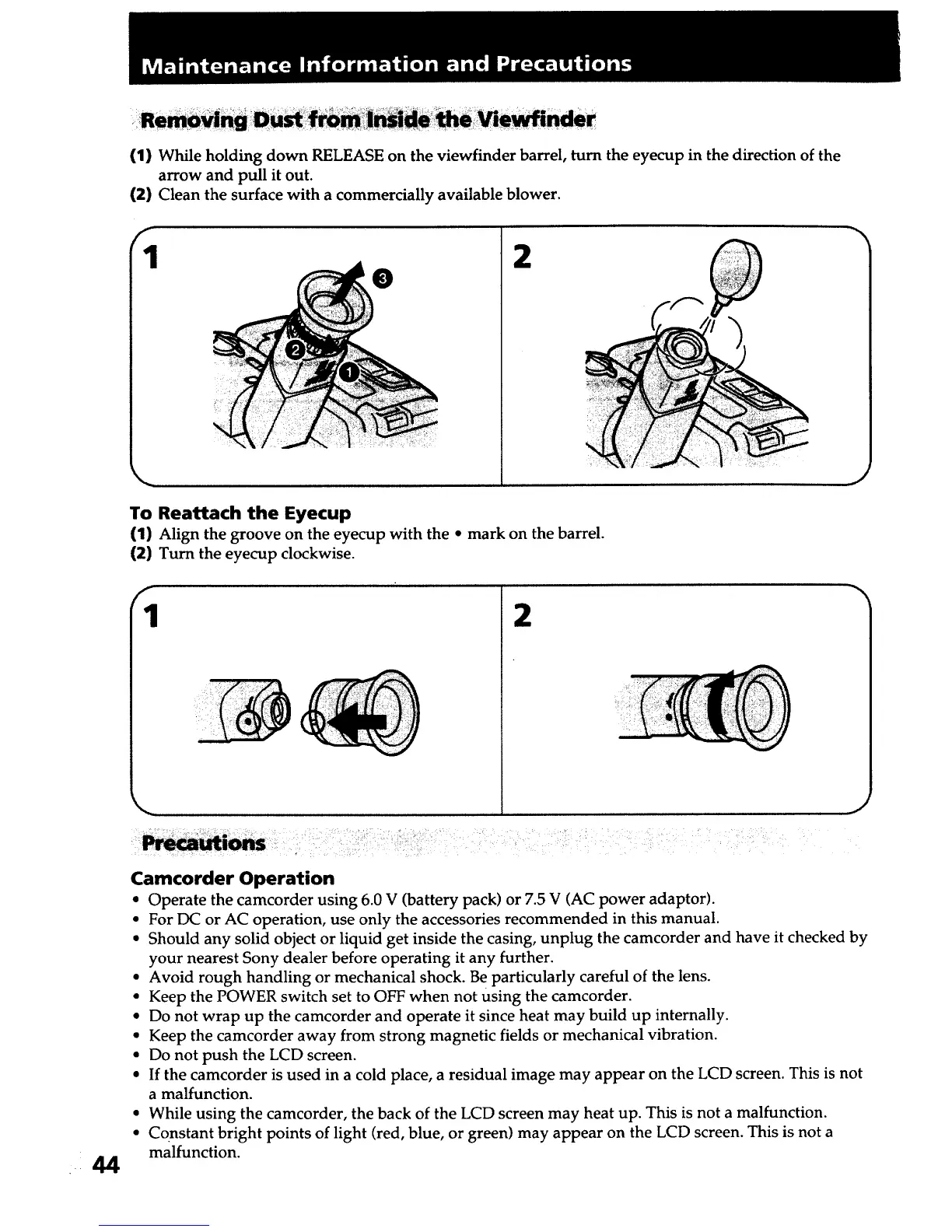
(1) While holding down RELEASE on the viewfinder barrel, turn the eyecup in the direction of the
arrow and pull it out.
(2) Clean the surface with a commercially available blower.
f
1 2
J
To Reattach the Eyecup
(1) Align the groove on the eyecup with the • mark on the barrel.
(2) Turn the eyecup clockwise.
f
1 2
J
Camcorder Operation
• Operate the camcorder using 6.0 V (battery pack) or 7.5 V (AC power adaptor).
• For DC or AC operation, use only the accessories recommended in this manual.
• Should any solid object or liquid get inside the casing, unplug the camcorder and have it checked by
your nearest Sony dealer before operating it any further.
• Avoid rough handling or mechanical shock. Be particularly careful of the lens.
• Keep the POWER switch set to OFF when not using the camcorder.
• Do not wrap up the camcorder and operate it since heat may build up internally.
• Keep the camcorder away from strong magnetic fields or mechanical vibration.
• Do not push the LCD screen.
• If the camcorder is used in a cold place, a residual image may appear on the LCD screen. This is not
a malfunction.
• While using the camcorder, the back of the LCD screen may heat up. This is not a malfunction.
• Constant bright points of light (red, blue, or green) may appear on the LCD screen. This is not a
malfunction.













 To Next Page