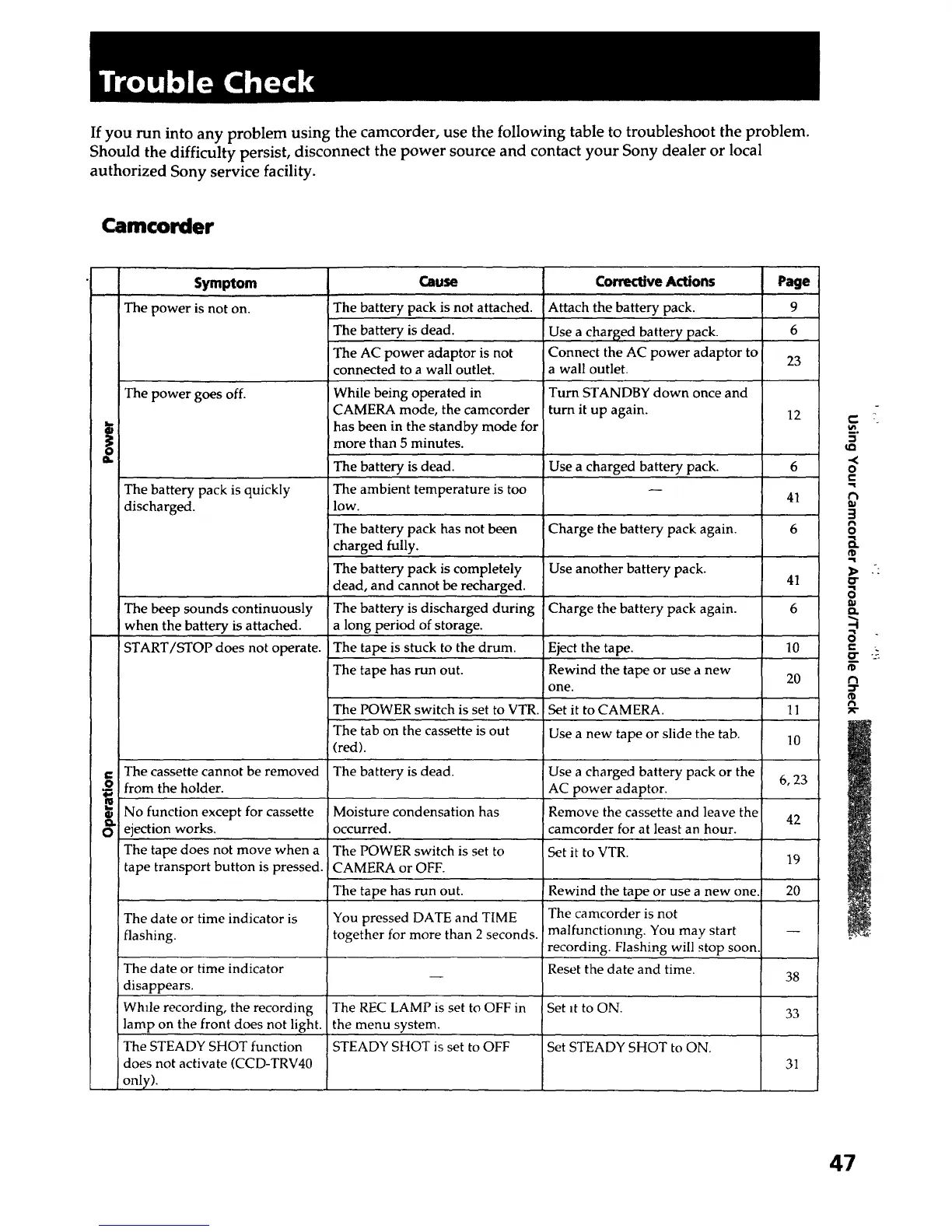
If you run into any problem using the camcorder, use the following table to troubleshoot the problem.
Should the difficulty persist, disconnect the power source and contact your Sony dealer or local
authorized Sony service facility.
Camcorder
Symptom
The power is not on.
The power goes off.
The battery pack is quickly
discharged.
The beep sounds continuously
when the battery is attached.
START/STOP does not operate.
The cassette cannot be removed
from the holder.
i No function except for cassette
_ ejection works.
The tape does not move when a
tape transport button is pressed.
Cllu_
The battery pack is not attached.
The battery is dead.
The AC power adaptor is not
connected to a wall outlet.
While being operated in
CAMERA mode, the camcorder
has been in the standby mode for
more than 5 minutes.
The battery is dead.
The ambient temperature is too
low.
The battery pack has not been
charged fully.
The battery pack is completely
dead, and cannot be recharged.
The battery is discharged during
a long period of storage.
The tape is stuck to the drum.
!The tape has run out.
The POWER switch is set to VTR.
The tab on the cassette is out
(red).
The battery is dead.
r
IMoisture condensation has
Ioccurred.
The POWER switch is set to
CAMERA or OFF.
Corrective Actions Page
!Attach the battery pack. 9
Use a charged battery pack. 6
Connect the AC power adaptor to
23
!a wall outlet.
ITurn STANDBY down once and
turn it up again. 12
!Use a charged battery pack. 6
41
!Charge the battery pack again. 6
Use another battery pack.
41
!Charge the battery pack again. 6
Eject the tape. 10
Rewind the tape or use a new 20
one.
Set it to CAMERA. 11
Use a new tape or slide the tab. 10
rThe tape has run out. Rewind the tape or use a new one.
The date or time indicator is You pressed DATE and TIME The camcorder is not
flashing, together for more than 2 seconds, malfunctioning. You may start --
recording. Flashing will stop soon.
! The date or time indicator Reset the date and time.
-- 38
disappears.
While recording, the recording The REC LAMP is set to OFF in Set it to ON. 33
lamp on the front does not light, the menu system.
The STEADY SHOT function STEADY SHOT is set to OFF Set STEADY SHOT to ON.
does not activate (CCD-TRV40 31
only).
Use a charged battery pack or the
6, 23
AC power adaptor.
Remove the cassette and leave the
42
camcorder for at least an hour.
Set it to VTR.
19
20
,,s
o
e-
3
o
a.
0"
a
n,
--I
a
E
i'D
47













 To Next Page