J
L
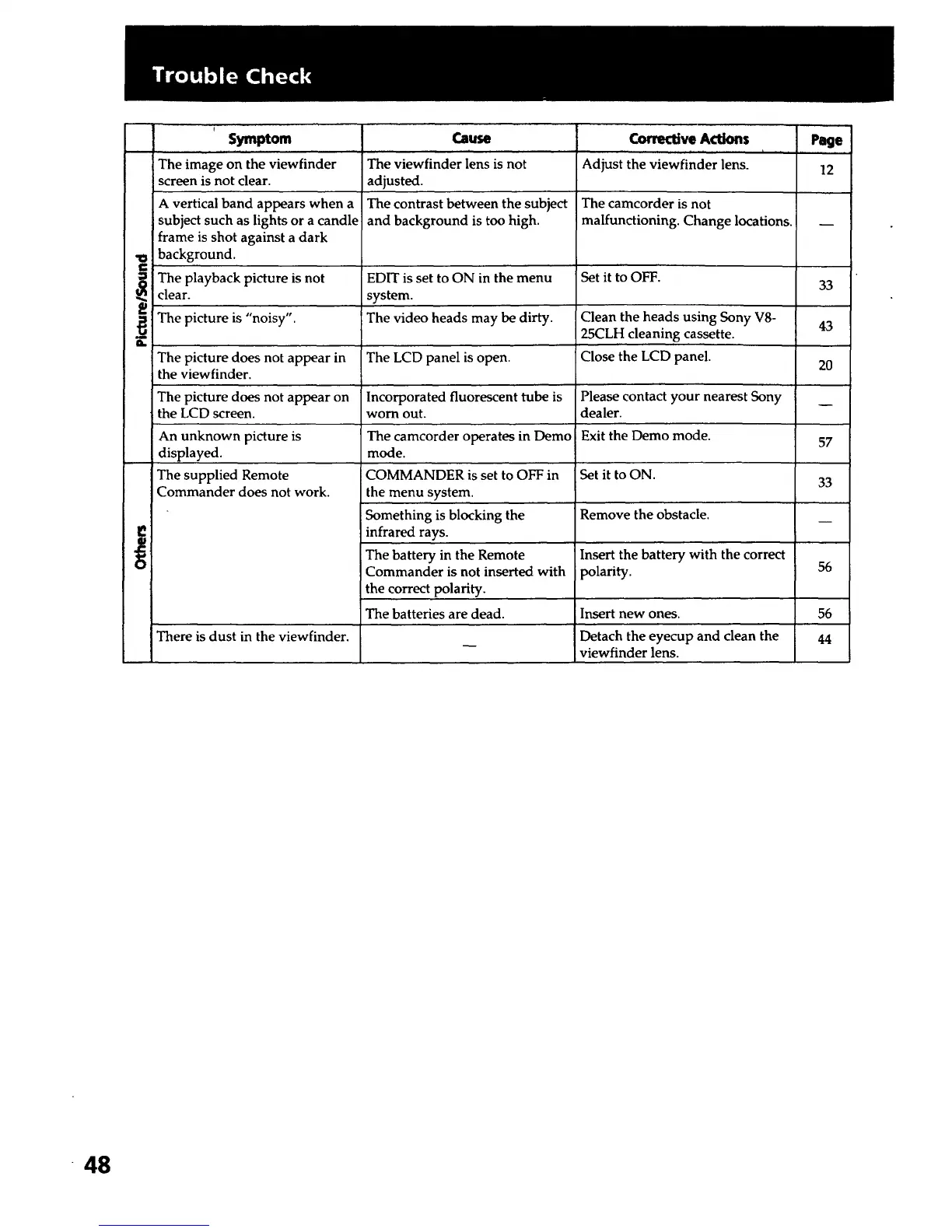
Symptom
, r , r,,, ,
The image on the viewfinder
screen is not clear.
A vertical band appears when a
subject such as lights or a candle
frame is shot against a dark
background.
The playback picture is not
clear.
The picture is "noisy".
The picture does not appear in
the viewfinder.
The picture does not appear on
the LCD screen.
An unknown picture is
displayed.
The supplied Remote
Commander does not work.
There is dust in the viewfinder.
Cause
The viewfinder lens is not
adjusted.
The contrast between the subject
and background is too high.
EDIT is set to ON in the menu
system.
The video heads may be dirty.
The LCD panel is open.
Incorporated fluorescent tube is
worn out.
The camcorder operates in Demo
mode.
Corrective Actions Page
, ,, i , , , ,
Adjust the viewfinder lens. 12
The camcorder is not
malfunctioning. Change locations.
Set it to OFF.
Clean the heads using Sony V8-
25CLH cleaning cassette.
Close the LCD panel.
Please contact your nearest Sony
dealer.
Exit the Demo mode.
33
43
20
57
33
Remove the obstacle.
Insert the battery with the correct
polarity.
Insert new ones.
Detach the eyecup and clean the
viewfinder lens.
COMMANDER is set to OFF in Set it to ON.
the menu system.
Something is blocking the
infrared rays.
The battery in the Remote
Commander is not inserted with 56
the correct polarity.
The batteries are dead. 56
44
48













 To Next Page