[a]
[b]
©
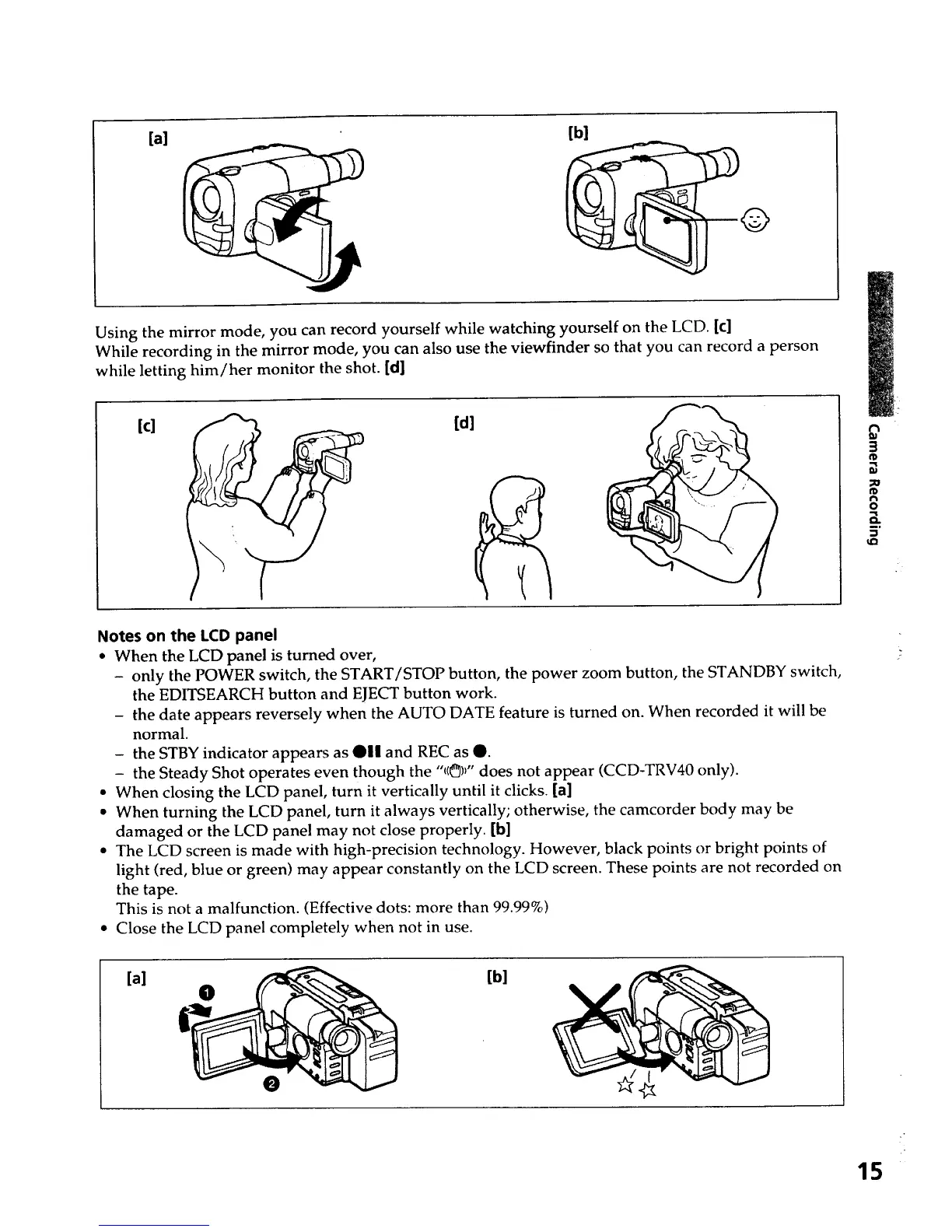
Using the mirror mode, you can record yourself while watching yourself on the LCD. [¢]
While recording in the mirror mode, you can also use the viewfinder so that you can record a person
while letting him/her monitor the shot. [d]
[c]
[d]
m
3
fD
fD
f_
o
5"
u_
Notes on the LCD panel
• When the LCD panel is turned over,
- only the POWER switch, the START/STOP button, the power zoom button, the STANDBY switch,
the EDITSEARCH button and EJECT button work.
- the date appears reversely when the AUTO DATE feature is turned on. When recorded it will be
normal.
- the STBY indicator appears as @1| and REC as @.
- the Steady Shot operates even though the "1(_)_"does not appear (CCD-TRV40 only).
• When closing the LCD panel, turn it vertically until it clicks. [a]
• When turning the LCD panel, turn it always vertically; otherwise, the camcorder body may be
damaged or the LCD panel may not close properly. [b]
• The LCD screen is made with high-precision technology. However, black points or bright points of
light (red, blue or green) may appear constantly on the LCD screen. These points are not recorded on
the tape.
This is not a malfunction. (Effective dots: more than 99.99%)
• Close the LCD panel completely when not in use.
[a]
[b]
15













 To Next Page