Advanced Operations
You can choose any of the following power sources for your camcorder: battery pack (p.6), house
current, and 12/24 V car battery. Choose the appropriate power source depending on where you want
to use your camcorder.
Indoors House current
Outdoor Battery Pack
in the car 12 V or 24 V car battery DC pack DCP-77
Supplied AC power adaptor
Battery pack NP-66 (supplied), NP-98/98D, NP-80/80D,
NP-68, NP-C65, NP-60D
Note on power sources
Disconnecting the power source or removing the battery pack during recording or playback may
damage the inserted tape. If this happens, restore the power supply again immediately.
This mark indicates that this product is a genuine product related to our 8mm
video equipment.
When purchasing out 8ram video equipment, we recommend that you
purchase related 8ram video products provided with the same mark or
products provided with our logotype mark.
i.g .ore
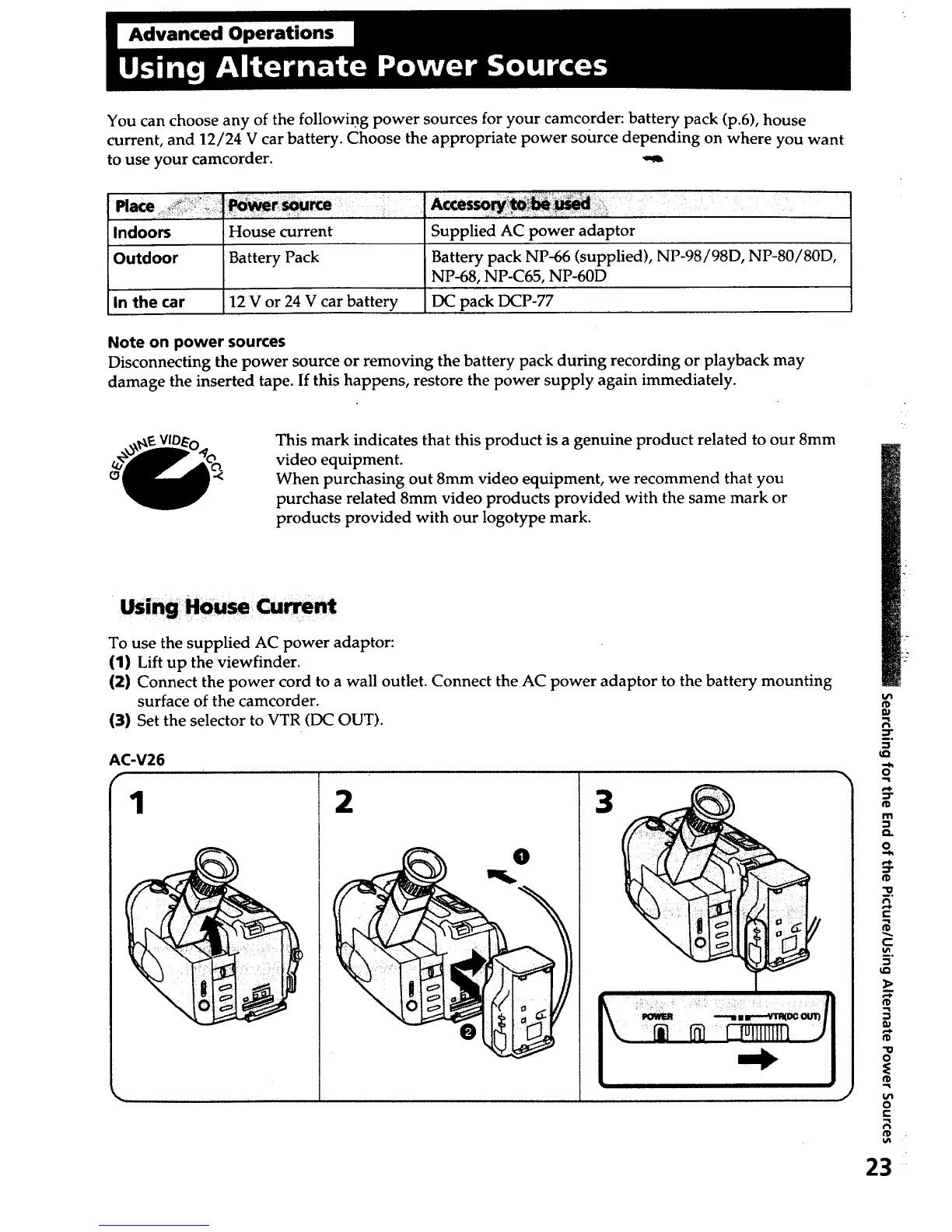
To use the supplied AC power adaptor:
(1) Lift up the viewfinder.
(2) Connect the power cord to a wall outlet. Connect the AC power adaptor to the battery mounting
surface of the camcorder.
(3) Set the selector to VTR (DC OUT).
AC-V26
1 2 3
J
7,
_o
-i
o
_D
rll
Q.
o
"0
m.
¢D
"0
o
E
€O
u_
o
23













 To Next Page