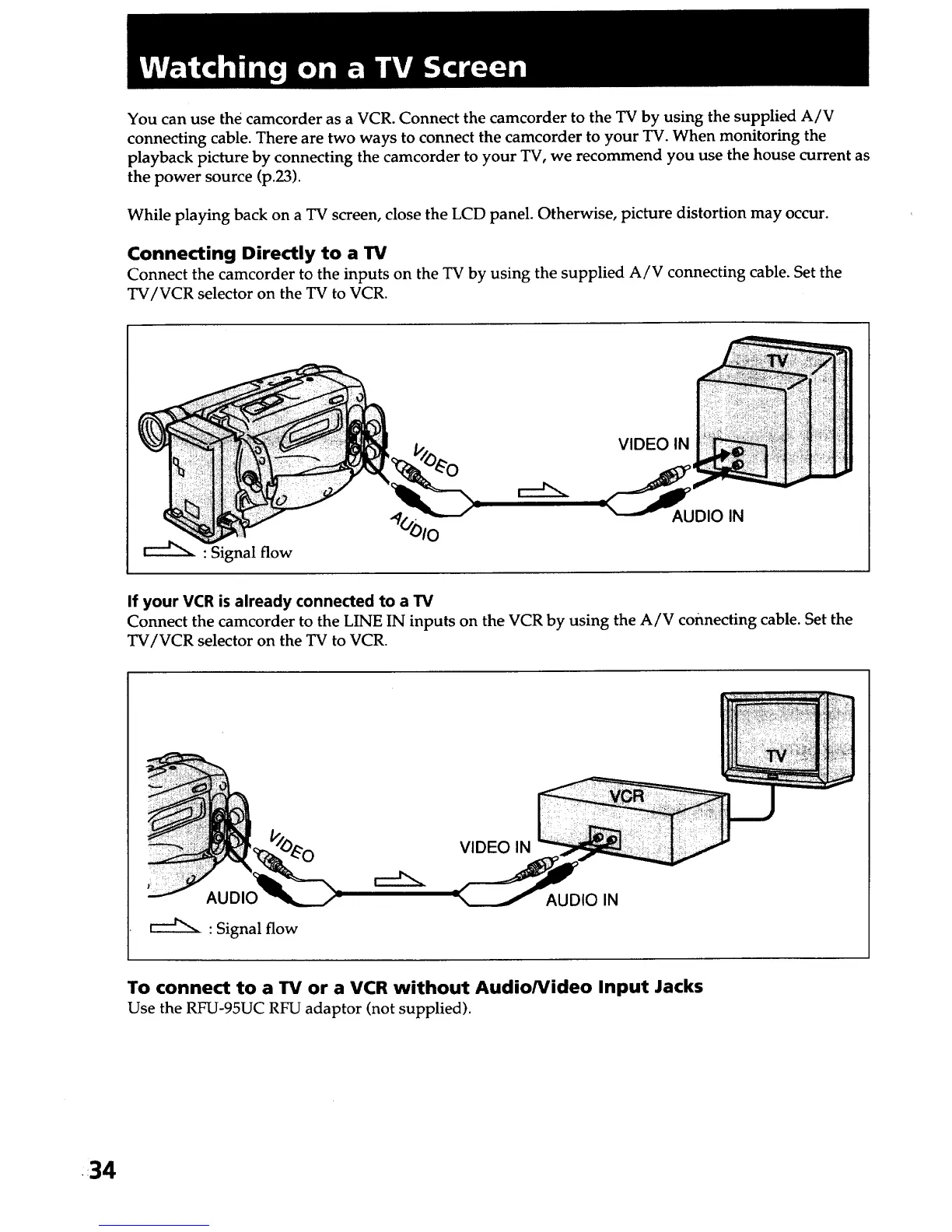
You can use the camcorder as a VCR. Connect the camcorder to the TV by using the supplied A/V
connecting cable. There are two ways to connect the camcorder to your TV. When monitoring the
playback picture by connecting the camcorder to your TV, we recommend you use the house current as
the power source (p.23).
While playing back on a TV screen, close the LCD panel. Otherwise, picture distortion may occur.
Connecting Directly to a 13/
Connect the camcorder to the inputs on the TV by using the supplied A/V connecting cable. Set the
TV/VCR selector on the TV to VCR.
VIDEO IN
: Signal flow
"qO_)lO AUDIO IN
If your VCR is already connected to a TV
Connect the camcorder to the LINE IN inputs on the VCR by using the A/V connecting cable. Set the
TV/VCR selector on the TV to VCR.
AUDIO
r--J"N : Signal flow
VIDEO IN
AUDIO IN
To connect to a 13/or a VCR without Audio/Video Input Jacks
Use the RFU-95UC RFU adaptor (not supplied).
•34













 To Next Page