50
Locations and Functions of Parts
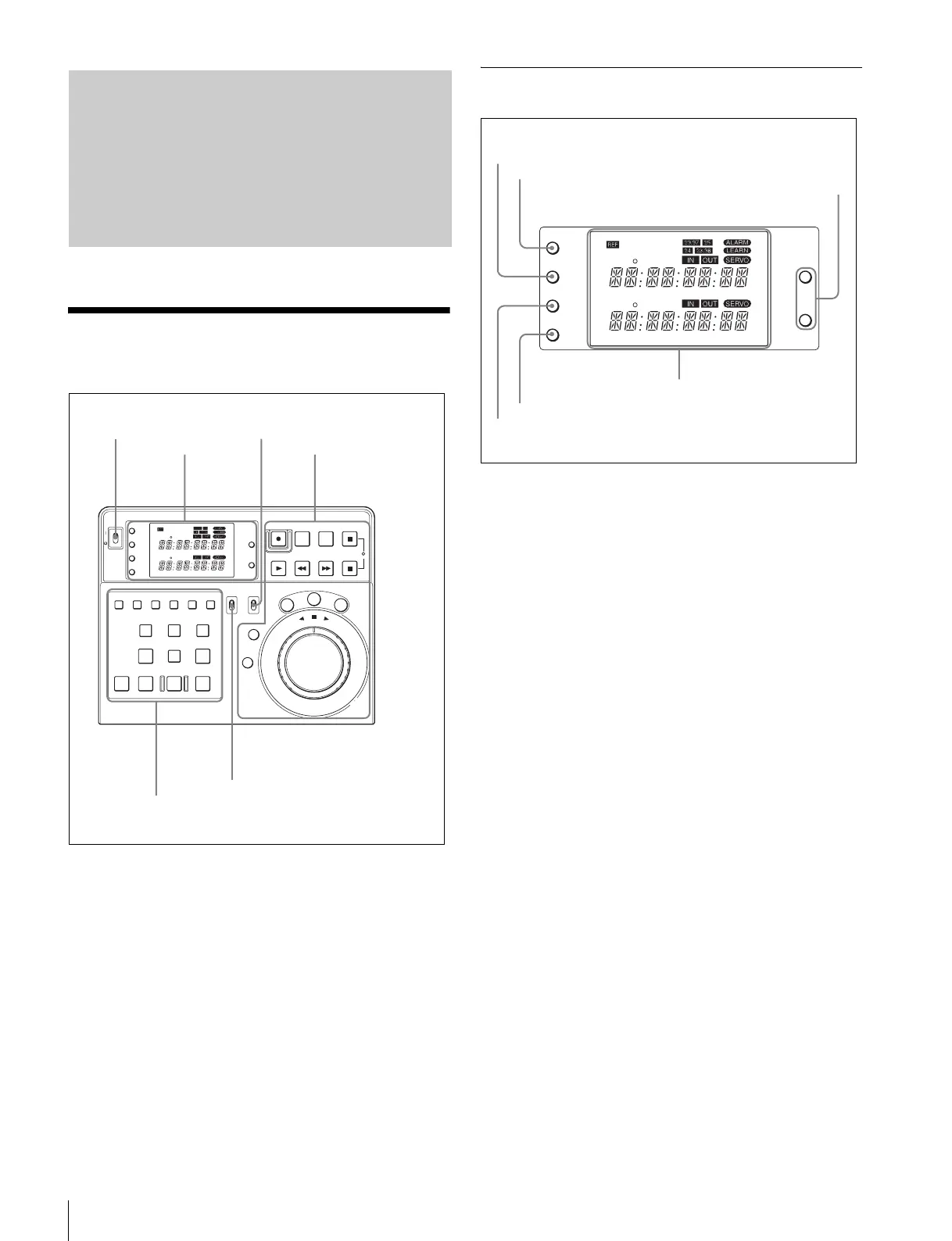
Control Panel
a POWER switch
Turns the unit on and off.
b KEY INHI switch
Set to ON to disable all the button operations to prevent
accidental button operation.
c EDITOR/REMOTE CONTROL switch
Selects whether to use this unit as an editor or as a remote
controller.
Set to EDITOR to use as an editor, and the PLAYER/
RECORDER indicators appear on the display.
Set to REMOTE CONTROL to use as a remote controller,
and the DEVICE 1/DEVICE 2 indicators appear.
1 Display Area
a LEARN button
Press to start the automatic measurement of the start delay
time (the time it takes for the VTR to get ready to play back
or record).
b TC/RTC/CTL button
Each time you press the button, the type of the time data
displayed in the time data display changes.
TC: Displays the timecode (absolute value) read from the
tape. It cannot be reset with the RESET button.
RTC: After being reset displays the increase and decrease
of the timecode as a relative value. It can be reset with
the RESET button.
CTL: After being reset displays the counted pulse of the
control signal. It can be reset with the RESET button.
c RESET button
Press to reset the time data (RTC or CTL) or the edit
points. When the time data in the display window is set to
RTC or CTL, press this button to cancel the IN and OUT
points that you have entered. When you press this button
while an error message is displayed, the message
disappears.
d MENU button
Press to display the setup menu. When you press this
button while the setup menu is displayed, the menu quits.
e SET button
Press to finalize the setting while using the setup menu.
Locations and
Functions of Parts
POWER
TC
IN OUT
PLAYER
RTCTL
DEVICE 2
RTC
CTL
LEARN
RESET
REC EDIT
JOG
SHTL
VA
R
EDITING CONTROLLER
RM
-
280
PREROLL PAUSE
PLAY REW FF STOP
STANDBY
RESET
MENU
SET
ASSEMBLE
VIDEO
TRIM
-
TRIM+
GO TO/SPLIT IN
PF7 PF8 PF9
PF4 PF5 PF6
PF1 PF2 PF3
IN ENTRY OUT
REVIEW / JUMP
PREVIEW AUTO EDIT ALL STOP
A1 A2 A3 A4
PF10 PF11 PF12 PF13 PF14 PF15
EDITOR
PLAYER
DEVICE 2
DEVICE 1
RECORDER
REMOTE
CONTROL
KEY INHI
ON
OFF
RECORDER
RTCTL
DEVICE 1
1 POWER switch
3 EDITOR/REMOTE CONTROL
switch
2 KEY INHI switch
2 Running Control Area1 Display Area
3Editing Control Area
TC
IN OUT
PLAYER
RTCTL
DEVICE 2
RTC
CTL
LEARN
RESET
RESET
MENU
SET
RECORDER
RTCTL
DEVICE 1
1 LEARN button
2 TC/RTC/CTL button
3 RESET button
4 MENU button
5 SET button
6 Display window














 To Next Page