81
Error Messages
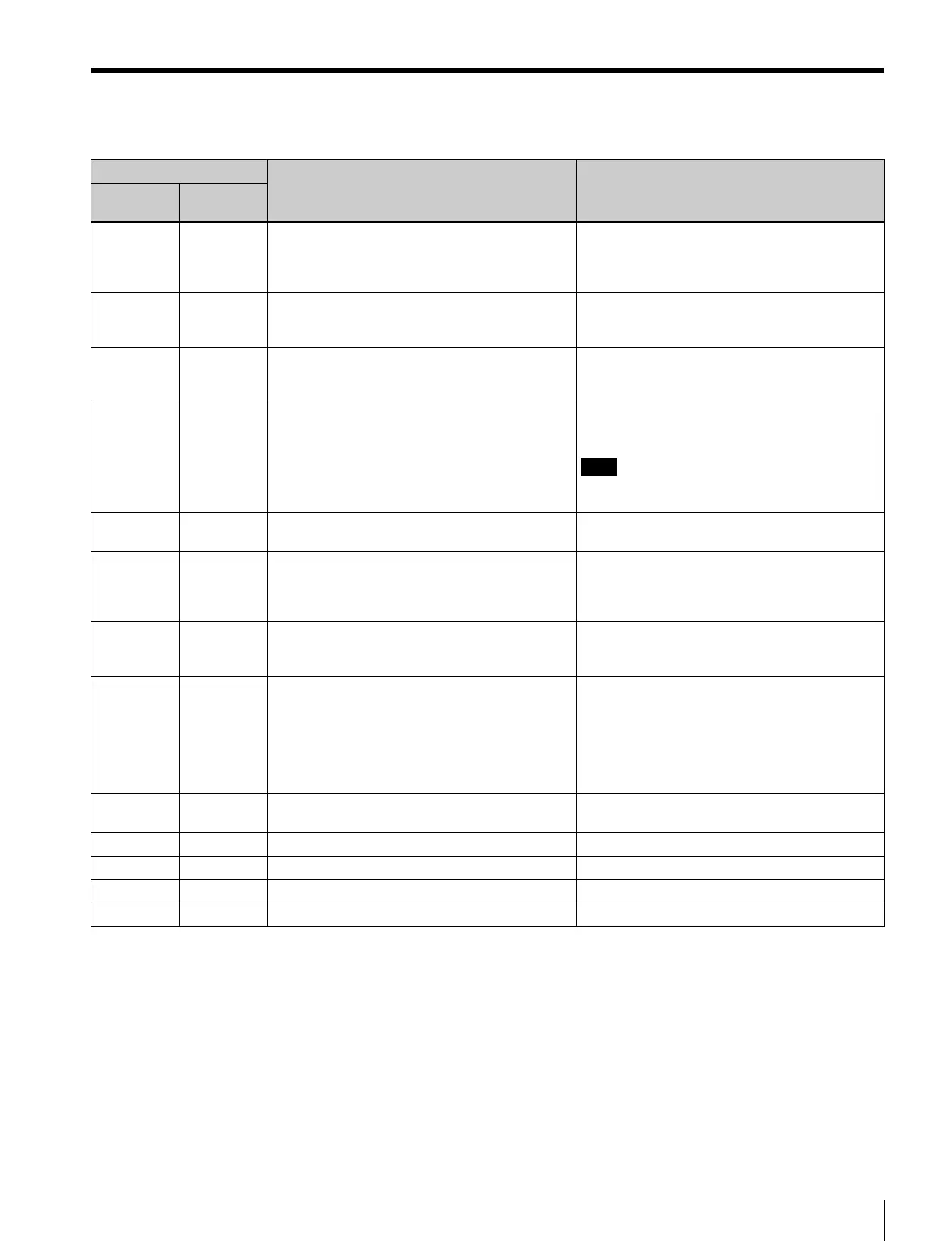
Error Message List
Message Meaning Action
Upper
portion
Lower
portion
VTR CTRL VTR CTRL This unit can’t control VTRs after automatic
control operation including the LEARN function
begins.
Make sure that the VTR 9PIN REMOTE is set to
ON.
Make sure that a cassette (or a recording
media) is inserted.
LRN ERR LRN ERR The VTR is in the standby mode when
automatic control operation including the
LEARN function begins.
Perform the start delay LEARN function for both
VTRs simultaneously.
REC INHI (none) The recorder is in rec-inhibit mode. Check the REC/SAVE switch of the cassette
and the status of the REC INHI setting of the
recorder, and cancel the rec-inhibit mode.
EDIT ERR E PRESET You haven’t set the edit mode before starting the
automatic editing.
Make sure that you select the edit mode with
some of the ASSEMBLE, VIDEO, and the A1 to
A4 buttons lit.
Note
Edit mode isn’t set if any of the ASSEMBLE,
VIDEO, or A1 to A4 buttons flash.
EDIT ERR ED POINT The setting for edit is not appropriate before an
automatic edit.
Make sure that the duration is not zero, or that
the OUT point is not set before the IN point.
SRCH ERR SRCH ERR Search function with the GOTO button can’t be
performed.
The tape doesn’t have enough leeway for
preroll.
Make sure that the timecode to cue up for exists.
SV UNLCK SV UNLCK The servo-mechanism of the VTR is not locked
at the IN point (when the setup menu item 08
SVLCK ER is set to ABORT).
Make sure that the material tape or the
recording tape is recorded correctly.
SYNC ERR SYNC ERR Synchronization between the player and the
recorder can’t be performed (when the setup
menu item 05 SYNC SEL is set to other than
OFF).
Check the preroll time setting on the setup
menu item 01. If the preroll time is shorter than
the minimum preroll time of the VTR, set the
preroll time to a longer amount.
Determine the start delay setting with the
LEARN button and set the setup menu item 10
and 11 to LEARN.
VTR TYPE VTR TYPE The type of the VTR can’t be detected during
the automatic editing.
Set the timing of the editing manually.
REF MISS (none) The reference signal is not input to the recorder. Input the reference signal to the recorder.
HARD ERR KY COMM KY communication error Contact your Sony service representatives.
HARD ERR NVRAM ER NVRAM read/write error Contact your Sony service representatives.
HARD ERR FPGA FPGA error Contact your Sony service representatives.















 To Next Page