62
Using as an Editor
To start automatic editing
When you have entered the edit points (see page 60), the
AUTO EDIT button starts flashing.
When you press the AUTO EDIT button, the AUTO EDIT
button changes from flashing to continuously lit, and the
automatic editing begins.
At the end of the editing, the AUTO EDIT button turns off.
To modify the OUT point after starting an
automatic editing
After starting the automatic editing, to end the operation
before the preset OUT point, press the OUT button
simultaneously with the ENTRY button.
The point where you press the buttons becomes the OUT
point, and editing ends.
To stop automatic editing
Press the ALL STOP button to stop the automatic editing.
The PREVIEW and AUTO EDIT buttons start flashing,
and the state before the editing was started is restored.
In this case, the IN and OUT points already entered are
preserved so that you can perform a preview or automatic
editing again.
Reviewing the Editing Results
After an editing operation, you can review the editing
results on the monitor.
To review, after performing the automatic editing, and
before you enter any new edit points or make other
settings, press the REVIEW button.
When the review operation is ready, the REVIEW
indicator starts to flash.
Press the REVIEW button while the REVIEW button is
flashing. The REVIEW button changes from flashing to
continuously lit, and the review operation begins.
At the end of the review, the REVIEW button starts
flashing again, and the tape returns to the OUT point.
To check the OUT point during the review
operation (Jump function)
You can make the tape run to the OUT point quickly
during the review operation.
Press the REVIEW/JUMP button at any point after the IN
point.
Then the tape runs to the point 3 seconds before the OUT
point at high speed, and the VTR starts playback from that
point to the point 2 seconds after the OUT point. After
playback, the tape returns to the OUT point.
This function does not work when the duration between
the IN and the OUT points is less than preroll time plus 1
second.
To cancel the review operation
Press the ALL STOP button.
To recall the previous edit points
Press the ENTRY button simultaneously with the
RECORDER (DEVICE 1) button or the PLAYER
(DEVICE 2) button.
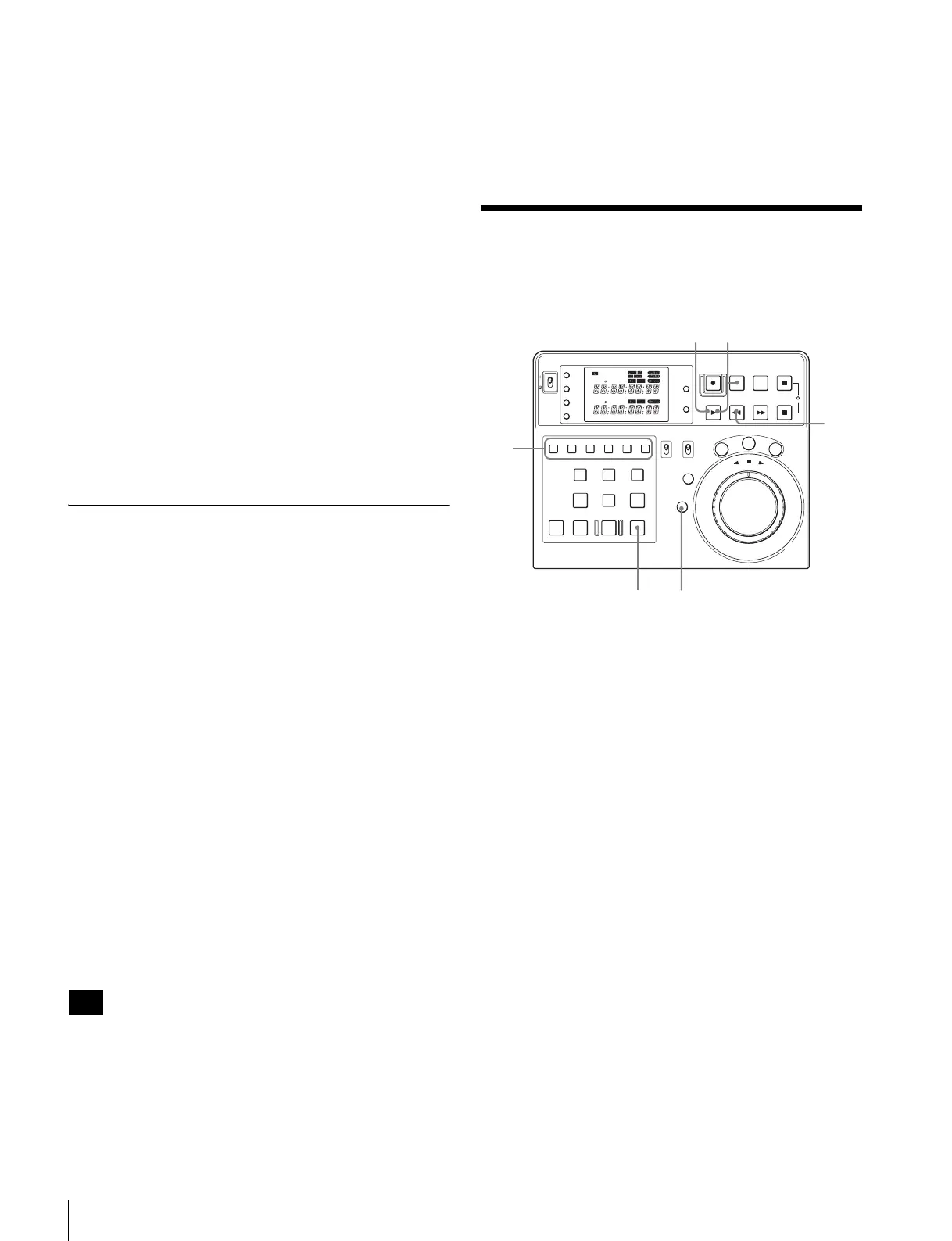
Manual Editing
1
Select the edit mode.
Assemble editing: Press the ASSEMBLE button.
Insert editing: Press the desired insert button(s):
VIDEO, A1 to A4.
The pressed button(s) light.
2
Search for the IN point for both the player and the
recorder.
3
Rewind more than five seconds ahead of the IN points
of the player and the recorder.
4
Press the PLAY buttons of both the player and the
recorder.
Then both the recorder and the player start playing
back.
5
Press the RECORDER (DEVICE 1) button to select
the recorder.
6
Press the EDIT button and the PLAY button
simultaneously at the desired IN point.
Editing begins.
Note
POWER
TC
IN OUT
PLAYER
RTCTL
DEVICE 2
RTC
CTL
LEARN
RESET
REC EDIT
JOG
SHTL
VAR
EDITING CONTROLLER
RM
-
280
PREROLL PAUSE
PLAY REW FF STOP
STANDBY
RESET
MENU
SET
ASSEMBLE
VIDEO
TRIM
-
TRIM+
GO TO/SPLIT IN
PF7 PF8 PF9
PF4 PF5 PF6
PF1 PF2 PF3
IN ENTRY OUT
REVIEW / JUMP
PREVIEW AUTO EDIT ALL STOP
A1 A2 A3 A4
PF10 PF11 PF12 PF13 PF14 PF15
EDITOR
PLAYER
DEVICE 2
DEVICE 1
RECORDER
REMOTE
CONTROL
KEY INHI
ON
OFF
RECORDER
RTCTL
DEVICE 1
1
3
6
7
4
5















 To Next Page