67
Using as a Remote Controller
Basic VTR function mode + extended
functions
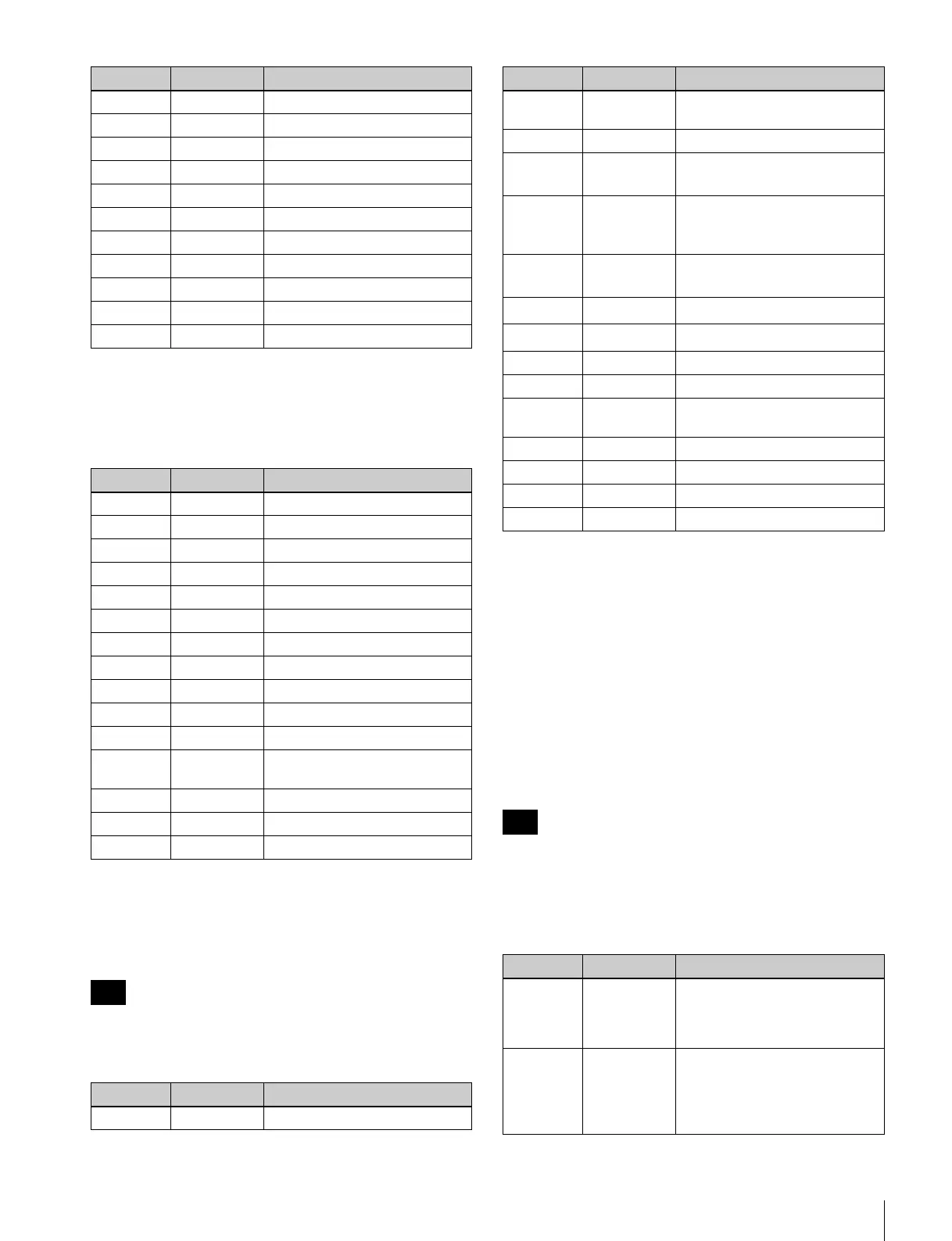
When setup menu items 12 and 13 are “VTR DEF”, the
functions are as follows.
Basic VTR function mode + multi cue
function
When setup menu items 12 and 13 are “MULT CUE”, the
functions are as follows.
Up to 256 entries can be registered as cue points. After 256
entries, previous entries will be overwritten, starting with
the first.
1)
When you display or increase/decrease the mark number, the mark number
and registered timecode are displayed for 1 second in the timecode display
area.
2)
The clip operation functions assigned to PF7 and PF8 are only supported
by the XDCAM series.
XDCAM Mode
The PF2, PF4, PF6, PF8 keys can be used to select an item
in the thumbnail display, the CLIP menu, the essence mark
selection screen, and the scene selection window.
You can use this unit as an editor by changing the
EDITOR/REMOTE CONTROL switch to EDITOR.
The functions indicated in the parentheses are functions of
the PF keys when the unit is used as an editor.
This mode is available on XDCAM devices
1)
. If certain
keys are not available on a particular model, the respective
key operations will not be available on that model.
1)
Supported devices: PDW-1500, PDW-F75, PDW-HR1, PDW-HR1/MK1,
PDW-HD1500, PDW-F1600, PDW-HD1200, XDS-1000/1000C, XDS-
PD1000/1000C, XDS-PD2000/2000C
PF5 – No function.
PF6 – No function.
PF7 – No function.
PF8 – No function.
PF9 10KYCALL Enable the ten-key input function.
PF10 – No function.
PF11 – No function.
PF12 – No function.
PF13 – No function.
PF14 – No function.
PF15 – No function.
Key Display Function
PF1 SYNC PLAY Start sync play.
PF2 EJECT Eject media.
PF3 STOP Stop playback.
PF4 SUPER ON Enable superimposing.
PF5 SUPER OFF Disable superimposing.
PF6 – No function.
PF7 EE SEL Enable EE mode.
PF8 PB SEL Enable PB mode.
PF9 10KYCALL Enable the ten-key input function.
PF10 SG ON Enable video SG.
PF11 SDI Switch the video input to SDI.
PF12 CMPST Switch the video input to
composite.
PF13 A INT SG Enable audio SG.
PF14 A IN SDI Switch the audio input to SDI.
PF15 A IN ANA Switch the audio input to analog.
Note
Key Display Function
PF1 PLAY Play.
Key Display Function
PF2 CUE IN Insert a mark using the current
timecode.
PF3 STOP Stop.
PF4 CUE– Decrease the setting value for
the cue up mark number.
1)
PF5 CUE DISP Display the setting value for the
cue up mark number and the
timecode.
1)
PF6 CUE+ Increase the setting value for
the cue up mark number.
1)
PF7 XDC PREV
Move to the previous clip.
2)
PF8 XDC NEXT
Move to the next clip.
2)
PF9 10KYCALL Enable the ten-key input function.
PF10 – No function.
PF11 CUEUP Cue up to the timecode of the
configured mark number.
PF12 – No function.
PF13 – No function.
PF14 CUE CLR Clear all inserted cue points.
PF15 – No function.
Note
Key Display Function
PF1 PAGE
(REVIEW/
JUMP)
Press this button to switch the
page of the function menu.
(Some models do not have this
function.)
PF2 MARK 2 r
(AUTO EDIT)
(During recording or playback)
Press this button
simultaneously with the SET
(ENTRY) button to record a shot
mark 2 as an essence mark.
Key Display Function















 To Next Page