STR-ZA1000ES/ZA2000ES/ZA3000ES
5
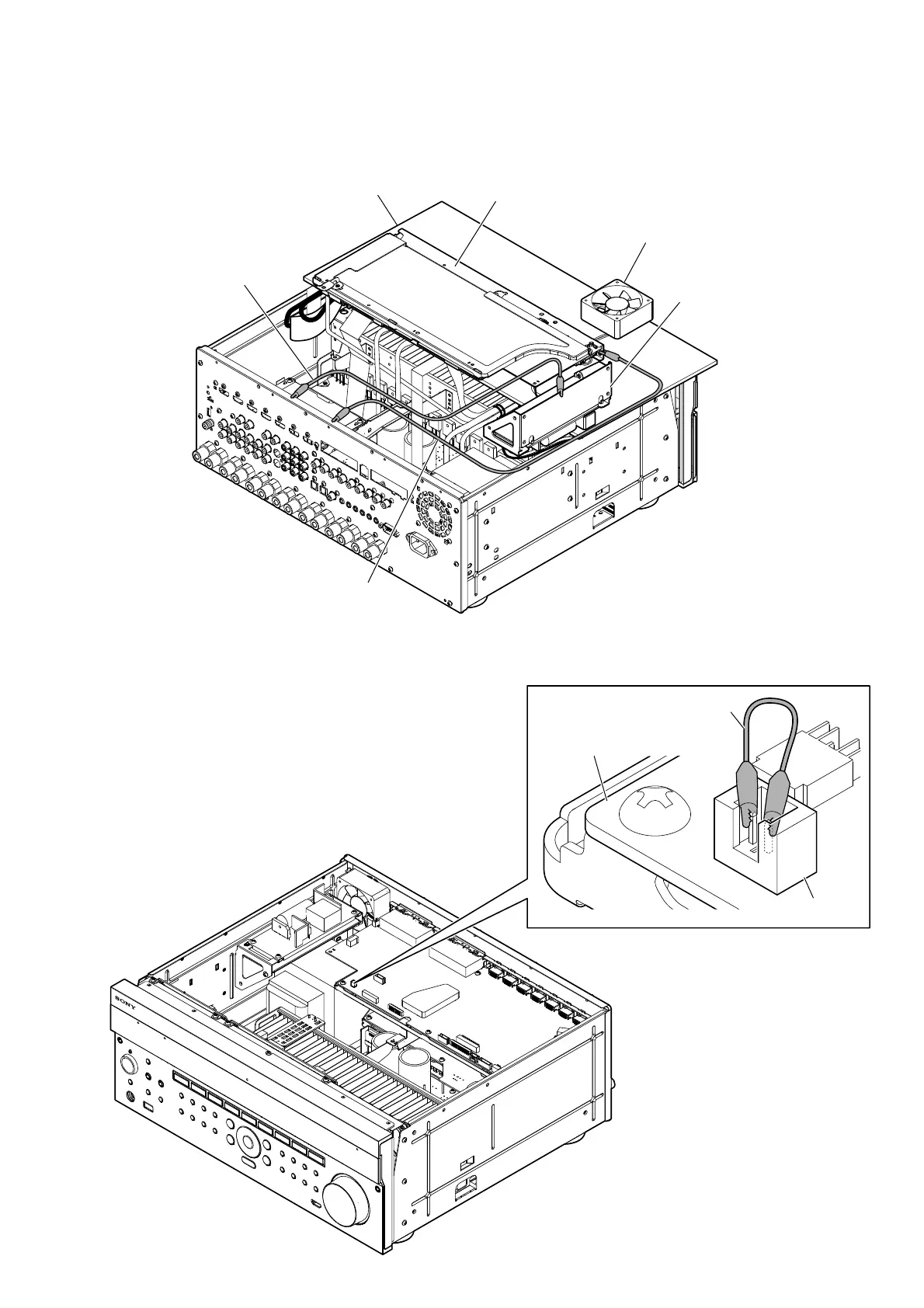
NOTE OF CHECKING THE OPERATION
When removing the DIGITAL board and power unit (PU1) (STR-ZA3000ES only) from the chassis, and checking the operation with the
power on, be sure to connect the ground on the DIGITAL board and power unit (PU1) (STR-ZA3000ES only) to the chassis by using the
alligator clips.
insulating sheet
DIGITAL board block
power unit block
(STR-ZA3000ES only)
DC fan (M1)
(STR-ZA3000ES only)
alligator clip
alligator clip
OPERATION CHECKING METHOD OF FAN MOTOR (M1) (STR-ZA3000ES only)
The operation of fan motor (M1) installed in this unit can be checked by the following method.
Short-circuit the CN9002 on the DIGITAL board with alligator clip.
DIGITAL board
CN9002
alligator clip



 To Next Page