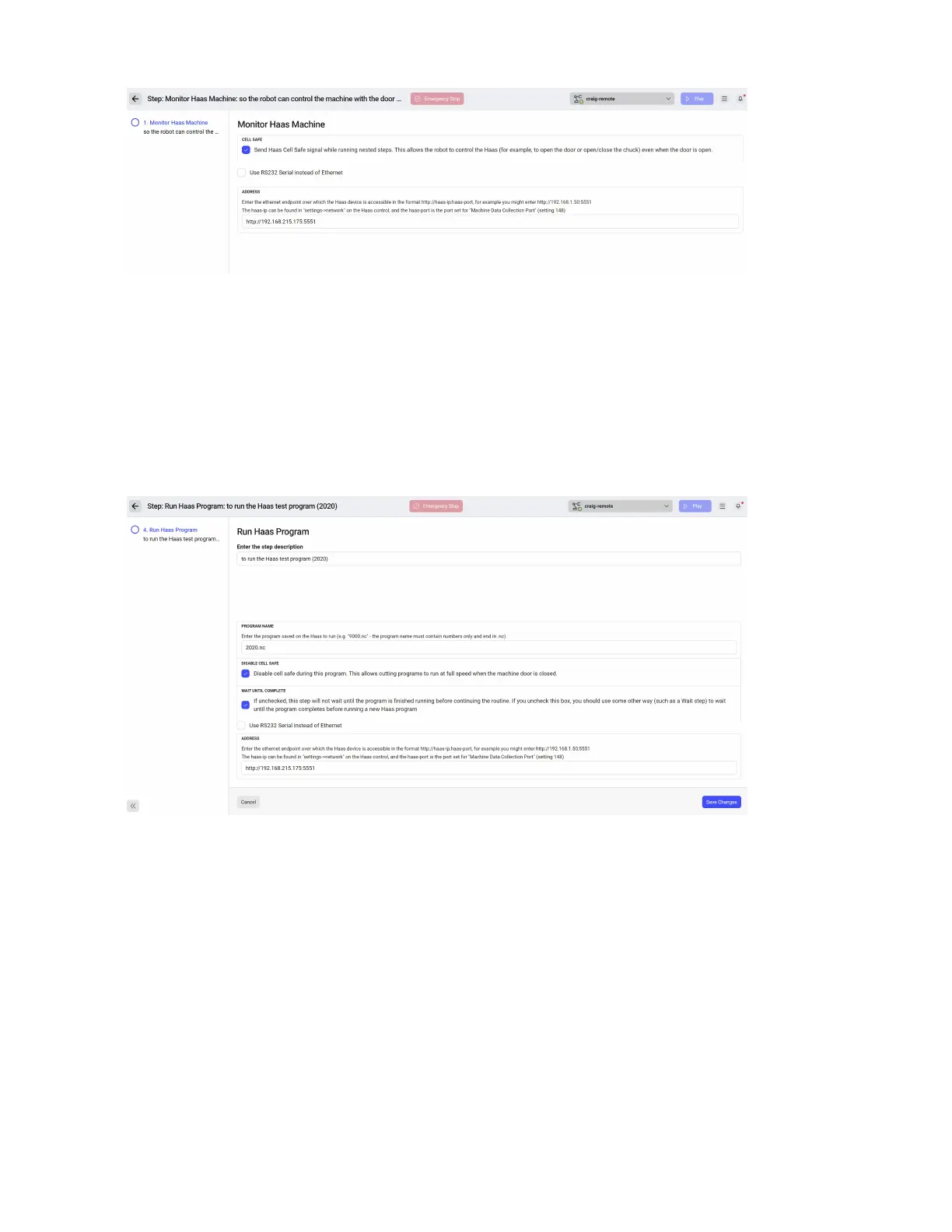
8. Edit the rst step of the sample routine. Leave the “Send Haas Cell Safe” button checked. This
allows the robot to run routines with the door open, which is often required (IE, when you need to
close the door).
9. Update the IP address of the Monitor Haas Machine step to match the IP address of the Haas.
Ensure the port remains at the end of the address. The format is: http://xxx.xxx.xxx.xxx:port . I.e.,
http://192.168.215.175:5551. Save the step.
10. Go back and edit Step 4, Run Haas Program.
11. The “haas test” program will attempt to run 2020.nc. In many Haas machines, this is the spindle
warmup program. If needed, change this program number to a dierent program under “Program
Name”.
12. Leave “Wait until Complete” checked. This will ensure the routine stays at the current step until
the Haas has completed the program sent above under “Program Name”.
13. Update the IP address of the Monitor Haas Machine step to match the IP address of the Haas.
Ensure the port remains at the end of the address. The format is: http://xxx.xxx.xxx.xxx:port . I.e.,
http://192.168.215.175:5551. Save the step.
14. Start program 6000.nc on the Haas using the standard cycle start button on the Haas.
15. Start the sample program on the robot by running the routine.
86



 To Next Page