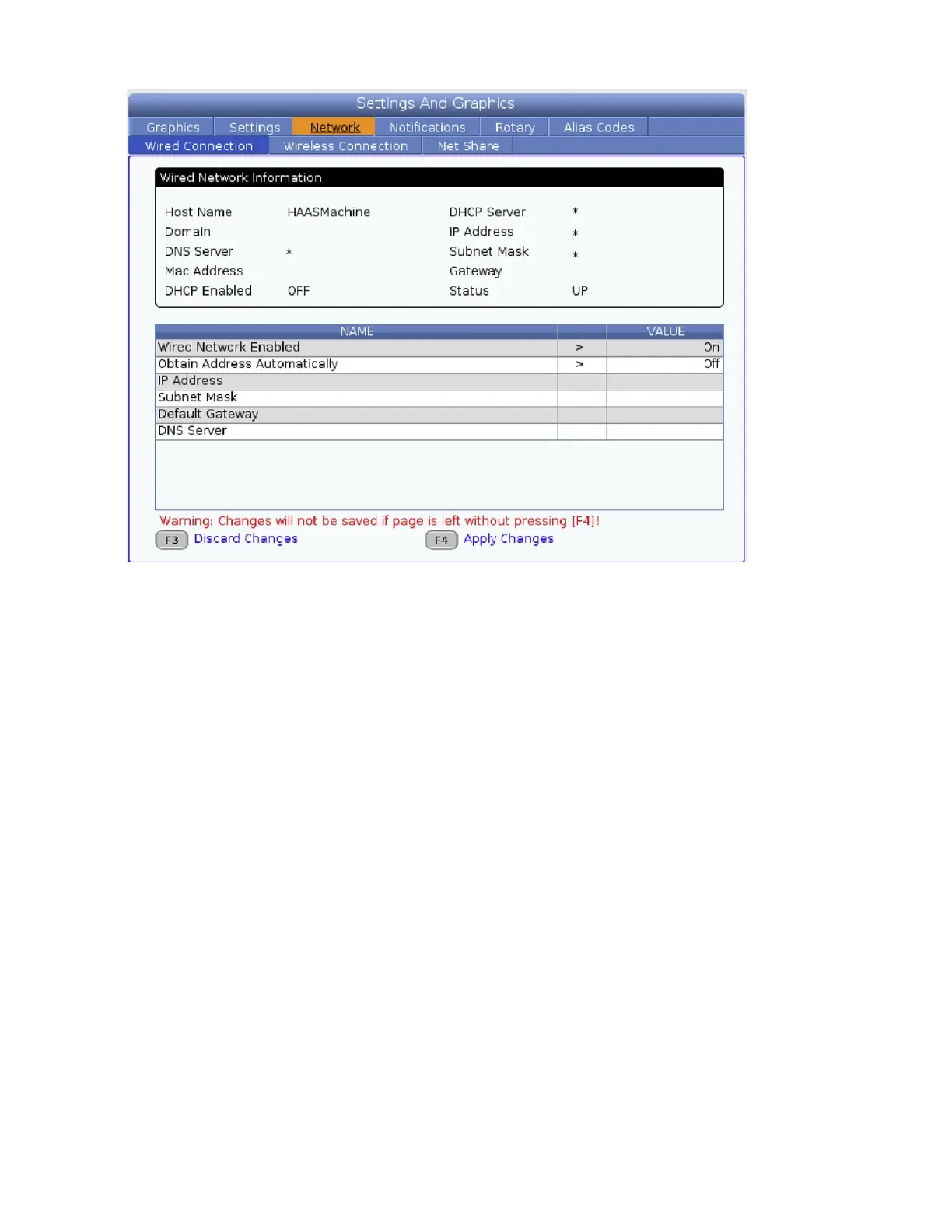
3. If using a wired connection, run an ethernet cable from the Ro1 cabinet to the Haas machine
cabinet. The ethernet port on the Ro1 box is on the underside of the IO connection points
in the box. The ethernet port on the Haas for Machine Data Collect is usually on the upper
left when looking at the back of it. To get to the ethernet settings on the Haas navigate to
Settings→Network→Wired/Wireless Connection.
4. Set the Haas machine up to communicate with the robot. The robot and Haas machine must be on
the same subnet (3rd set of numbers in IP address) and be on the same wireless or wired network
to communicate with each other. To ensure Haas can talk to the robot even through a power cycle
the Haas must be set to a static IP address (no DHCP) or have network provisions made to ensure
it is always the same IP address.
5. Enable machine data collect on the Haas (settings 143) and set the port to 5551.
6. If you are using a wired connection without DHCP, contact Standard Bots support for assistance
setting a static IP addess on the physical robot port.
7. Load the sample “haas test” program provided by Standard Bots into the routine editor by going
to Actions-> Edit Routine Schema and pasting the contents of the text le in. Then select “Create
Routine”.
85



 To Next Page