Operation & Service Manual (VA) 43 ST1175
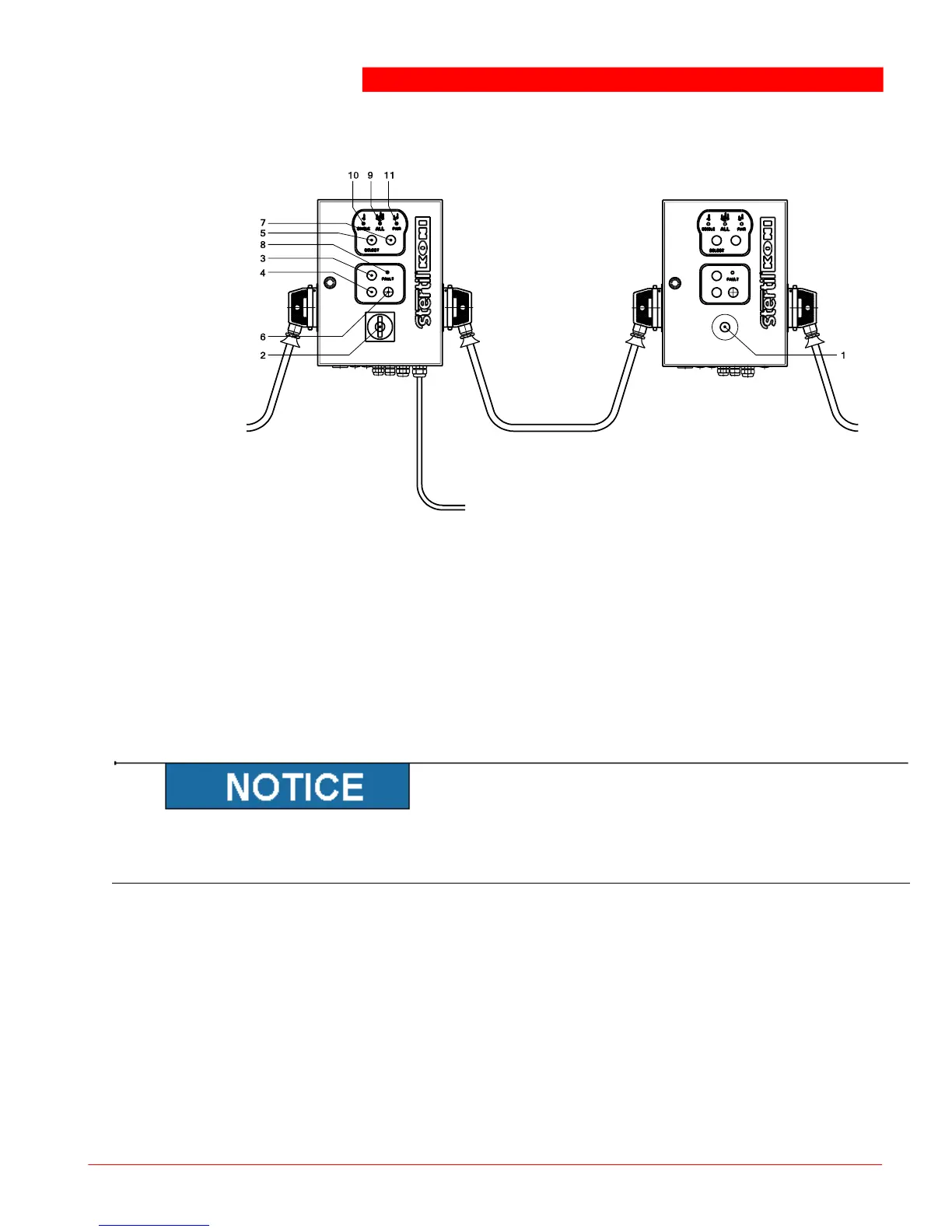
For the functions of the switches, see next figure.
1. Emergency button
2. Main switch
3. UP
4. DOWN
5. [SELECT] button
6. Unlocking
7. Slow lowering selection button
8. <FAULT> indicator
9. <ALL> indicator
10. [SINGLE] indicator
11. [PAIR] indicator
A. Master column
B. Slave column
C. Main power supply
D. To next column
Control boxes
Operate the panel only with your fingertips. Pressing the buttons using sharp
objects (such as screwdrivers) can damage the equipment and cause errors.
6.4.1 Emergency shutdown button
If the emergency shutdown button is pressed, all movement is immediately halted
(raising or lowering).
6.4.2 Starting
The main switch controls the power supply to the column lifts. This switch has two
positions:
0 (OFF)
This will interrupt the power supply to the column lift(s).



 To Next Page