Operation & Service Manual (VA) 68 ST1175
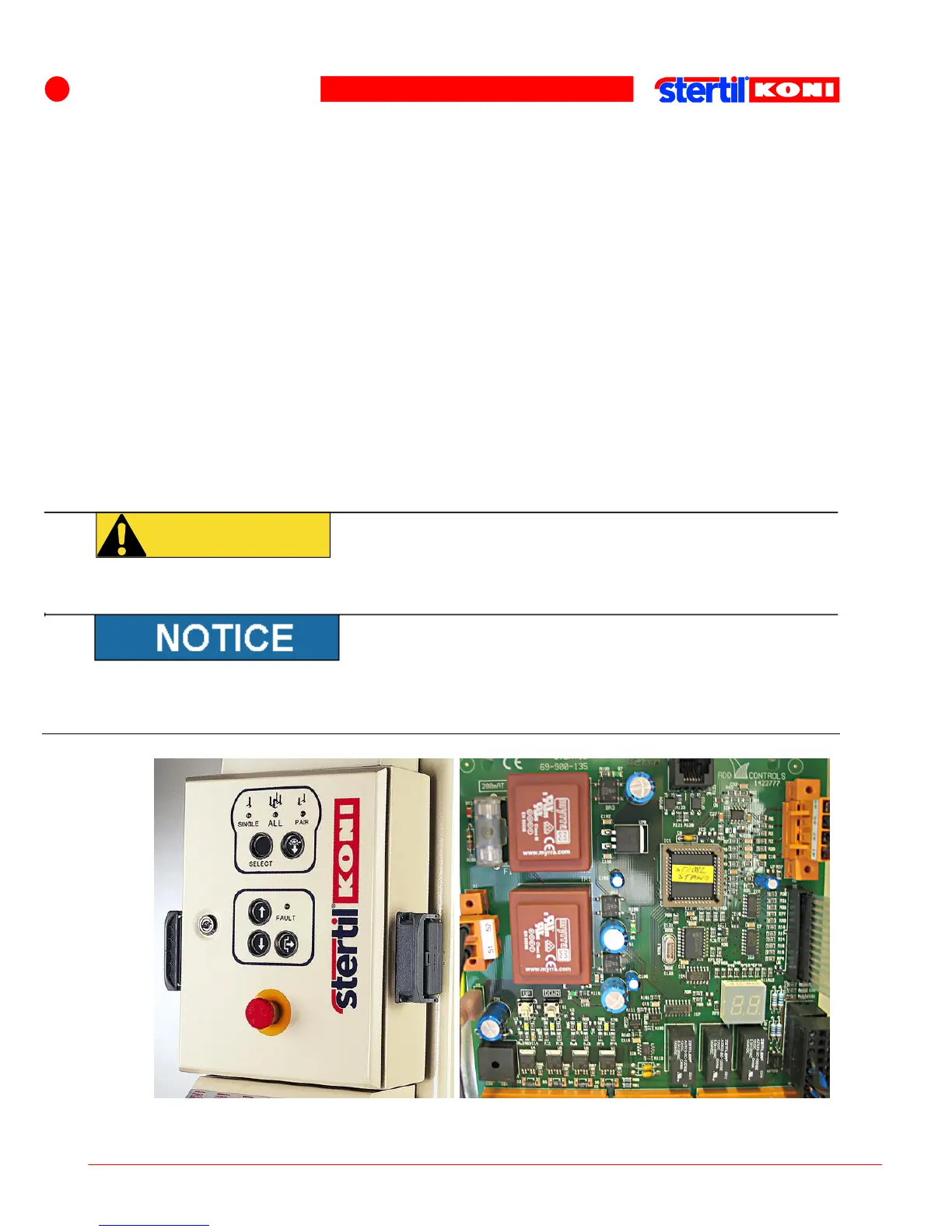
A red light (FAULT) will be continuously lit on the front panel when a fault occurs.
In this event, open the front panel and read the code on the 2x7-segment display.
See the sticker on the inside of the front panel or section Error codes for the
possible problems.
When lowering:
If the lowering movement stops and the red light (FAULT) on the front panel
flashes, then a difference of 1 3/16" has arisen between the columns during
lowering. Raise the columns approximately 4" and remove any obstacle. The
column lifts can now be lowered further. Do not forget to press the [UNLOCK]
button first.
When raising:
If the rising movement stops and the red light (FAULT) on the front panel is lit
continuously, then it may be that the highest position has been reached. If this is
the case, open the front panel to read the code on the 2x7-segment display. This
must be 04 as long as the [UP] button is being pressed. See section Error codes
for possible problems.
There is a danger of injury from electrical voltages and use by unqualified persons.
Only remove the protective cover for maintenance purposes. Always ensure in that
case that the lifting system is not connected to the mains power supply.
Location on the display which specifies an error or fault



 To Next Page