Installation and commissioning
Instructions for use • AIDA C WD310 • AAB272_EN_V2.0_12-2021_IFU_CE-MDR 40
The configured destinations can be manually selected or deselected by the user. Automatic
storage of the image and video data cannot be ensured here.
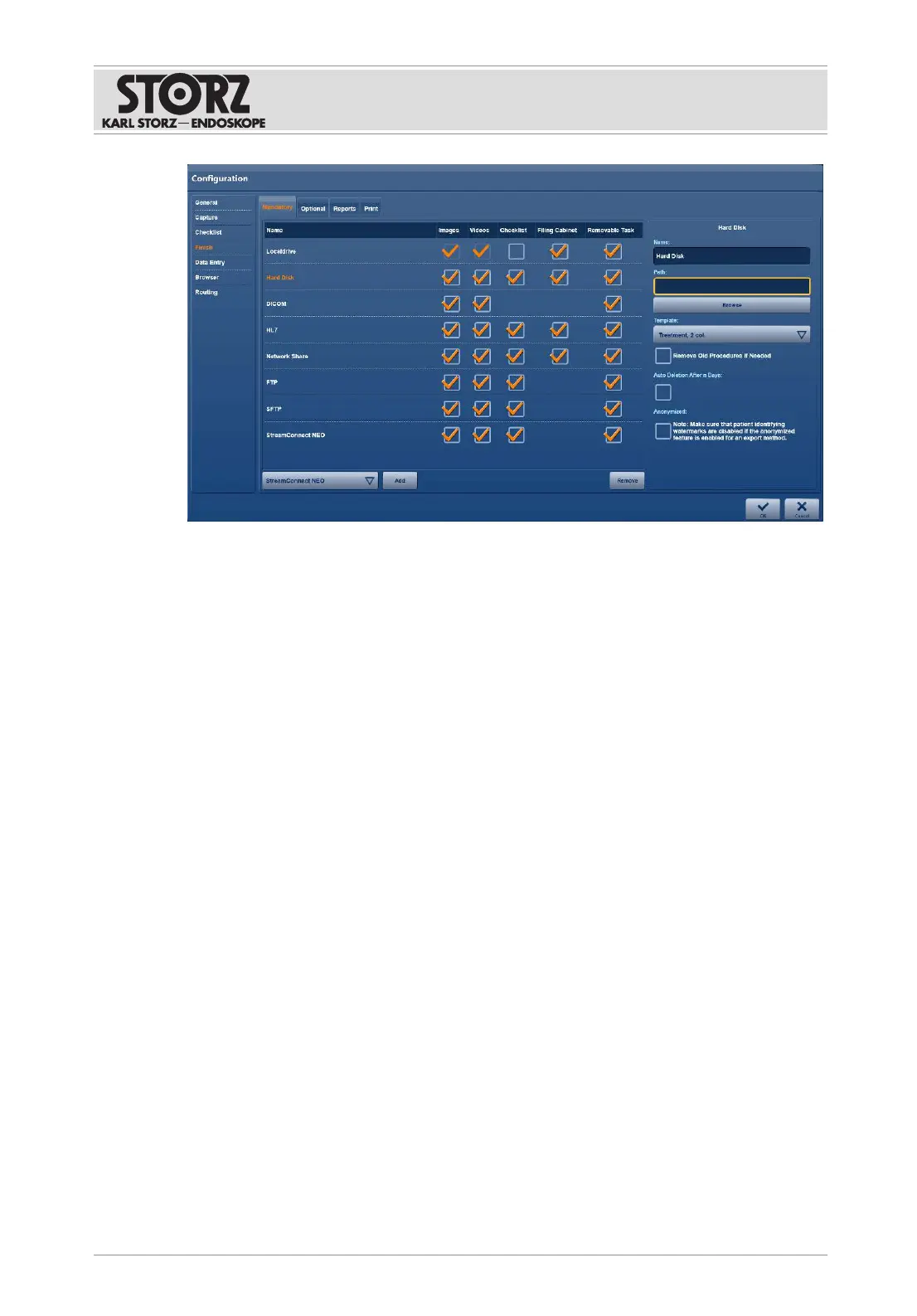
Specifying destinations for data storage
1. Open the
Select
drop-down menu and select a destination to be included in data
storage.
2. Tap the
Add
button.
ð The selection is included in the list of destinations.
ð All checkboxes (Stills, Videos, Reference, and Removable) are automatically enabled.
3. To add further destinations for data storage, repeat steps 1 and 2.
4. Check the
Reference
checkbox to allow saved data to be retrievable again for displaying
and editing in the Filing Cabinet.
5. Uncheck the checkbox if you do not wish the data to be retrievable.
6. Check the
Removable
checkbox if the data in the
Open Tasks
module should be deleted.
7. Tap the relevant destination for further information and to enter details such as the path
or server name for the destination, login name and password, and report form.
8. To delete a destination from the list, highlight it and tap
Remove
.
For the
DICOM
storage destination, also set a timeout period:
– Stills: 30seconds
– Stills and videos: 120seconds













 To Next Page