Design and function
82
Verti-Mix SF / Verti-Mix Double SF Version 06.12
When pressing the "Change entry data" key
, a dialogue box
opens.
The dialogue box may have the form of:
an input field,
a status indication,
a list of the cameras,
a list of functions.
The position of a dialogue box can be varied.
1. Touch and keep hold of the dialogue box.
2. Use the holding finger to move the dialogue box to the desired
position by moving the holding finger across the display.
3. Remove the finger from the box.
The dialogue box appears in its new position.
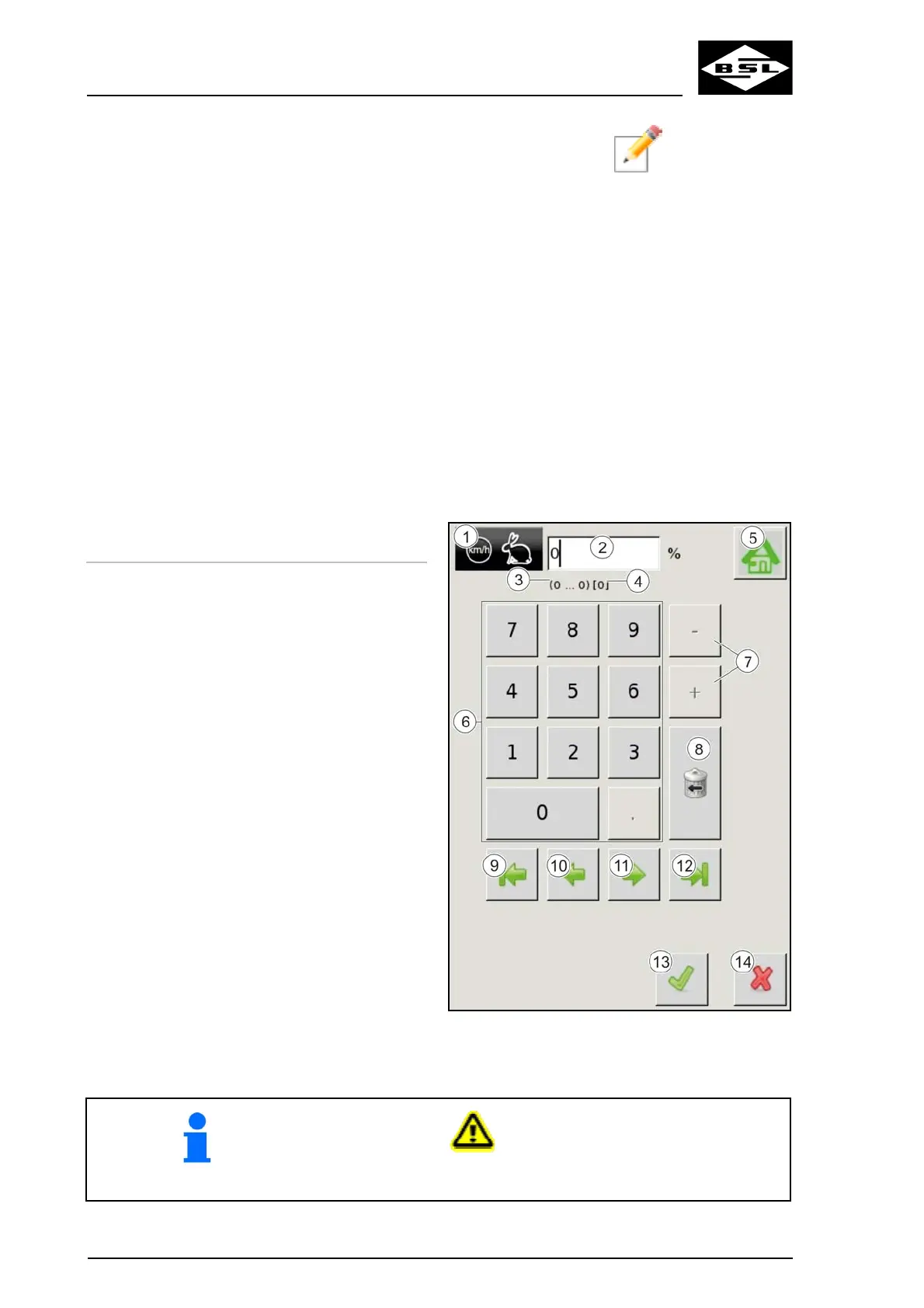
Input field
(1) Selected feature
(2) Dialogue box
(3) Entry of admissible range
(4) Entry of value with factory setting
(5) Set value of factory setting
(6) Number pad
(7) Plus / Minus key
(8) Clear digit
(9) Move pointer to the left-hand end
(10) Move pointer one position to the left
(11) Move pointer one position to the right
(12) Move pointer to the right-hand end
(13) Confirm data entry
(14) Cancel entry
1. Touch the respective digits in the input field
to enter a numerical value.
2. Press the "Confirm" key (10) to confirm your
entry.
Fig. 30
If a warning triangle
appears, the entered value is beyond the
admissible range (3). Correct your entry using a value which is within
the admissible range (3).



 To Next Page