Design and function
98
Verti-Mix SF / Verti-Mix Double SF Version 06.12
5.9.4 Switch front / rear work lights on and off
Switch the work lights off when travelling on roads.
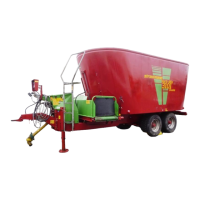
Switch front work lights on
1. Turn the light switch (1) to position "I"
(parking light) or "II" (driving light).
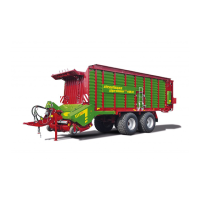
2. Press the toggle switch "Front work lights"
(Fig. 45/1) to position "I" (ON).
Switch front work lights off
1. Press the toggle switch "Front work lights"
(Fig. 45/1) to position "0" (OFF).
2. Turn the light switch (1) to position "0"
(OFF) if necessary.
Switch rear work lights on
1. Turn the light switch (1) to position "I"
(parking light) or "II" (driving light).
2. Press the toggle switch "Rear work lights"
(Fig. 45/2) to position "I" (ON).
Switch rear work lights off
1. Press the toggle switch "Rear work lights"
(Fig. 45/2) to position "0" (OFF).
2. Turn the light switch (1) to position "0"
(OFF) if necessary.
Fig. 44
Fig. 45



 To Next Page