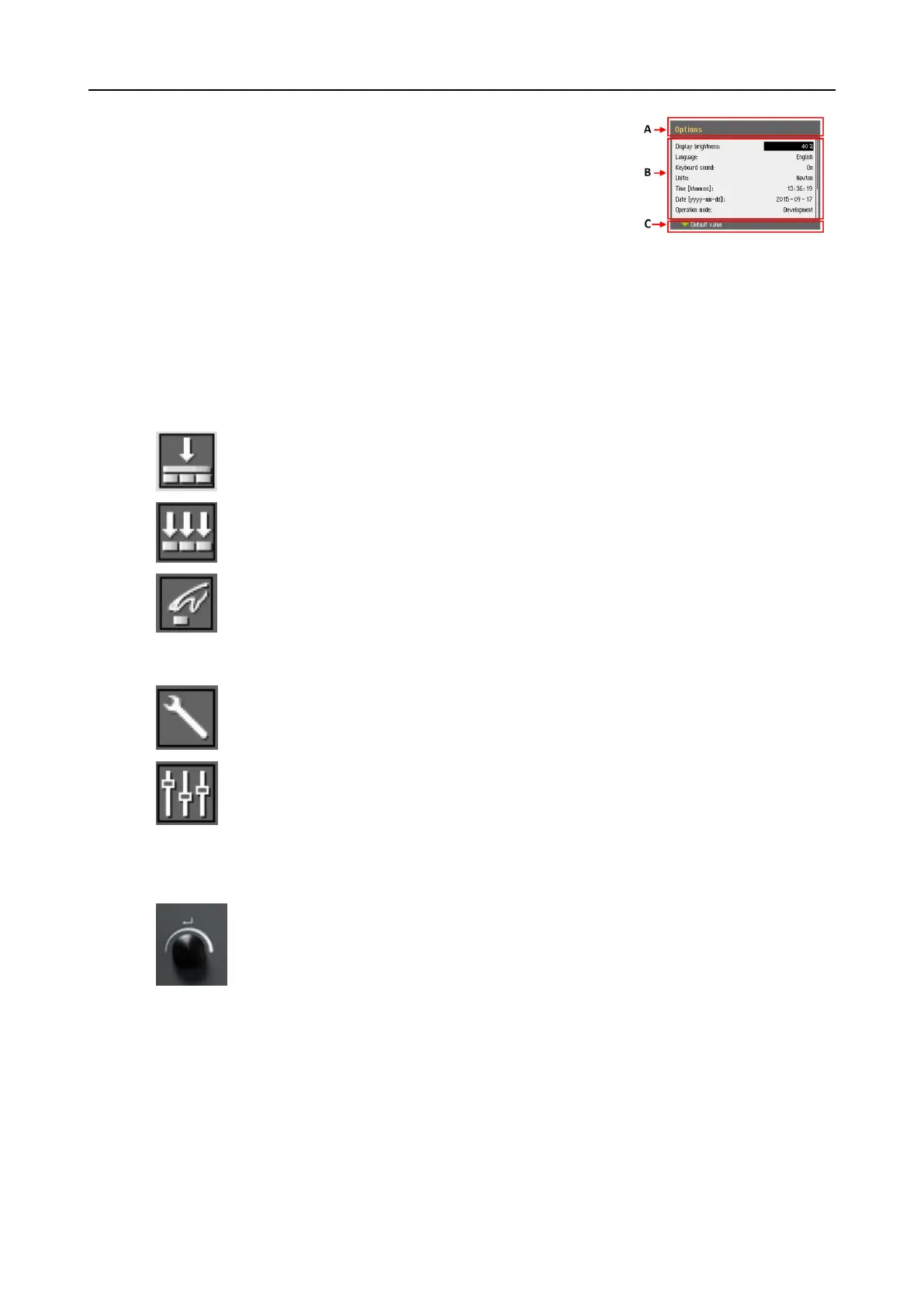
The display is divided into some main areas. See this example.
A Title bar
The title bar shows the function you have selected.
B Information fields
These fields show information about the selected function. In
some fields you can select and change the value.
C Function key options
The functions shown depend on the screen that is displayed.
8.2.6 Main menu
From the Main menu screen you can choose between the following options:
• Specimen holder methods
• Single specimen methods
• Manual preparation
You can also access the maintenance and configuration screens.
• Maintenance
• Configuration
8.2.7 Navigating in the display
The Turn/push knob knob
Use this knob on the control panel to select menu items.
• Turn the knob to select a menu, a method group or to change a value.
• Press the knob to enter a field or activate the selection.
• Turn the knob to increase or decrease the numeric value, or to toggle
between two options.
– If there are only two options, press the knob to toggle between the two
options.
– If there are more than two options, a pop-up box is shown.
52 LaboPol-60
8 LaboForce-100











 To Next Page