Machine manual STYLE 350 – 510 V4.9
To switch on/off the machine
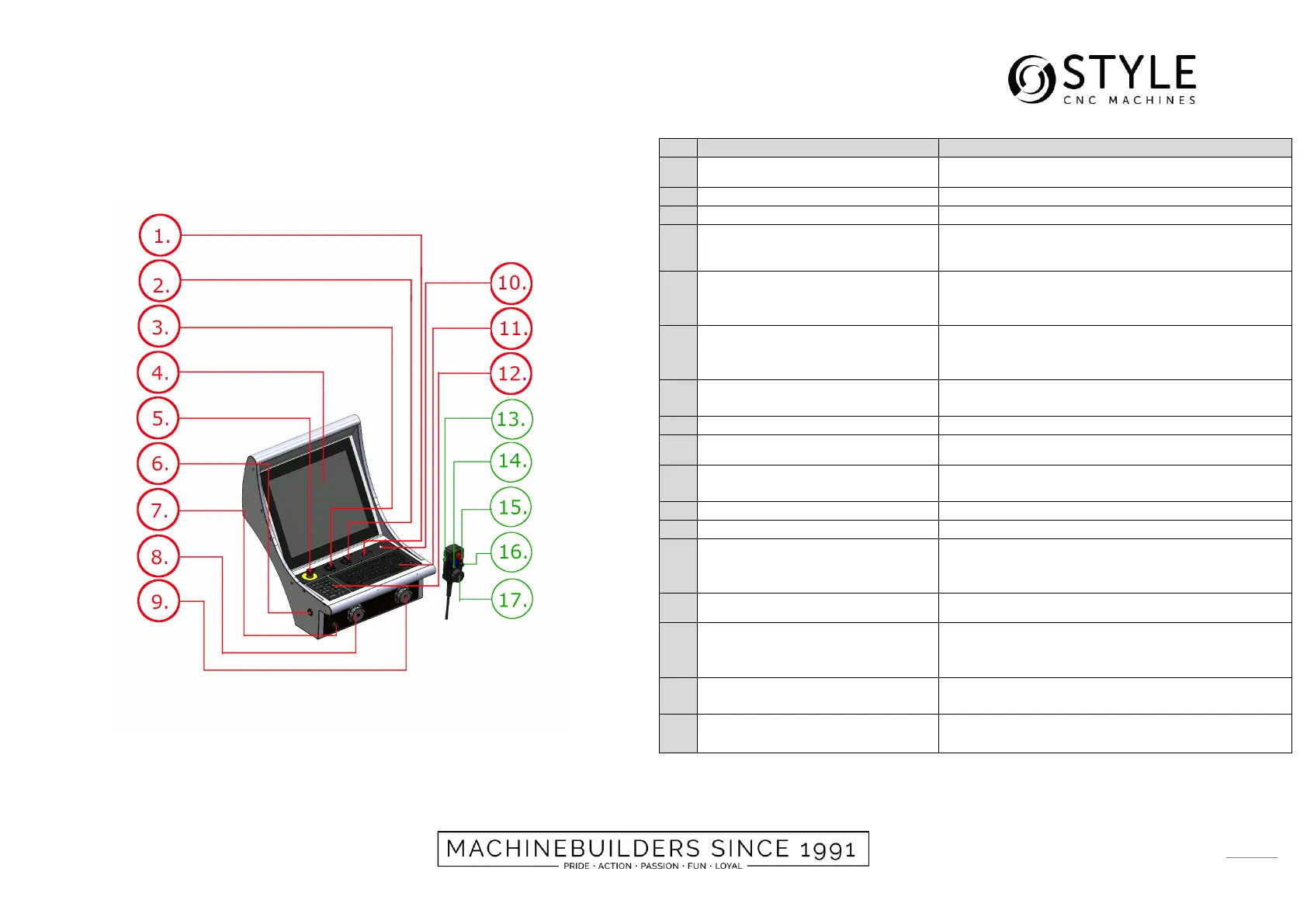
This controls the speed of the spindle
Controls the speed of the power supply
Touch screen to control and visualize the
software
All motorized movements will be stopped and
disconnected of the main power.
Use this button only in case of emergency.
A button that is pressed to override security
functions. The machine will stop when the button
is released
To select the step sizes of the MPG. Step sizes
to be chosen are 0-1-10-100
For manually movement in the X-axis direction
For manually movement in the Z-axis direction
Additional potentio meter
(Optional)
To be able to manually adjust the speed of the
main spindle (-10% ~ +10%)
A button that is pressed to override security
functions. The machine will stop when the button
is released
This allows you to select the axis to be operated.
All motorized movements will be stopped and
disconnected of the main power.
Use this button only in case of emergency.
To select the step sizes of the MPG. Step sizes
to be chosen are 0-1-10-100
Allows you to move the axis selected to operate


 To Next Page