4-1
4. Functions
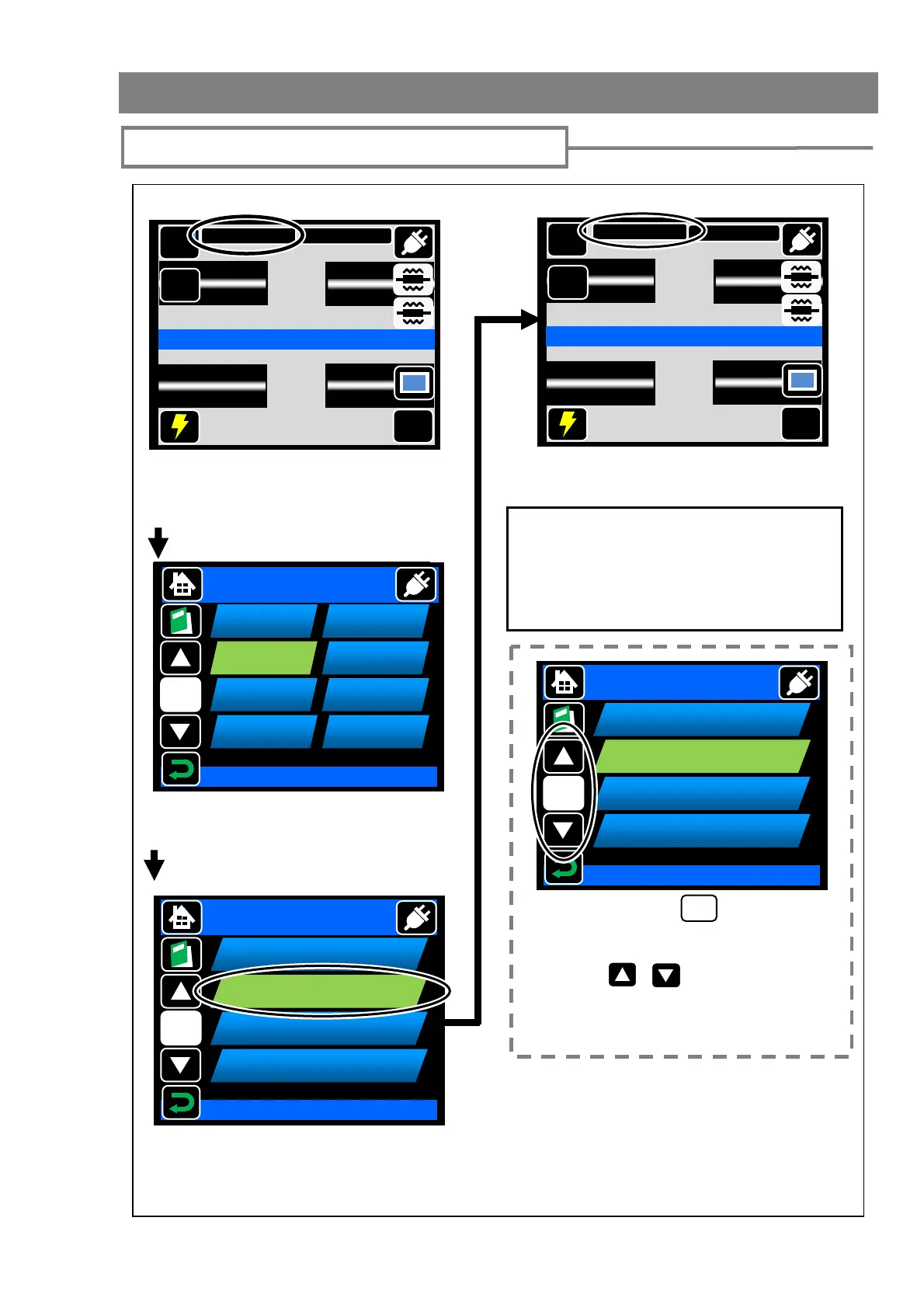
Splice and heater programs setting
Ready
Touch splice program icon once. The
icon will expand. Then touch it again.
Select Item
Splice Program
1/1
Auto
Recent
SM G652
MM G651
DS G653
NZ G655
BIF G657
SPF
Select the category of the fiber.
For the details of splice programs, refer to
page 4-3.
If you would like to change splicer program
parameters, refer to page 4-6.
Touch splice program once. The icon
will change its color. Then touch it
again to determine selection.
Splice program is changed.
If the page icon ( ) displays the
number except “1/1”, that means
there are other pages. Touch the
“move” ( , ) to go next page
or touch the page icon to order the
page directly.
X/X
Select Item
<Splice program setting>
MENU
SM G652 Std.
60mm 0.25
Start
Ready
X/Y
DISP
MENU
60mm 0.25
Start
Ready
X/Y
DISP
SM G652 Quick
1/67
SM G652 Std.
002
SM G652 Quick
003
SM G652 AIAS
004
PureMetro-SM
028
Splice Program
Select Item
SMF
1/67
SM G652 Std.
002
SM G652 Quick
003
SM G652 AIAS
004
PureMetro-SM
028
Splice Program
Select Item
SMF



 To Next Page