4-9
1/2
Function settings
Select Function
1/5
Arc Pause
ON
Automatic
Function
Sleep
Auto Power Off
OFF
OFF
Display Monitor
Ready
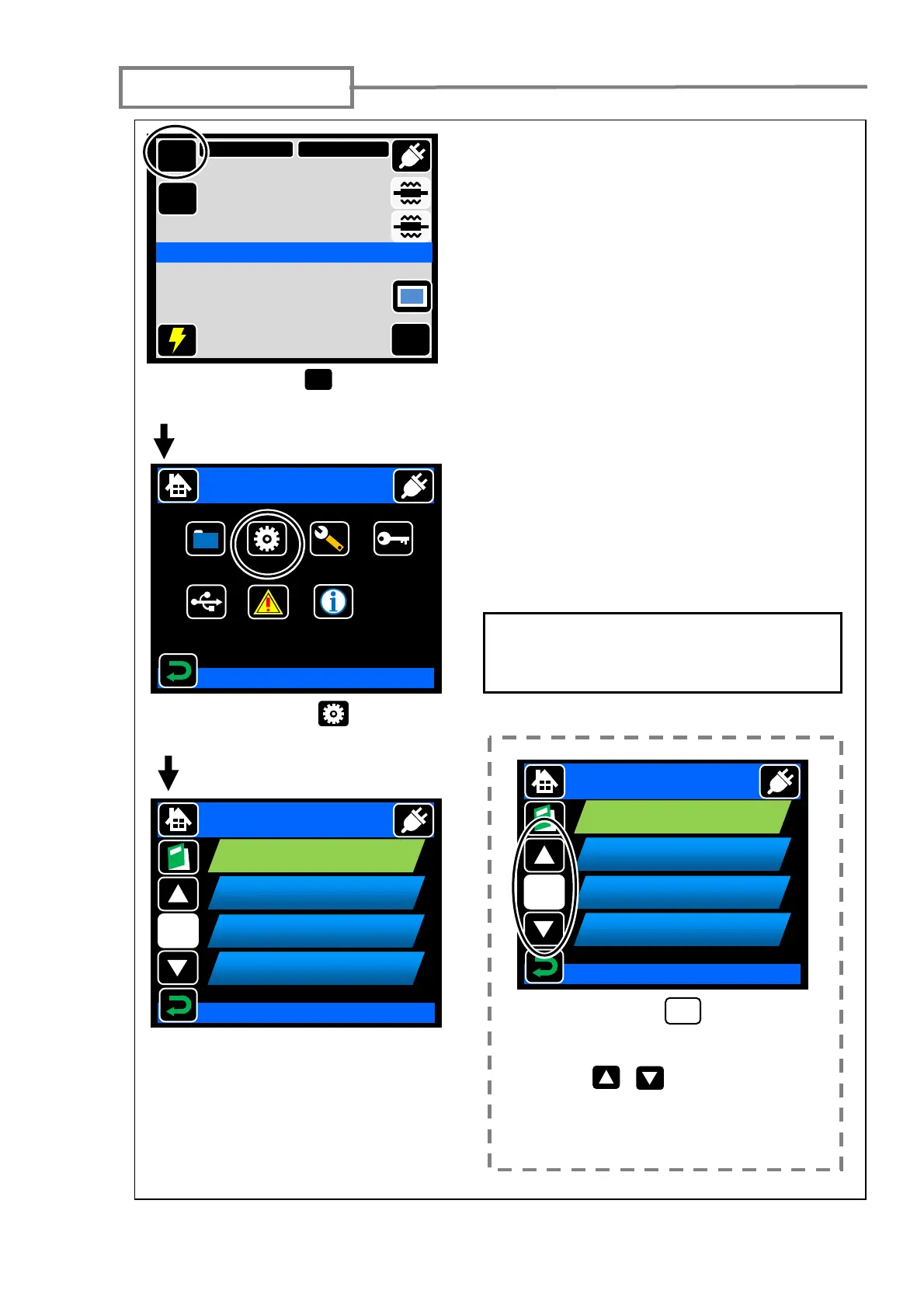
Touch “Menu” ( ) to go to
menu screen.
MENU
Touch “Function” ( ) to go to
function screen.
Touch the item once. The icon will
change its color. Then touch it again
to go to setting screen.
For more details of the items of
function, please refer to the page 4-11.
Select Function
1/5
Arc Pause
ON
Automatic
Function
Sleep
Auto Power Off
OFF
OFF
Display Monitor
If the page icon ( ) displays the
number except “1/1”, that means
there are other pages. Touch the
“move” ( , ) to go next page
or touch the page icon to order the
page directly.
X/X
Menu
Splice
Data
Maintenance
Security
Function
USB
Login
2011/01/01 00:00
DATA
Select Item
MENU
SM G652 Std.
60mm 0.25
Start
Ready
X/Y
DISP
Information



 To Next Page