Chapter 3 Installing the Server Into a Rack With Slide-Rails 55
▼ Disassemble Bolt-On Slide-Rails
To remove the mounting brackets from the bolt-on slide-rail assemblies:
1. Unpack the slide-rails.
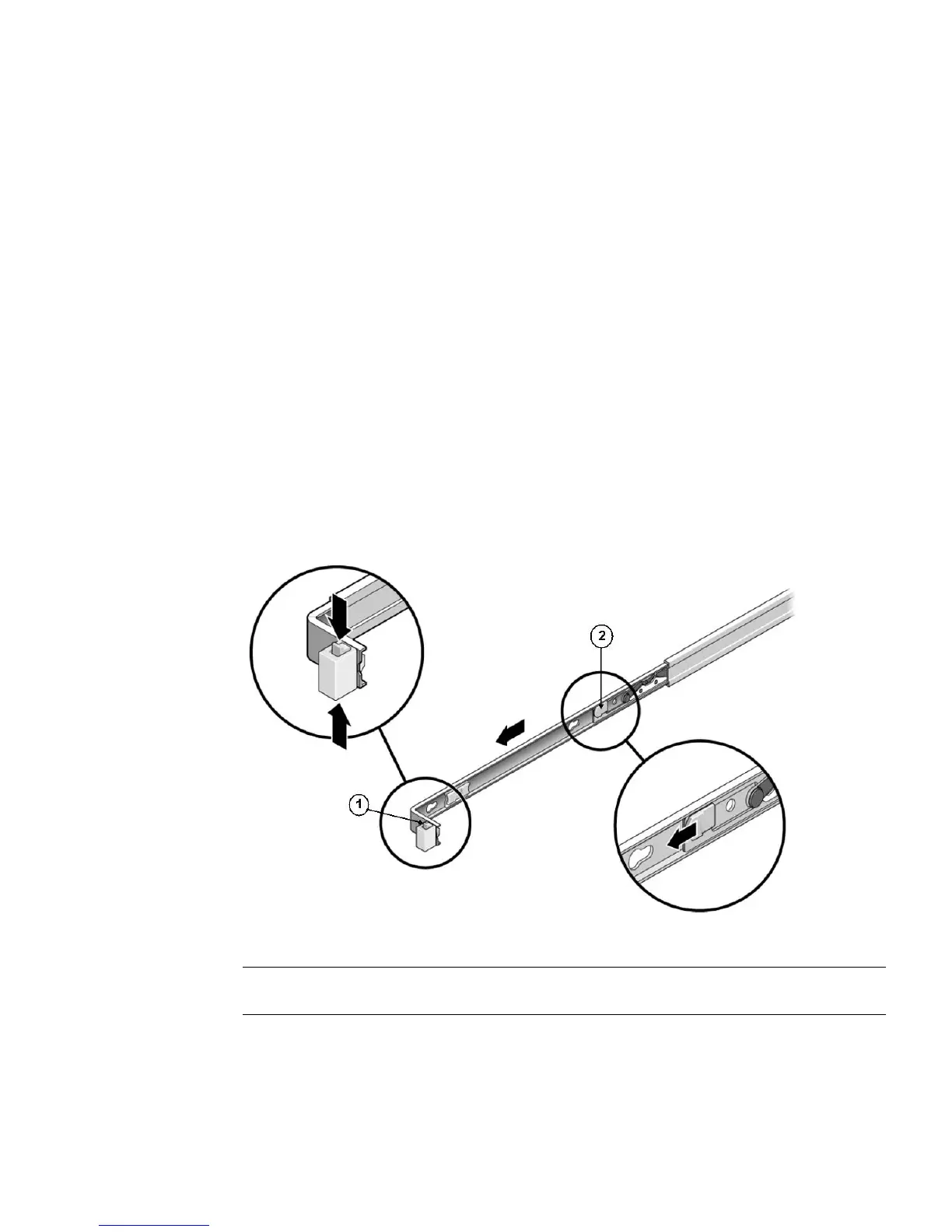
2. Locate the slide-rail lock at the front of one of the slide-rail assemblies, as
shown in
FIGURE 3-1.
3. Squeeze and hold the tabs at the top and bottom of the lock while you pull the
mounting bracket out of the slide-rail assembly until it reaches the stop (see
FIGURE 3-1).
4. Push the mounting bracket release button toward the front of the mounting
bracket, as shown in
FIGURE 3-1, and simultaneously withdraw the mounting
bracket from the slide-rail assembly.
5. Repeat for the remaining slide-rail assembly.
FIGURE 3-1 Disassembling the Bolt-On Slide-Rail Before Installation
Figure Leg end
1 Slide-rail lock
2 Mounting bracket release button















 To Next Page