73
8
System Decommissioning
8.1 Disconnecting the Inverter
For maintenance or other service work, the inverter must be switched off.
Proceed as follows to disconnect the inverter from the AC and DC power sources.
Lethal voltages or damage to the inverter will follow if otherwise.
Step 1 Disconnect the external AC circuit breaker and secure it against reconnection.
Step 2 Rotate the DC switch to the "OFF" position for disconnecting all of the PV string inputs.
Step 3 Wait about 10 minutes until the capacitors inside the inverter completely discharge.
Step 4 Ensure that the DC cable is current-free via a current clamp.
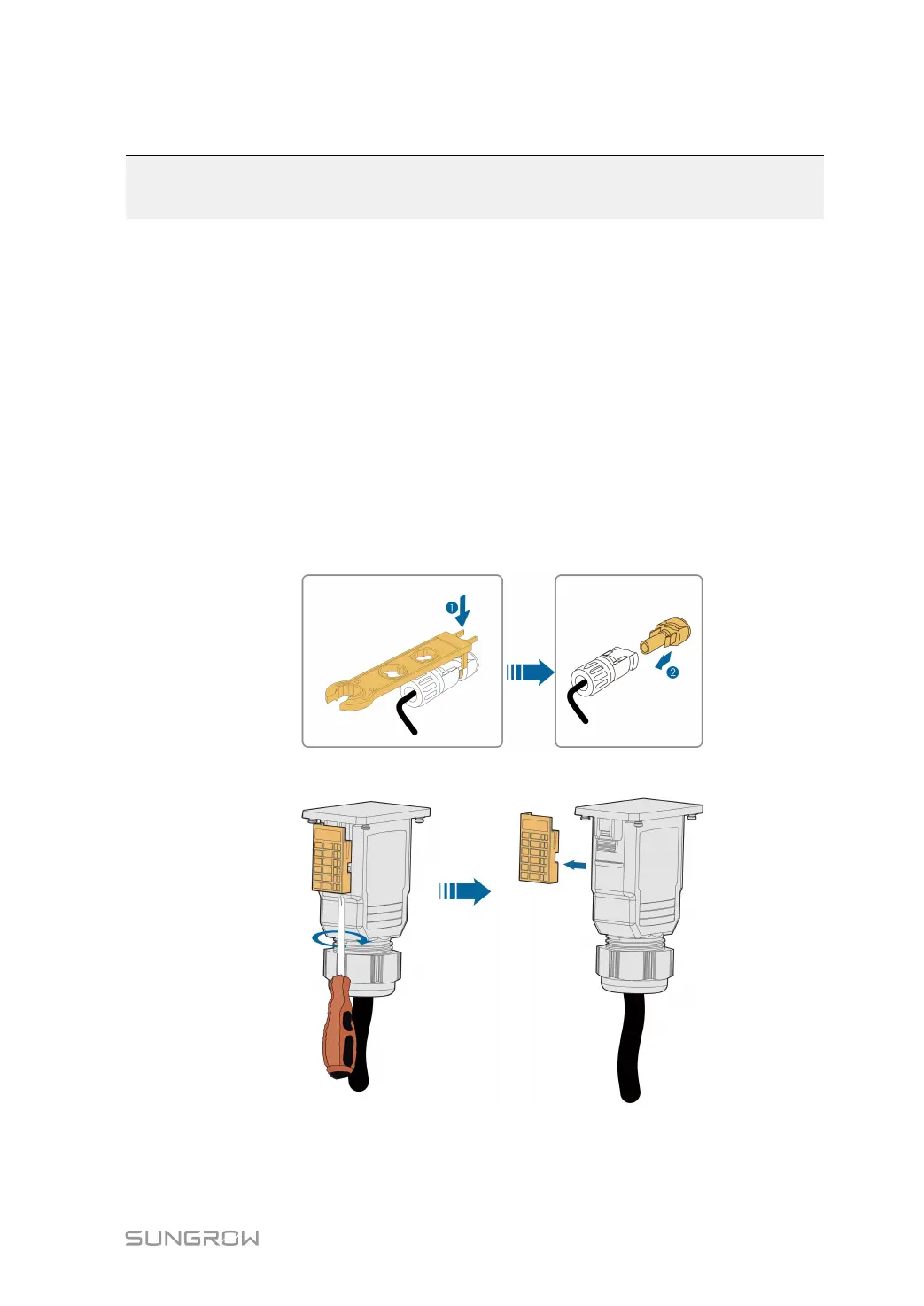
Step 5 Insert a MC4 wrench into the notch and press the wrench with an appropriate force to
remove the DC connector.
Step 6 OOppttiioonnaall:: Remove the block with the Phillips screwdriver.
Step 7 Lay the tool in the location of snap and press the tool down to remove the AC connector.
Ensure that the AC wiring terminals are voltage-free via a multimeter, and remove the
AC wires and communication wires.



 To Next Page