REPARATION
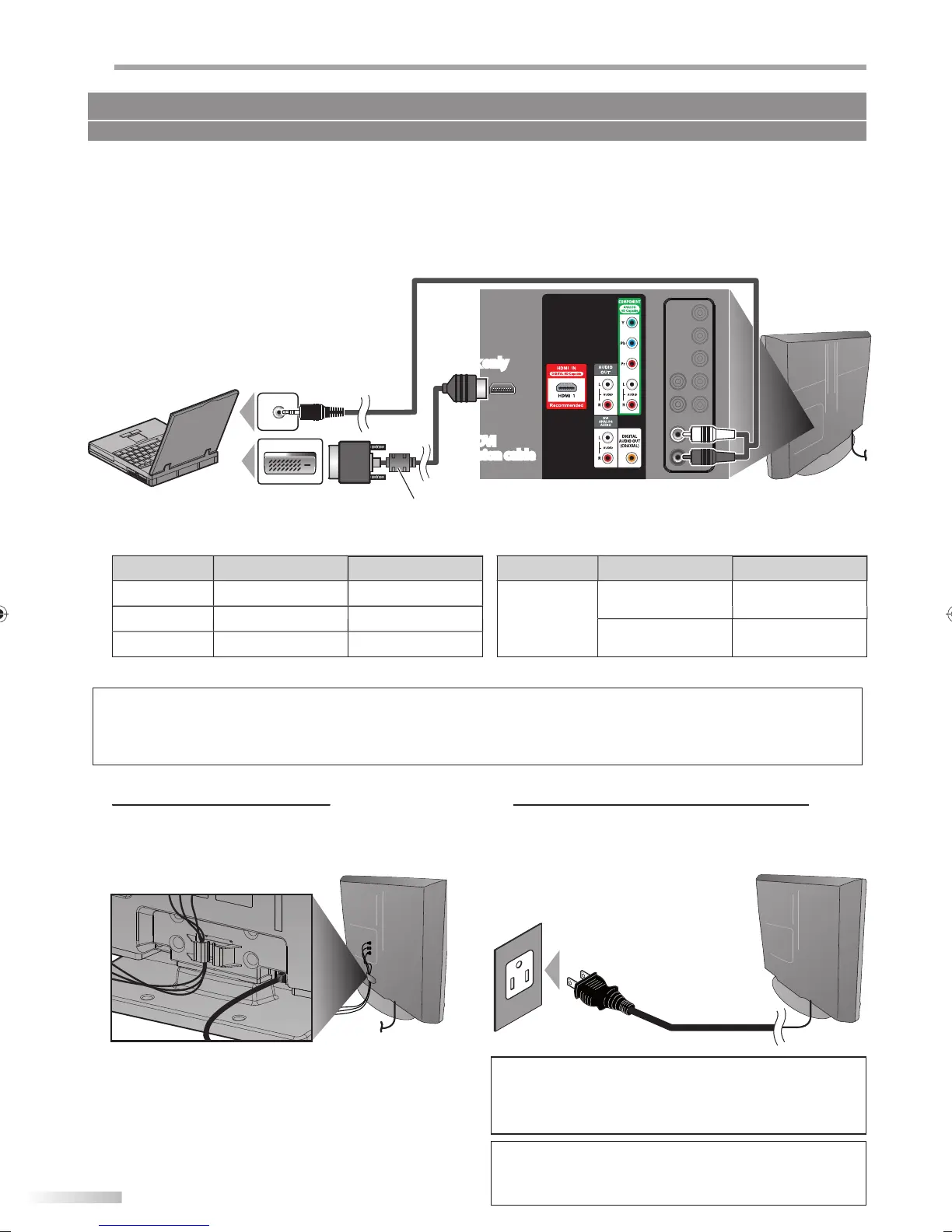
PC Connection
his unit can be connected to
our PC that has a DVI terminal.
Use an HDMI-DVI conversion cable for this connection and it requires stereo mini plu
conversion cable as well.
If
ou connect this unit to
our PC,
ou can use this unit as a PC monitor
e.
.
DVI OUT
stereo mini plu
nv
r
i
n
l
rear o
this uni
HDMI-DVI
nv
r
i
n
l
h
l
wi
h f
rri
r
ersona
com
ute
he
ollowing signals can be displayed
rm
R
l
i
fr
h r
F
rm
l
i
R
fr
h r
V
4
x 4
H
X
A
1,
x 76
60
z
VG
x
H
1
6
x 76
z
X
024 x 76
H
Other
ormats or non-standard signals will not be displa
ed correctl
• Please purchase the HDMI-DVI conversion cable that has a
errite core.
• The
ollowing operations may reduce noise.
- Attach a
errite core to the AC power cord o
your PC.
- Unplug the AC power cord and use the built-in battery o
your PC.
No supplied cables are used in this connection:
Please purchase the necessary cables at your local store.
Keep the cables throu
h this holder to avoid tan
le
h
m
r
r
f
hi
ni
Plug In the AC Power Cord
Make sure that the AC power cord must be plugged
to an AC outlet after all the necessary connections are
completed.
r
r
f
hi
ni
AC power cor
C out
et
n
o not connect t
e AC power cor
to a power supp
y outsi
e
the indicated voltage o
this unit (AC 120V)
onne
ting the AC power cord to a power supply outside o
this range may result in
ire or electrical shocks.
ote:
Each time
ou plugged in the AC power cord, an
operations
will not be
erformed for a few seconds.
Thi
i
n
m
lf
n
i
n
A9DF1UH_LD320SS1_EN_v1.indd 14A9DF1UH_LD320SS1_EN_v1.indd 14 2010/01/22 17:12:152010/01/22 17:12:15




 To Next Page