INTRODUCTION PREPARATION
WATCHING TV
OPTIONAL SETTING OPERATING DVD DVD SETTING TROUBLESHOOTING
INFORMATION
EnglishEspañol Français
power
p. 15
Pr
rn
h
ni
n
n
ff
pla
)
p. 36
Press to
egin t
e
isc p
a
ac
sto
. 36
Press to stop the disc pla
back
e
ect) (p. 36
Press to e
ect the disc
H
. 16 /
. 17)
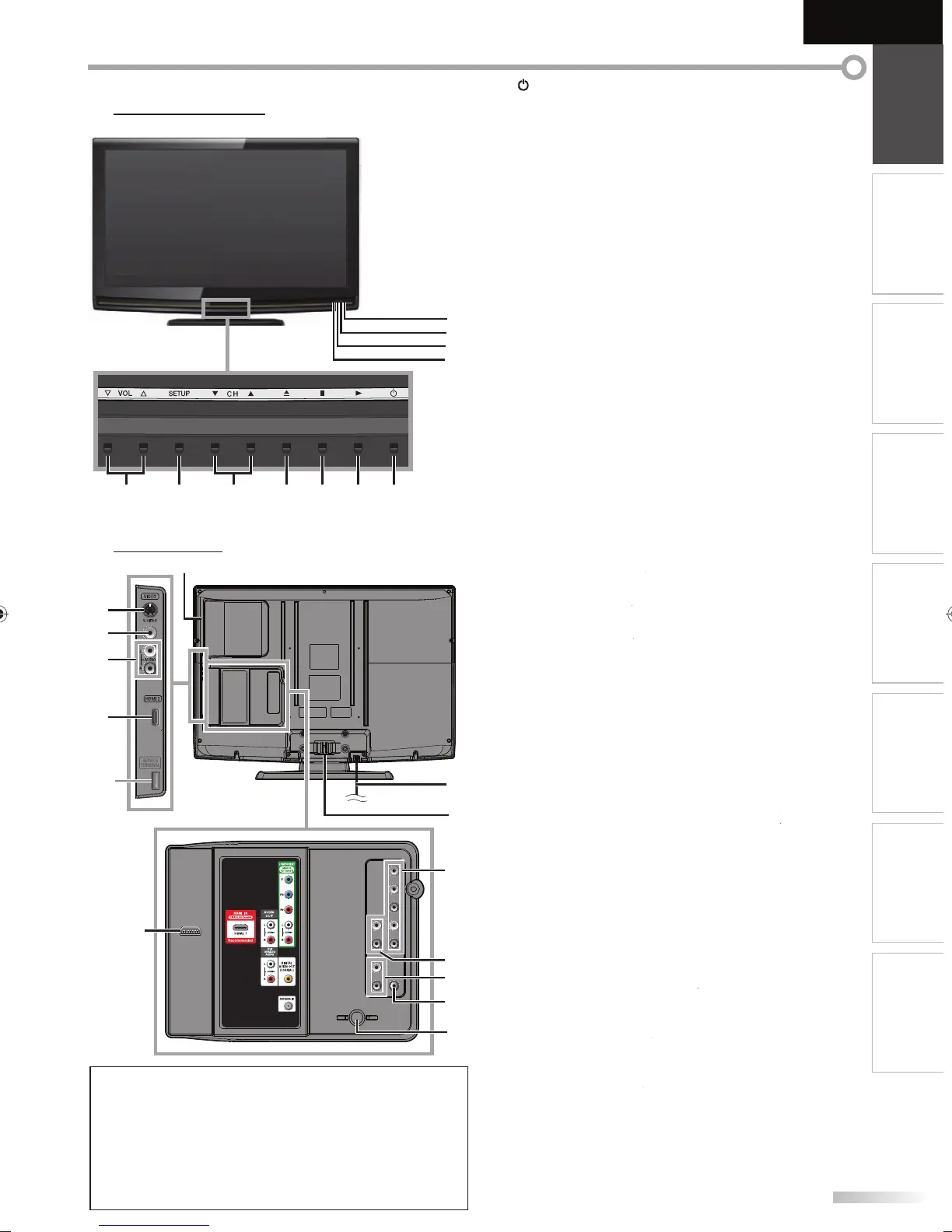
Press to select channels or move u
/ down
throu
h the main menu items
ET
. 15 /
. 44
Press to displa
the main menu
V
L
. 16
Press to ad
ust the volume or move right
/ left
throu
h the main menu items.
In
r
r
n
r win
Receives infrared ra
s transmitted from the remote
n
r
P
WER
N in
i
Li
ts up
reen w
en power is on
TAND BY in
i
Li
hts up red when power is off
1
DVD in
i
Li
hts up oran
e when the disc is inserted
Si
e Pane
2. Disc Loa
ing S
o
p. 36
Insert the disc with the label side
acing
orward
. 12
S-Video cable connection
rom an external device.
. 13
Video cable connection
rom an external device
p. 12 / p. 13
Audio cable connection
rom an external device
6. HDMI 2 Input jac
. 10 / p. 11
HDMI connection
rom HDMI device.
Rear Panel
7. AC power cor
p. 14
Connect the su
lied AC
ower cord for a standard
A
8. Ca
e Mana
emen
. 14)
i
r
n
Component Video and Audio Input jack
. 10 / p. 12)
Com
onent vi
eo ca
e an
au
io ca
e
nn
i
n
r
m
n
x
rn
l
vi
. 13
A
i
l
nn
i
n
r
n
x
rn
l
vi
1. Audio Input
ack for HDMI
. 11 /
. 14)
A
i
l
nn
i
n
r
m
DVI
vi
When
ou connect
our PC that has a DVI terminal
use a stereo mini p
ug conversion ca
e as we
(For HDMI 1 Input jack onl
22. Digital Audio Output jack
. 13
Coaxial digital cable connection
or a decoder or an
i
r
iv
r
p. 10
coaxial cable connection for your antenna or cable
TV signa
p. 10 / p. 11 / p. 14
HDMI
nn
i
n f
r HDMI
r DVI
vi
When
ou connect
our PC that has a DVI terminal,
ou can enjo
this unit as a PC monitor
T
rmin
l
n
r
P
n
8
9
11
10
75 16 4 3 2
N
service terminal (service use onl
)
• Use this terminal only when a so
tware update is necessary
• User should not connect an
devices to the service terminal such
as digital camera, ke
board, mouse, etc. (because these will not
ork
• The software update is, in most cases, handled b
an authorized
service person or in some circumstances the user ma
be aske
o do the software up
rade themselves.
24
20
21
22
12
23
18
17
15
13
14
16
*
19
A9DF1UH_LD320SS1_EN_v1.indd 7A9DF1UH_LD320SS1_EN_v1.indd 7 2010/01/22 17:12:012010/01/22 17:12:01













 To Next Page