INTRODUCTION
PREPARATION
WATCHING TV
OPTIONAL SETTING
OPERATING DVD
DVD SETTING TROUBLESHOOTING
INFORMATION
EnglishEspañol Français
nn
Li
T
e c
anne
s se
ecte
ere can
e s
ippe
w
en se
ectin
t
e c
anne
s
s
ng
CH
T
se c
nne
s c
n sti
e se
ecte
wit
[t
e Num
er
uttons
1
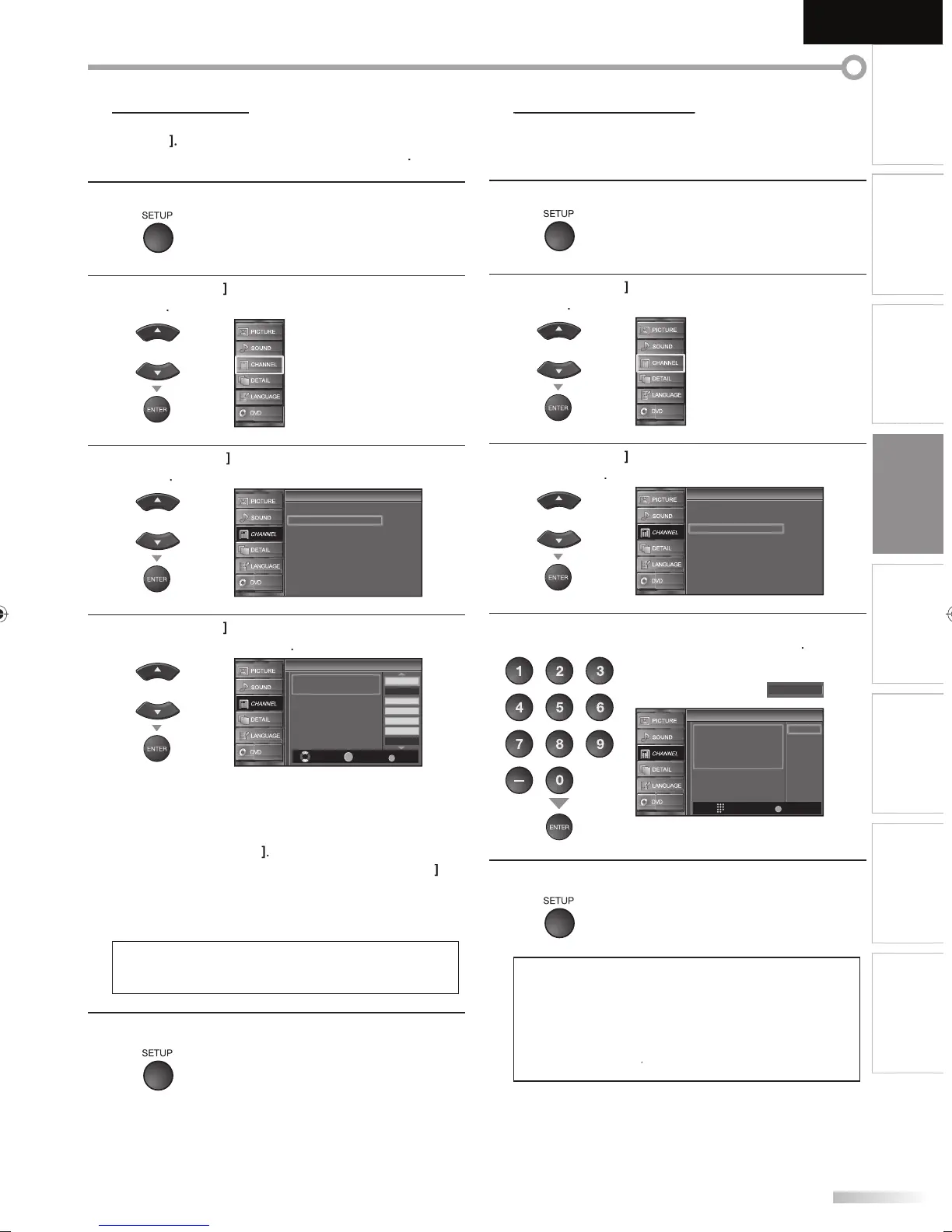
Press [SETUP] to display the main menu.
2
Cursor
to select “CHANNEL”, then
ress
ENTER
3
Cursor
to select “Channel List”, then
ress
ENTER
Channel
Channel
Autoscan
Channel List
Manual Register
Antenna
4
Cursor
to select the channel
ou want to
remove, then
ress
ENTER
Channel List
Channel List
DTV 8
DTV 8
9
9
DTV 48
DTV 48
58
58
DTV 6
DTV 6
27
DTV 67
Ch Select Watch/Skip Back
BACK
ENTER
Highlight channels for Ch
Up/Down key selection.
he channel displa
for the removed channel
r
n
Y
wi
n
nn
a
a
n us
n
C
•
o reactivate a remove
c
anne
use
Cursor
n
press
ENTER
. T
e re
istere
c
anne
s are
i
i
te
•W
en
ou remove a main c
anne
, its su
c
anne
s
r
r
m
v
w
N
• The channel with the “DTV” indicated on the displa
is
AT
h
rwi
h
h
nn
l i
NT
5
Pr
SETUP
xi
his function lets
ou add the channels that were not added b
e autoscan
ue to t
e recepti
e con
ition at t
e initia
setting
1
Press [SETUP] to display the main menu.
2
Cursor
to select “CHANNEL”, then
ress
ENTER
3
Cursor
to select “Manual Re
ister”, then
ress
ENTER
Channel
Channel
Autoscan
Channel List
Manual Register
Antenna
4
the Number buttons
n
r
h
n
m
r
f
h
channel
ou want to add, then press
ENTER
Manual Register
Manual Register
Register
Ch Change
11
Back
BACK
For analog channels, select a
channel to register using number
keys.
For digital channels, you must
perform Autoscan function.
5
Pr
SETUP
xi
• I
setup completes success
ull
Added to the channel list” is displa
ed.
• I
external input is used, it is not possible to re
ister the
anne
an
“Unavai
a
e” wi
e
isp
a
e
on t
e T
r
n
•
using
C
, you can select the memorized
anne
s on
.
A9DF1UH_LD320SS1_EN_v1.indd 21A9DF1UH_LD320SS1_EN_v1.indd 21 2010/01/22 17:12:392010/01/22 17:12:39





 To Next Page