INTRODUCTION
PREPARATION
WATCHING TV
OPTIONAL SETTING OPERATING DVD
DVD SETTING
TROUBLESHOOTING INFORMATION
PERATING DVD
EnglishEspañol Français
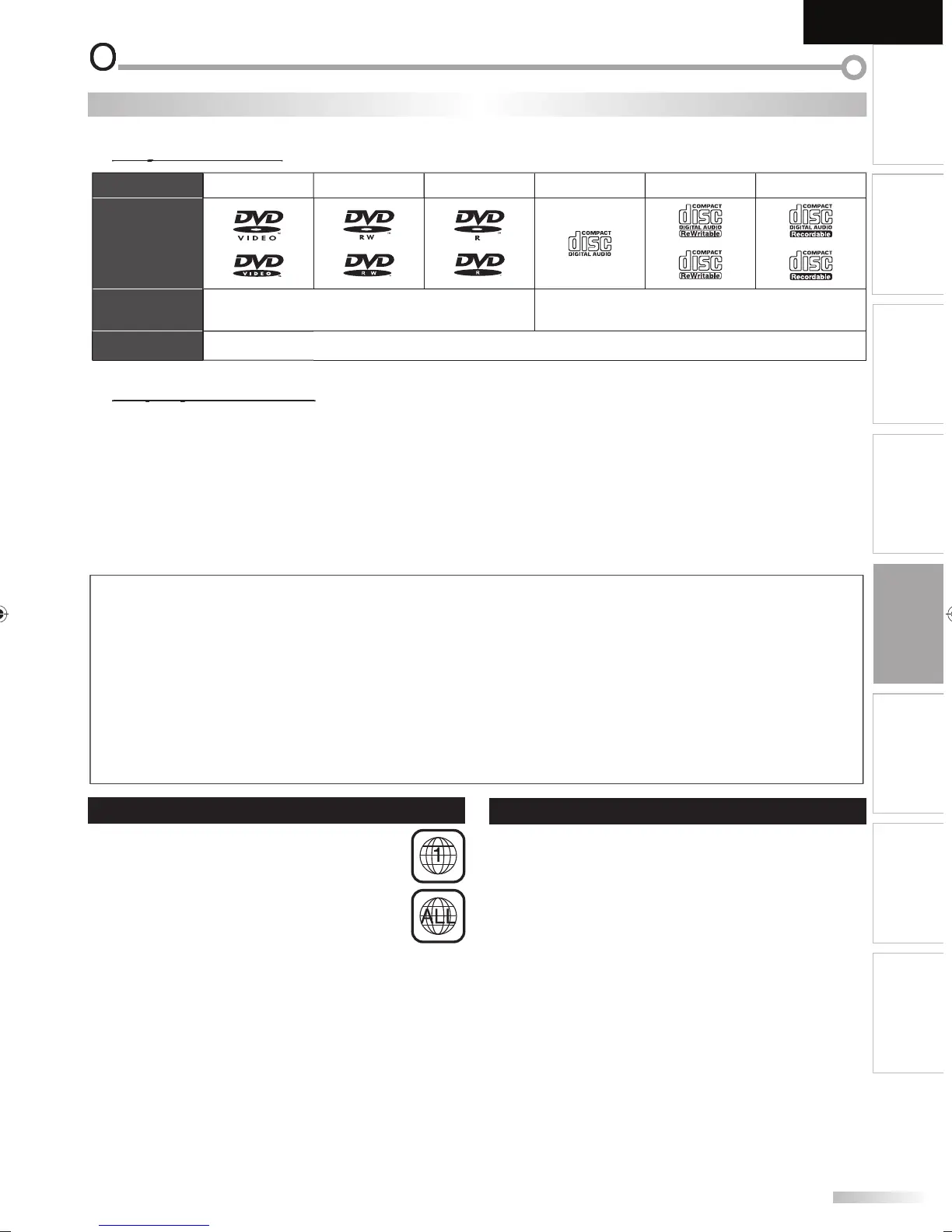
Media Type
DVD-VIDE
V
-
W
V
-
D-DA
D-R
D-
Logo
Recorded
Signal
i
ital video (MPEG2
di
ital audi
Media Size 5 inc
es (12 cm
NEVER pla
back the following discs. Otherwise, malfunction ma
result
3 inches (8 cm) disc, DVD-RAM, DVD-audio, CD-i, photo CD, Video CD, DVD with re
ion codes other than 1 or ALL, DTS-CD,
DVD-ROM for
ersonal com
uters, CD-ROM for
ersonal com
uters, the discs with labels
scratches
stains
blemishes
etc.
HD DVD, Blu-ra
Disc, CD-RW/-R with MP3 files and CD-RW/-R with JPEG files includin
Kodak Picture CD
On the followin
disc, the sound MAY NOT be heard.
su
er audio CD
n
other discs without compatibilit
indication
N
• Unfinalized discs cannot be pla
ed back.
• For DVD-RW/R, discs recorded in the VR (video recording) format cannot be pla
ed back. Onl
the finalized video format discs can be
pla
ed back.
• Some discs cannot be pla
ed back because o
incompatible recording conditions, characteristics o
the recorder or special properties o
i
• Onl
the sound recorded on the normal CD la
er can be delivered. The sound recorded on the high densit
super audio CD la
er cannot be
liv
r
• Do not use a sin
le CD adaptor which makes 3 inches (8 cm) to 5 inches (12 cm) disc.
• You can pla
back discs with the marks listed in “Pla
able Media”. If
ou use non-standardized discs, this unit ma
not pla
them back or
the sound and video qualit
will be compromised.
• If the recorded portion of the disc is too small (less than 2-3/16 inches (55 mm) across), it ma
not pla
back properl
.
DVD F
n
n
Region Codes
is unit
as
een
esigne
to p
ay
ac
DVD
with region 1. DVD must be labeled
or ALL
regions or
or region 1 in order to pla
back on
t
e unit. You cannot p
ay
ac
DVD t
at are
labeled
or other regions. Look
or the s
mbols on
your DVD. I
these region symbols are not on your
DVD,
ou cannot pla
back the DVD in this unit
he number inside the globe re
ers to region o
the world
A DVD labeled for a specific region can onl
be pla
ed
back on the unit with the same re
ion code
Color Systems
VD is recorded in di
erent color systems throughout the
or
. T
e most common co
or system is NTSC (w
ic
is
se
primari
y in t
e Unite
States an
Cana
a)
is unit uses NTSC, so DVD you p
ay
ac
must
e
ecor
e
in t
e NTSC system. You cannot p
ay
ac
DVD
ecor
e
in PAL co
or systems
A9DF1UH_LD320SS1_EN_v1.indd 35A9DF1UH_LD320SS1_EN_v1.indd 35 2010/01/22 17:13:232010/01/22 17:13:23





 To Next Page