VD SETTING
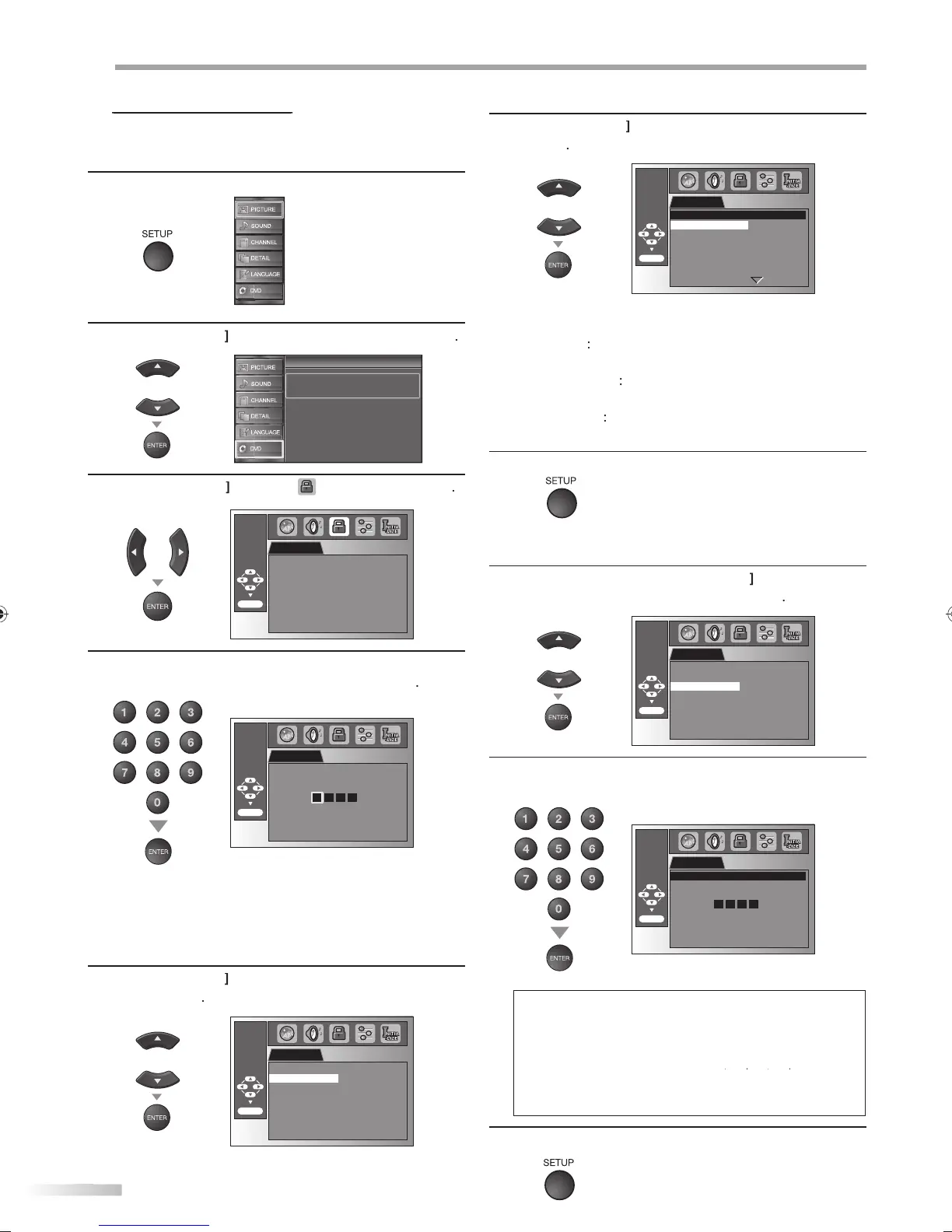
Parental setting prevents your children from viewing inappropriate
materials. (password protected.) Playback will stop if the ratings exceed
the levels you set.
1
Pr
SETUP
to displa
the main menu.
2
Cursor
to select “DVD”, then
ress
ENTER
Setup
Setup
Press “ENTER” key to move to DVD Setup.
3
Cursor
“ ”, t
en press
ENTER
PARENTAL
ENTER/OK
PARENTAL LEVEL ALL
4
se [t
e Num
er
uttons
to enter t
e 4-
igit
numbers
or your password, then press
ENTER
PARENTAL
ENTER/OK
Enter current password.
•If
ou have set password alread
, use
[t
e Num
er
uttons
to enter t
e current 4-
igit
passwor
You cannot use the de
ault password (4737) to play bac
V
5
Cursor
to se
ect t
e “PARENTAL LEVEL”
t
en
ENTER
PARENTAL
ENTER/OK
PARENTAL LEVEL ALL
PASSWORD CHANGE
6
Cursor
to select the desired item, then
ress
ENTER
PARENTAL
ENTER/OK
ALL
8 [ ADULT ]
7 [ NC-17 ]
6 [ R ]
5 [ PGR ]
4 [ PG13 ]
3 [ PG ]
PARENTAL LEVEL
: All
arental locks are cancelled
ADULT
ll ratin
s (adult /
eneral / children)
an be pla
ed back
NC-17
-2
G
nl
DVD intended for general use
and children can be pla
ed back.
KID SAFE
nl
DVD intended for children can
be pla
ed back.
7
Pr
SETUP
xi
o chan
e the passwor
5
Follow ste
s 1 to 4. Use
Cursor
l
“PASSWORD CHANGE”, then
ress
ENTER
PARENTAL
ENTER/OK
PARENTAL LEVEL ALL
PASSWORD CHANGE
6
t
e Num
er
uttons
to enter t
e new 4-
i
it
passwor
.
PARENTAL
ENTER/OK
PASSWORD
Please enter a 4-digit password.
0 0 0 0
Don’t forget the password.
Press ‘ENTER/OK’ to activate
password.
ote:
•
VD-video ma
not respond to parental lock settings. Make
ure this function works with
our DVD-video
•
ecord the password in case
ou forget it.
•
f
ou forget the password, press
7
our new password. Password will be cleared and parental
v
l
will
“ALL”
•
power failure will not erase
our password.
7
ress
SETUP
to ex
t
A9DF1UH_LD320SS1_EN_v1.indd 46A9DF1UH_LD320SS1_EN_v1.indd 46 2010/01/22 17:14:162010/01/22 17:14:16














 To Next Page