ATCHING TV
nn
i
Se
ect c
anne
s
using
CH
r
t
e Num
er
uttons
• To select the memorized channels, use
CH
or
[the Number buttons].
•
o select the non-memorized channels
use
the Number buttons
o Use
the Number buttons
When selectin
analo
channel 1
W
en se
ecting
igita
c
anne
11-
e sure to press
be
ore entering
t
e su
c
anne
num
er
ress
CH RETURN
to return to t
e previous
y
anne
A
out
igita
TV
roa
casting:
With its high de
inition broadcast, digital broadcasting
ar surpasses analog broadcasting in both its picture
an
soun
qua
ity. Not a
igita
TV
roa
casts are
ig
de
inition (HD). To con
irm whether your watching T
program is in HD, re
er to the program guide, contact
your ca
e / sate
ite provi
er or
oca
TV stations
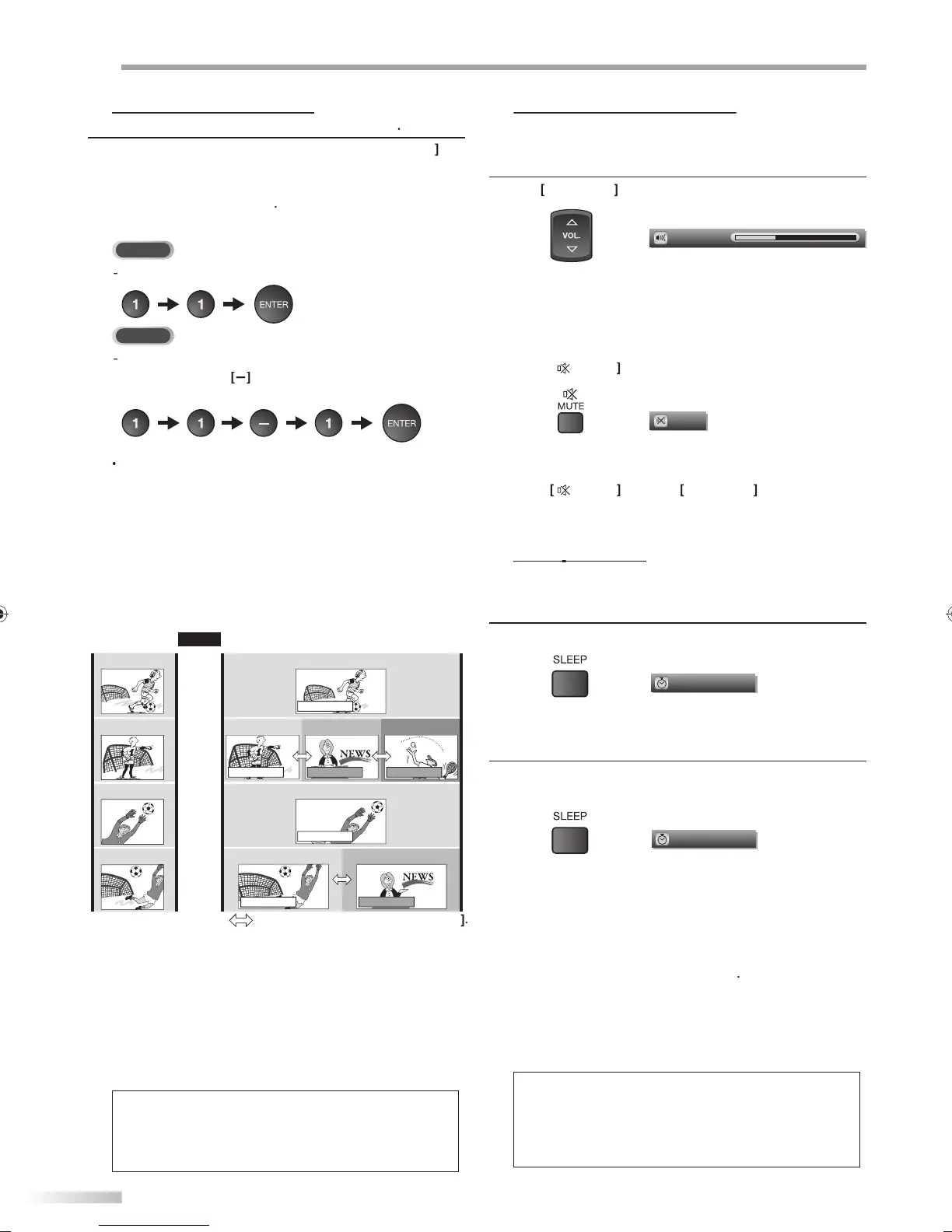
NTSC
(analog mode)
ATSC
(digital mode)
CH4-1
(Soccer)
CH4-2
(News)
CH4-3
(Tennis)
CH4-1
(Soccer)
CH4
(Soccer)
CH4
(Soccer)
CH4-1
(Soccer)
CH4-2
(News)
CH4
(Soccer)
CH4
(Soccer)
CH4-1
(Soccer)
Air time
subchannelsubchannel
main channel
main channel
main channel
main channel
subchannel
6:00pm
6:30pm
7:00pm
7:30pm
8:00pm
W
at is t
e su
c
anne
By using
ig
compression tec
no
ogy,
igita
broadcasting o
ers a service that enables multiple
signa
s to sen
simu
taneous
y
here
ore, you can select more than one program per
main c
anne
since
igita
roa
casting tec
no
ogy
istinguis
es
etween mu
tip
e c
anne
s
roa
cast
y
a sing
e networ
N
• “No Si
nal” will appear on the TV screen after the
h
nn
l
r
i
v
r
• “Audio onl
program“ message will appear on the T
screen, when
ou receive onl
sound signal.
his section describes how to ad
ust the volume. The mute
unction, which
urns the sound off and on
is also described
L
to ad
ust the audio volume
The volume bar will be displa
ed at the bottom of the
TV screen when ad
usting the volume
The volume bar will automatically disappear in a
ew
secon
s
Pr
T
rn
ff
n
n
h
n
“Mute” is displayed on the TV screen
or a
ew seconds.
ress
aga
n or
L.
to recover t
e
ori
inal volume
The sleep timer can be set to automatically turn off the unit after an
incremental period of time.
1
ress
SLEEP
to set t
e s
eep timer
Sleep timer displa
appears on the TV screen
2
ress
SLEEP
repeatedly to change the amount o
time
until shut o
You can set
our unit to turn off after a set period of
time
from 30 to 120 minutes
Each press o
SLEEP
wi
increase t
e time
y 30
m
nutes
A
ter setup, the sleep timer display can be called up
or checking by pressing
SLEEP
To cancel the sleep t
mer
ress
SLEEP
repeatedly until “Sleep O
” is displayed
on t
e TV screen
• T
e s
eep timer
isp
ay wi
automatica
y
isappear in a
w
n
• When you disconnect the unit
rom the AC outlet or when
power
ailure occurs, the sleep timer setting will be
ance
e
.
an
e c
ange
y using
CH
A9DF1UH_LD320SS1_EN_v1.indd 16A9DF1UH_LD320SS1_EN_v1.indd 16 2010/01/22 17:12:202010/01/22 17:12:20





 To Next Page