PTIONAL SETTING
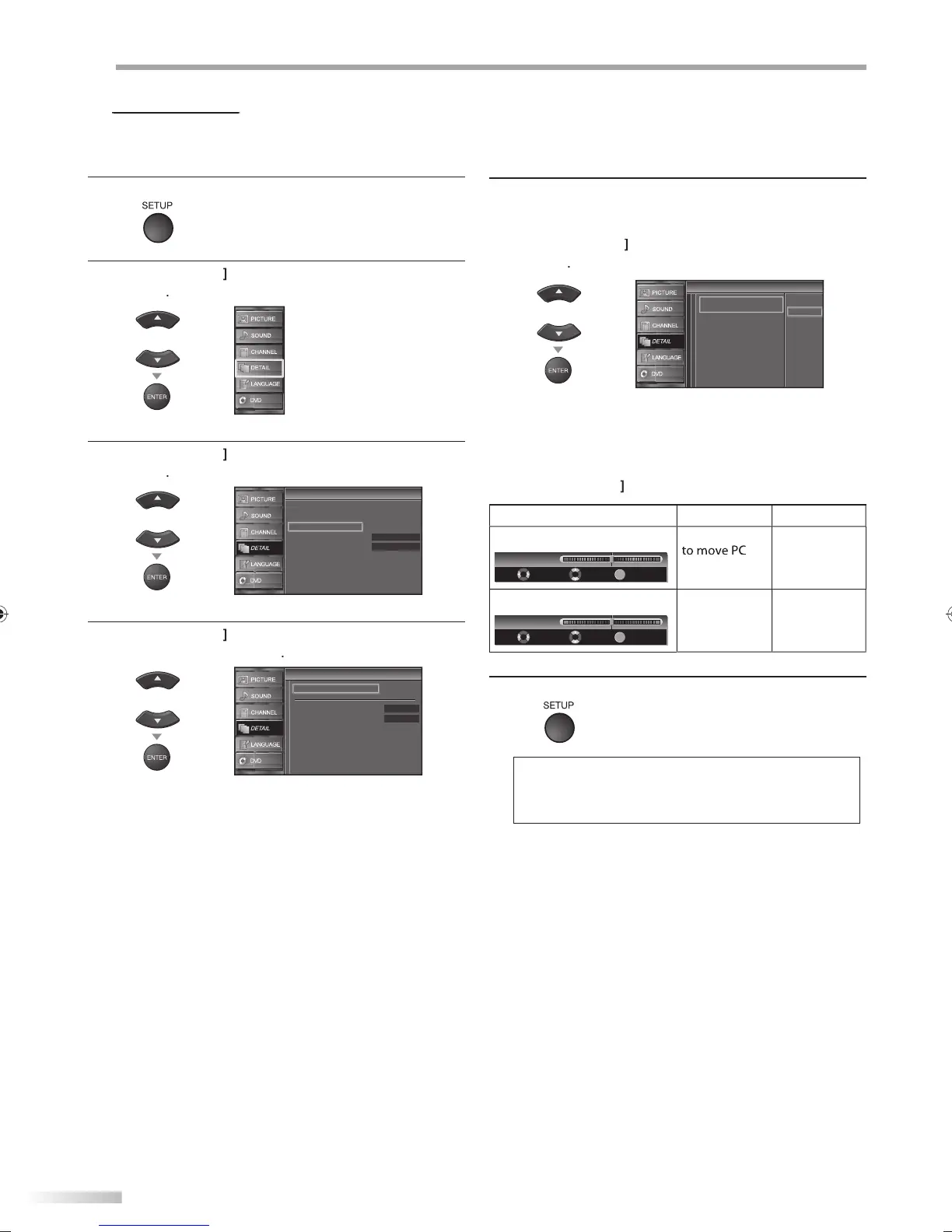
This
unction lets
ou adjust the PC screen position during PC input through
t
e HDMI 1 Input
ac
1
Pr
SETUP
to displa
the main menu
2
se
Cursor
to se
ect “DETAIL”, t
en press
ENTER
3
se
Cursor
to se
ect “PC Settings”, t
en press
ENTER
Detail
Detail
On
Closed Caption
Child Lock
PC Settings
Energy Saving Mode
Location
Current Software Info
Home
4
Cursor
to select the setting
ou want to
ad
ust, then press
ENTER
PC Settings
PC Settings
Position Reset
Horizontal Position
Vertical Position
0
0
5
Ad
ust the setting
P
i
i
n R
Cursor
to select “Reset”, then
ress
ENTER
Cancel
Reset
Position Reset
Position Reset
Resets the display position of the
picture.
The horizontal/vertical position o
the PC screen are
automatica
y a
juste
Horizonta
Position, Vertica
Positio
se
Cursor
to a
just
ursor
ursor
H
riz
n
l P
i
i
n
ENTER
H. Position
Adjust Move
Enter
0
-
+
r
n l
o move P
creen rig
V
r
i
l P
i
i
n
ENTER
V. Position
Adjust Move
Enter
0
-
+
m
v
P
creen
own
m
v
P
c
u
6
ress
SETUP
to ex
t
• You may not o
tain an appropriate screen wit
Position Reset”
or some signals. In this case, adjust the
ettings manua
y.
A9DF1UH_LD320SS1_EN_v1.indd 32A9DF1UH_LD320SS1_EN_v1.indd 32 2010/01/22 17:13:132010/01/22 17:13:13




 To Next Page