VD SETTING
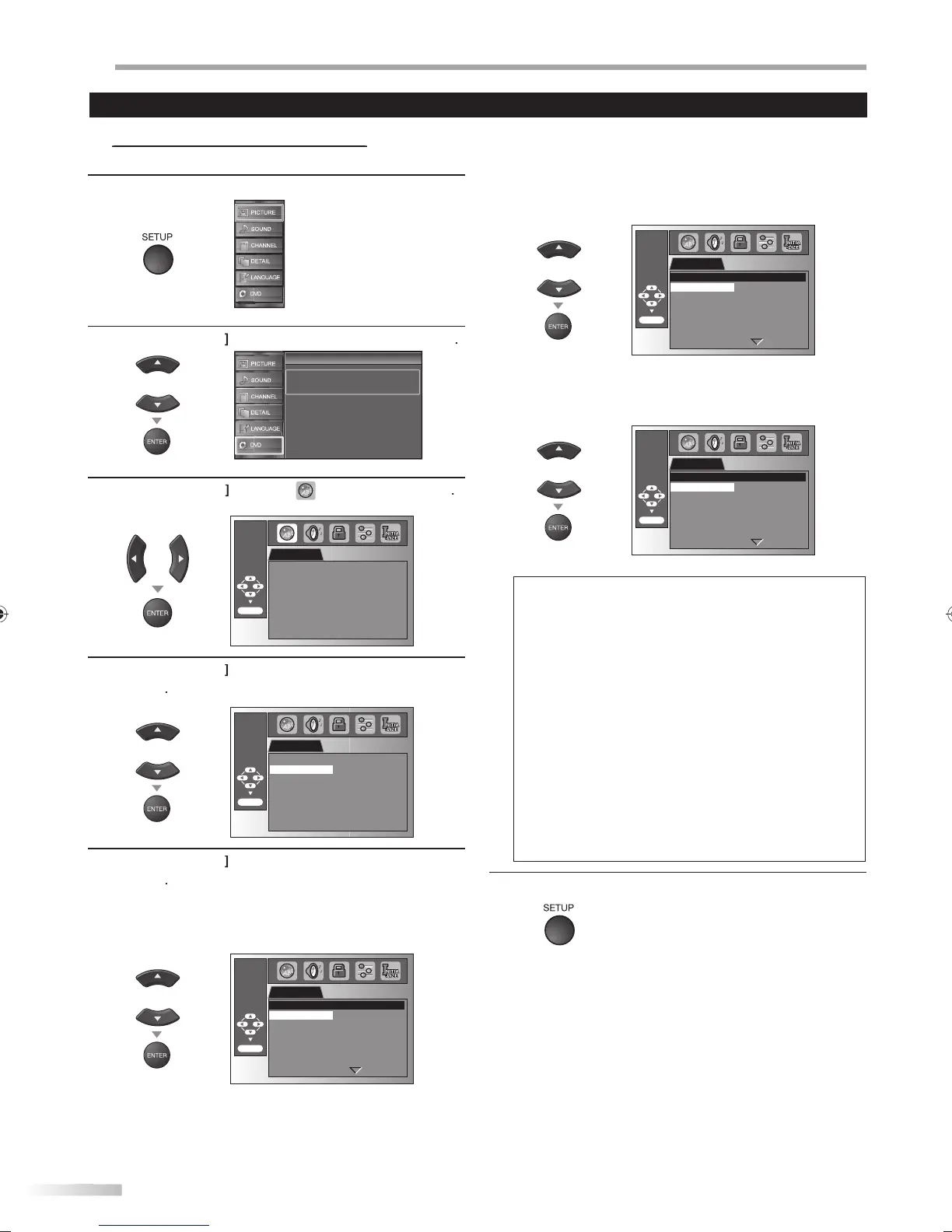
You can change the desired language when playing back the disc.
1
r
SETUP
to
isp
a
t
e main menu.
2
se
Cursor
to se
ect “DVD”, t
en press
ENTER
Setup
Setup
Press “ENTER” key to move to DVD Setup.
3
Cursor
l
“
ENTER
LANGUAGE
AUDIO ORIGINAL
SUBTITLE OFF
DISC MENU ENGLISH
ENTER/OK
4
Cursor
to select the desired item, then
ress
ENTER
LANGUAGE
ENTER/OK
AUDIO ORIGINAL
SUBTITLE OFF
DISC MENU ENGLISH
5
se
Cursor
to se
ect t
e
esire
item, t
en press
ENTER
AUDI
1,
2 (De
ault: ORIGINAL
Se
ect t
e
esire
au
io
anguage
LANGUAGE
ENTER/OK
ORIGINAL
ENGLISH
FRENCH
SPANISH
GERMAN
ITALIAN
SWEDISH
AUDIO
UBTITLE
1,
2
De
ault: OFF)
Se
ect t
e
esire
su
tit
e
anguage
LANGUAGE
ENTER/OK
OFF
ENGLISH
FRENCH
SPANISH
GERMAN
ITALIAN
SWEDISH
SUBTITLE
DI
MEN
*1
Default: ENGLISH
Select the desired lan
ua
e in DVD menu
LANGUAGE
ENTER/OK
ENGLISH
FRENCH
SPANISH
GERMAN
ITALIAN
SWEDISH
DUTCH
DISC MENU
ote
• To chan
e the on-screen lan
ua
e, call up “LANGUAGE
from the main menu and set the desired lan
ua
e
Refer to “Lan
ua
e Selection” on pa
e 22
*
•Lan
ua
e options are not available with some discs.
• If “OTHER” is selected in “AUDIO”
“SUBTITLE” o
“DISC MENU” menu, press 4-di
it number to enter the code
for the desired lan
ua
e. Refer to “Lan
ua
e Code List” on
pa
e 48.
•Onl
the languages supported b
the disc can be selected
*
•Lan
ua
e settin
for Audio and Subtitle are not available
wi
h
m
i
-
MODE
l
i
l
v
il
l
n
h
DVD
-
AUDIO
l
i
v
il
l
n
h
DVD
• If the DVD’s default settin
s for audio and subtitle are the
same language, the subtitles ma
not show unless
ou
rn
h
m
n
6
ress
SETUP
to ex
t
Settings are only effective when the unit is in DVD mode and any discs should not be played back.
A9DF1UH_LD320SS1_EN_v1.indd 44A9DF1UH_LD320SS1_EN_v1.indd 44 2010/01/22 17:14:092010/01/22 17:14:09













 To Next Page