INTRODUCTION
PREPARATION
WATCHING TV
OPTIONAL SETTING
OPERATING DVD
DVD SETTING TROUBLESHOOTING
INFORMATION
EnglishEspañol Français
ou can set w
et
er t
e
ower consum
tion is save
or not
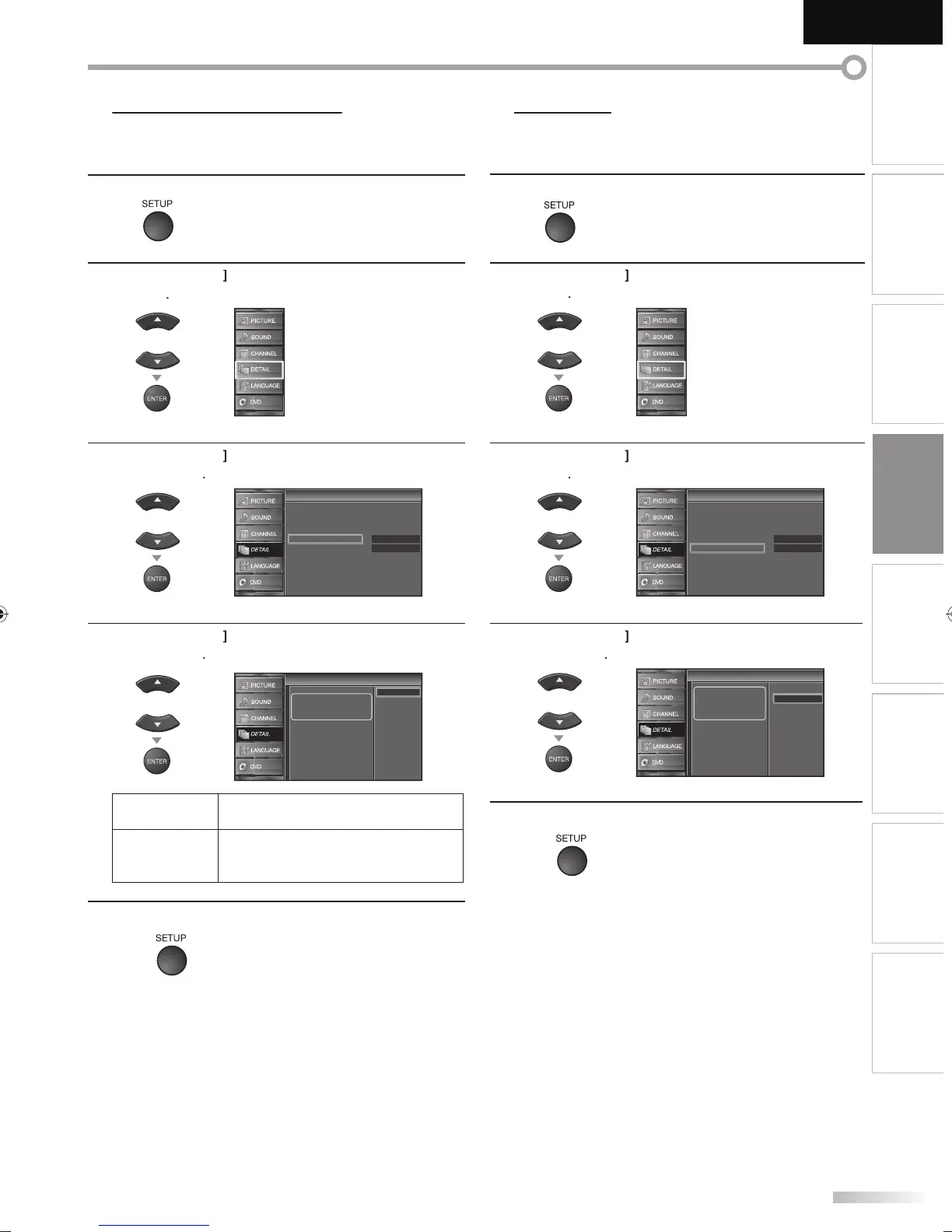
1
Pr
SETUP
to displa
the main menu
2
se
Cursor
to se
ect “DETAIL”, t
en press
ENTER
3
Cursor
to se
ect “Energy Saving Mo
e”, t
en
ENTER
On
Home
Closed Caption
Child Lock
PC Settings
Energy Saving Mode
Location
Current Software Info
Detail
Detail
4
Cursor
to select the desired mode
then
ENTER
When set to “On”, power
consumption is reduced by
decreasing backlight
brightness.
On
Off
Energy Saving Mode
Energy Saving Mode
Select if
ou want to reduce the power
consum
tion
O
T
e power consumption may possi
y
exceed the limited requirement o
the
ENERGY STAR® quali
ication.
5
ress
SETUP
to ex
t
L
W
en
ou se
ect ”Retai
”, t
e power consumption ma
possi
excee
t
e
limited re
uirement of the ENERGY STAR®
ualification
1
Pr
SETUP
to displa
the main menu
2
se
Cursor
to se
ect “DETAIL”, t
en press
ENTER
3
Cursor
to select “Location”, then
ress
ENTER
On
Home
Closed Caption
Child Lock
PC Settings
Energy Saving Mode
Location
Current Software Info
Detail
Detail
4
Cursor
to select the desired location
then
ress
ENTER
Location
Location
Location Home is
recommended for normal
home use.
In the Retail Store mode, all
settings are fixed.
Retail
Home
5
ress
SETUP
to ex
t
A9DF1UH_LD320SS1_EN_v1.indd 33A9DF1UH_LD320SS1_EN_v1.indd 33 2010/01/22 17:13:162010/01/22 17:13:16













 To Next Page