INTRODUCTION
PREPARATION
WATCHING TV
OPTIONAL SETTING
OPERATING DVD
DVD SETTING
TROUBLESHOOTING
INFORMATION
EnglishEspañol Français
r
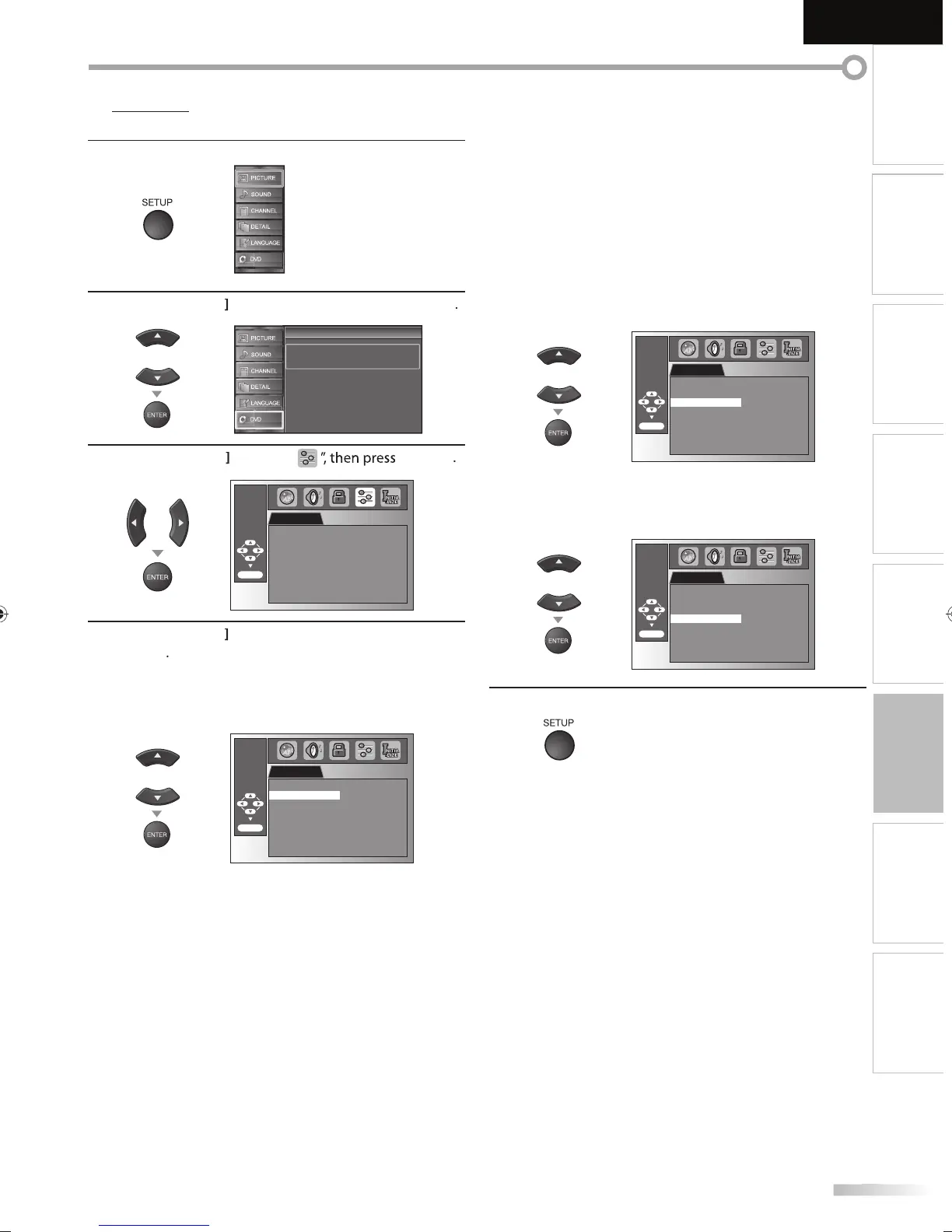
You can change the other functions.
1
ress
SETUP
to
isp
ay t
e main menu.
2
Cursor
to select “DVD”, then
ress
ENTER
Setup
Setup
Press “ENTER” key to move to DVD Setup.
3
Cursor
/
“
ENTER
r
OTHERS
ENTER/OK
ANGLE ICON ON
STILL MODE AUTO
AUTO POWER OFF ON
4
se
Cursor
to se
ect t
e
esire
item, t
en press
ENTER
ANGLE I
N
De
ault: ON)
Set to “ON” to s
ow t
e ang
e icon w
en mu
tip
e
amera ang
es are avai
a
e
uring DVD p
ay
ac
OTHERS
ENTER/OK
ANGLE ICON ON
STILL MODE AUTO
AUTO POWER OFF ON
TILL M
DE
Default: AUTO
Set the picture quality in the still mode
If
ou select “AUTO”, it automaticall
selects the best
reso
ution settin
(“FRAME” or “FIELD”)
ase
on t
e
date characteristics of the
ictures
FIEL
: T
e
icture in t
e sti
mo
e wi
iliz
F
AME
The picture in the still mode will be highl
fin
OTHERS
ENTER/OK
ANGLE ICON ON
STILL MODE AUTO
AUTO POWER OFF ON
A
T
P
WER
FF
Default: ON
Set to “ON” to turn this unit off automaticall
after 20
minutes o
no use
OTHERS
ENTER/OK
ANGLE ICON ON
STILL MODE AUTO
AUTO POWER OFF ON
5
Pr
SETUP
xi
A9DF1UH_LD320SS1_EN_v1.indd 47A9DF1UH_LD320SS1_EN_v1.indd 47 2010/01/22 17:14:202010/01/22 17:14:20




 To Next Page