PTIONAL SETTING
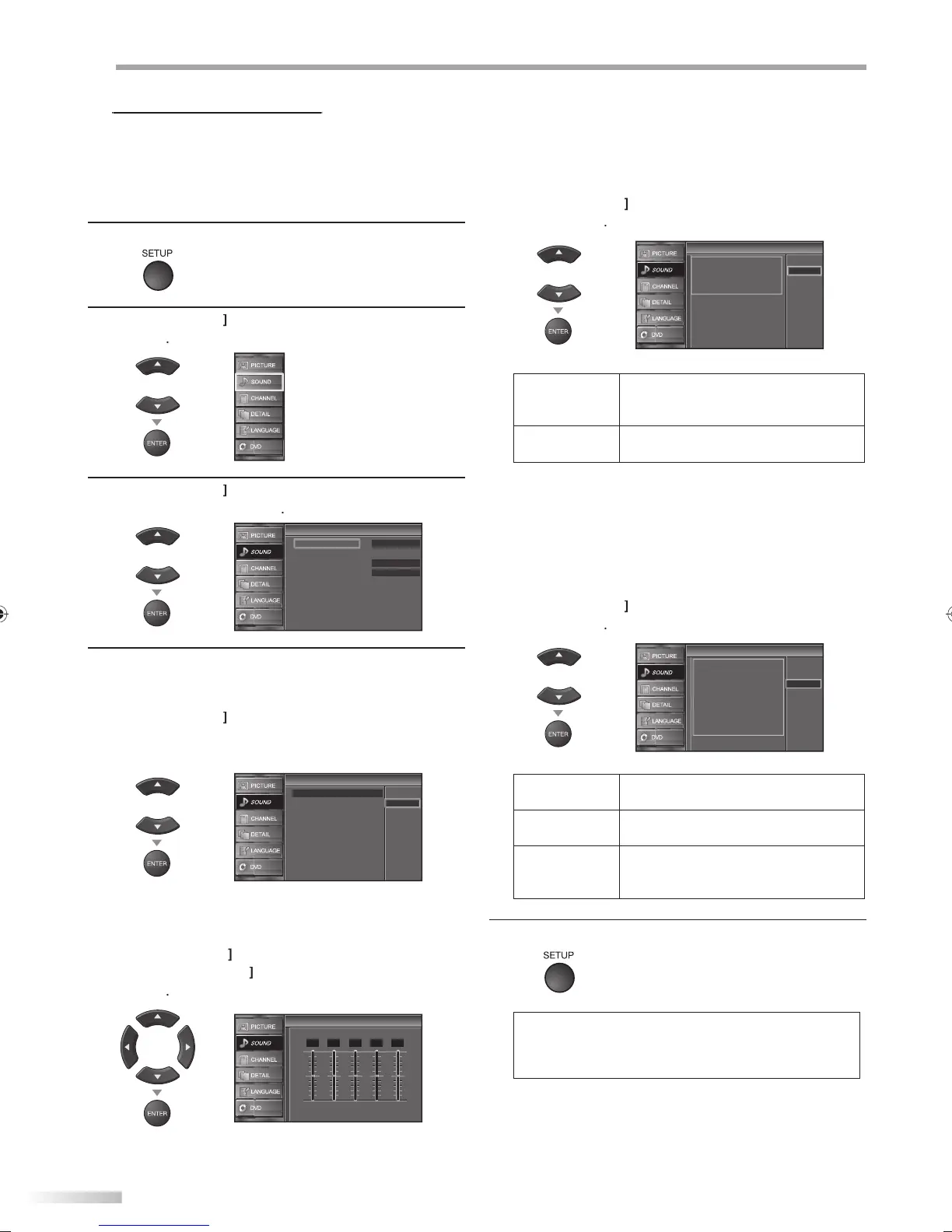
You can adjust the sound mode, equalizer and some other sound functions.
Before you begin: You must set ”Home” in ”Location”. Refer to page 33.
Otherwise, the settings you adjusted will not be
memorized after you turn off the unit.
1
r
SETUP
to displa
the main menu
2
Cursor
to se
ect “SOUND”, t
en
ress
ENTER
r
3
Cursor
to se
ect t
e soun
t
pe
ou want to
a
ust, t
en press
ENTER
r
Standard
Off
Ext. Amp
Sound Mode
Equalizer
Auto Volume Leveling
TV Speakers
Sound
Sound
4
Ad
ust the following items
n
M
Cursor
to select the desired settin
, then
ress
ENTER
(“Personal “
“Standard “
“Movie “
“Music“ and “News “)
Equalizer
Auto Volume Leveling
TV Speakers
Sound Mode
Movie
Music
News
Standard
Personal
Sound
Sound
E
ualizer
Adjust tonal qualit
for each frequencies
Cursor
to select the specific frequenc
n
Cursor
to ad
ust the level, then press
ENTER
Equalizer
Equalizer
0
120Hz
0
500Hz
0
1.5kHz
0
5kHz
0
10kHz
Auto Volume Levelin
This function keeps a constant loudness differential
etween t
e TV commercia
s an
t
e programs
Use
Cursor
to se
ect t
e
esire
option, t
en
press
ENTER
Off
On
Auto Volume Leveling
Auto Volume Leveling
Auto Volume Leveling reduces
volume differences between
channels and programs,
providing a consistent audio
level.
n
elect i
ou want to reduce volume
i
r
n
w
n
h
TV
mm
r
i
l
n
t
e pro
rams
elect i
ou want to remove the auto
o
ume
eve
ing.
TV S
eaker
Select the audio out
ut from the unit’s s
eakers, or not
If
our amplifier is HDMI link function compatible an
connecte
an HDMI ca
e to t
is unit, some soun
operations suc
as vo
ume up can
e c
ange
using
hi
ni
’
r
m
n
r
l
Cursor
to select the desired o
tion, then
ress
ENTER
On
TV Speakers
TV Speakers
Ext. Amp
"On":
Sound will be output from the TV
speakers.
"Off":
Sound will not be output from the
TV speakers.
"Ext. Amp":
Operation is possible by connecting
to the HDMI-CEC compatible amp
with a HDMI cable. For details look
in the user manual.
Off
n
he sound will be out
ut from the unit’s
eakers
ff
he sound will not be out
ut from the
nit’s s
eakers.
xt.
m
ou can control audio output
rom your
onnecte
HDMI
in
evices
y using
i
ni
’
r
m
n
r
5
r
SETUP
xi
ote:
• To cancel sound ad
ustment, press
SETUP
• We do not guarantee 100% interoperabilit
with othe
r
n
f HDMI link
vi
A9DF1UH_LD320SS1_EN_v1.indd 24A9DF1UH_LD320SS1_EN_v1.indd 24 2010/01/22 17:12:452010/01/22 17:12:45







 To Next Page