INTRODUCTION
PREPARATION
WATCHING TV
OPTIONAL SETTING
OPERATING DVD
DVD SETTING
TROUBLESHOOTING
INFORMATION
EnglishEspañol Français
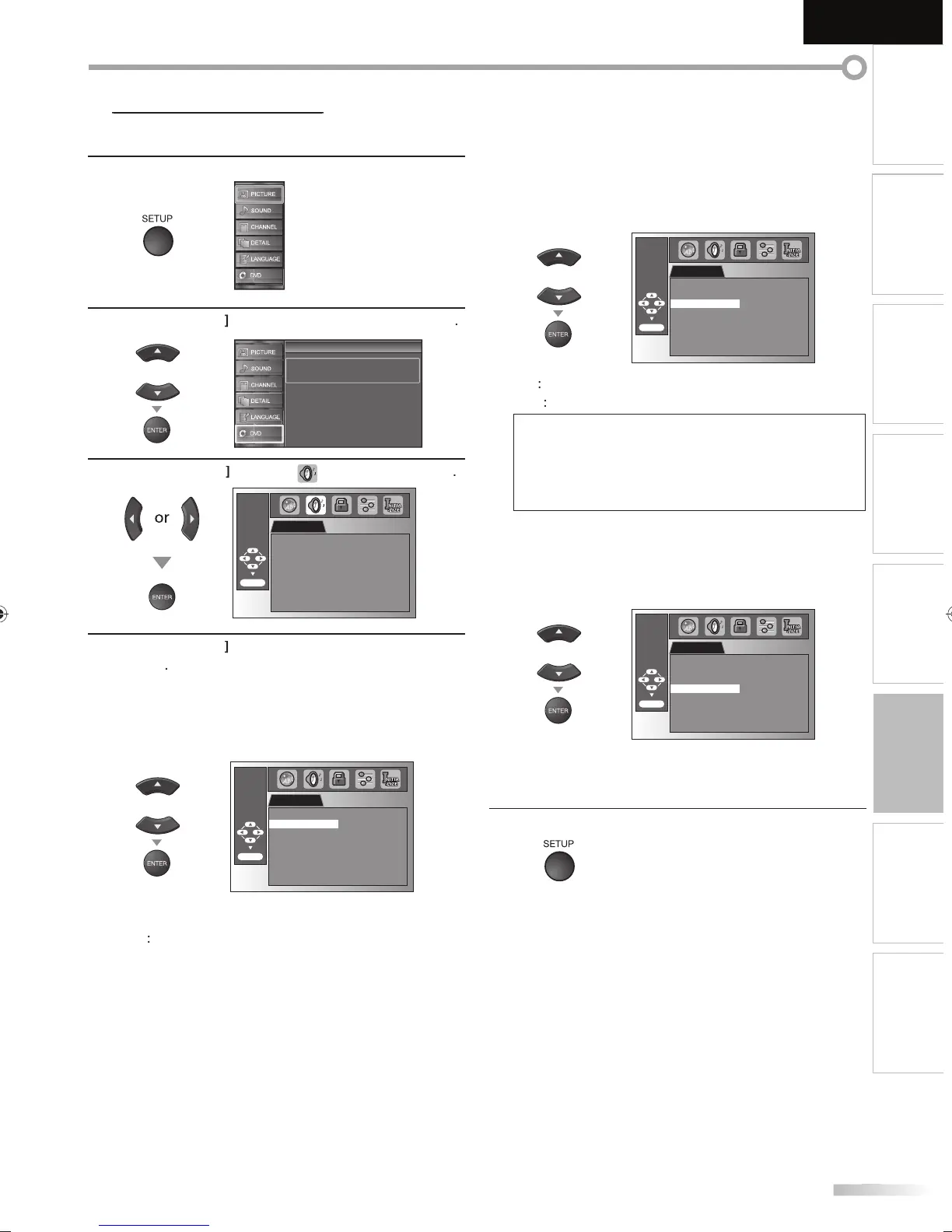
Choose the appropriate audio settings for your equipment. It only affects
during the playback of DVD.
1
Pr
SETUP
to displa
the main menu.
2
Cursor
to select “DVD”, then
ress
ENTER
Setup
Setup
Press “ENTER” key to move to DVD Setup.
3
Cursor
“ ”, t
en
ress
ENTER
AUDIO
ENTER/OK
DRC ON
DOWN SAMPLING ON
DOLBY DIGITAL BITSTREAM
4
Cursor
to select the desired item, then
ress
ENTER
DRC (d
namic range control)
Default: ON
his
unction is available only on the discs which are
ecorded in the Dolby Digital
ormat
AUDIO
ENTER/OK
DRC ON
DOWN SAMPLING ON
DOLBY DIGITAL BITSTREAM
N
ompress the ran
e between soft and loud
n
FF
No effects (ori
inal sound).
D
WN
AMPLING
Default: ON
This function is available onl
on digital outputting of a
i
r
r
in 9
kHz
AUDIO
ENTER/OK
DRC ON
DOWN SAMPLING ON
DOLBY DIGITAL BITSTREAM
N
hen outputtin
in 48kHz.
FF
en outputtin
t
e ori
ina
soun
.
ote
• When pla
ing back a 96 kHz disc with the cop
righ
rotection or when ‘‘Virtual Surround” is set to “1” or “2”,
the sound will be down sam
led at 48 kHz even if the
“D
WN
AMPLING” i
“
FF”
Refer to “Virtual Surround” on pa
e 43.
D
LBY DIGITAL
Default: BITSTREAM
Set to “BITSTREAM“ w
en t
is unit is connecte
to a
Do
y Digita
eco
er
AUDIO
ENTER/OK
DRC ON
DOWN SAMPLING ON
DOLBY DIGITAL BITSTREAM
BIT
TREAM
Outputs Do
y Digita
signa
s
P
M : Converts t
e Do
y Digita
into PCM
(2 channel
5
ress
SETUP
to ex
t
A9DF1UH_LD320SS1_EN_v1.indd 45A9DF1UH_LD320SS1_EN_v1.indd 45 2010/01/22 17:14:132010/01/22 17:14:13













 To Next Page