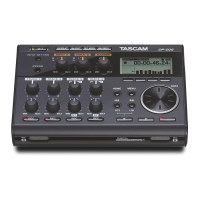
a MIX PAN key
Press to open the
PAN
settings screen. Press when
the
PAN
settings screen is open to close it and
return to the Home Screen.
s VALUE knob
Use this to change the value of the selected item on
the
TRIM
,
LEVEL
and
PAN
settings screens.
On the Functions Screen, use this to select function
items, and press the knob to turn each function
item ON or OFF.
Turn this knob while pressing the DISPLAY key on
the front panel to adjust the display contrast.
When the
MENU
screen is open, this dial can be
used for the same functions as the DATA wheel
and pressing this dial has the same function as the
ENTER key.
d PAUSE key and indicator
Press when stopped or recording to start recording
standby. The indicator lights when in recording
standby.
Press when in recording standby to stop recording
standby.
NOTE
The PAUSE key on the front panel functions only when
recording. Use the PLAY/PAUSE key on the top of the
unit to pause playback.
f REC key and indicator
Press when stopped or in recording standby to start
recording. The indicator lights when recording or
in recording standby.
Press this key when recording to end the current
take and continue recording a new take without
pause.
g REC TRIM key
Press to open the input
TRIM
settings screen.
When the input
TRIM
settings screen is open, press
to close it and open the Home Screen.
h MIX LEVEL key
Press to open the
LEVEL
settings screen.
Press when the
LEVEL
settings screen is open to
close it and return to the Home Screen.
j1–6 keys
Use these to select tracks on the
TRIM
,
LEVEL
and
PAN
settings screens.
Press when in recording standby to arm/disarm that
track for recording.
On the Functions Screen, press to turn the selected
function ON or OFF for that track.
Press and hold to enable/disable solo monitoring of
that track.
k MIX (LOCK) key
When the
LEVEL
screen is open, this selects the
stereo track as the track to be controlled. Press
and hold this key to engage or disengage the lock
function, which disables the use of other keys.
2 – Names and Functions of Parts


 To Next Page