STEPRACE: Service & Maintenance Manual - rev. 1.2
Page 7.4
7.3. DISASSEMBLING THE CPU BOARD
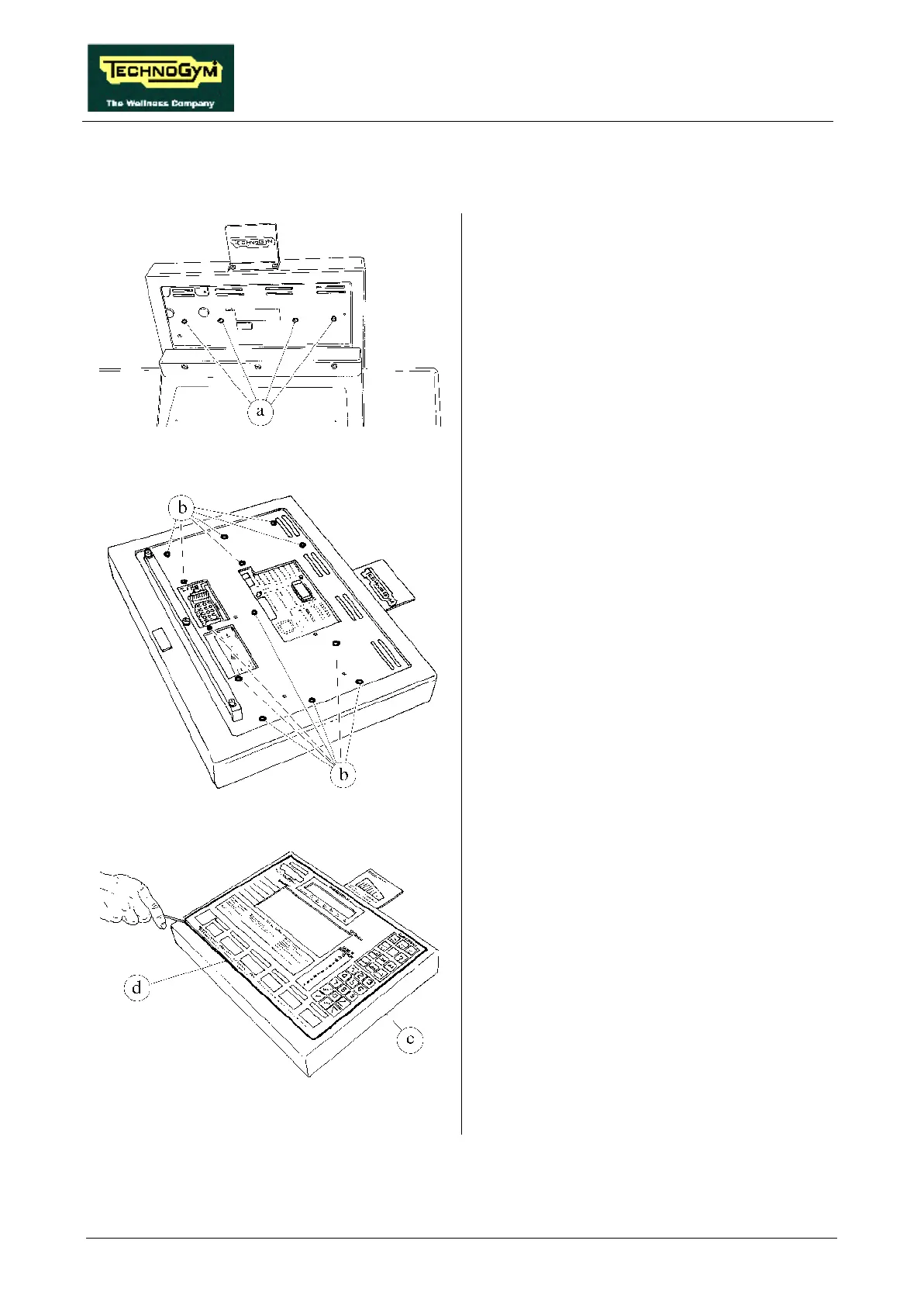
Figure 7.3-1
1. Turn off the machine and unplug the mains
lead from the wall outlet.
2. Back off the 4 fixing screws a of the
protective cover using a small Philips
screwdriver.
3. Remove the protective cover.
Figure 7.3-2
Carry out the procedures described in paragraph
7.1. “Disassembling the display”.
With the display placed on a work bench:
4. Back off the 13 screws b, using a small
Philips screwdriver.
Figure 7.3-3
5. Pushing against the screw studs with a
pointed tool, use a flat-blade screwdriver to
separate outer housing c from the keyboard –
electronic circuit boards group d.
6. Disconnect the cardio receiver cable from the
connector.
Continued on the following page →













 To Next Page