ENGLISH
UPS EVO DSP PLUS Modular 81 User’s manual
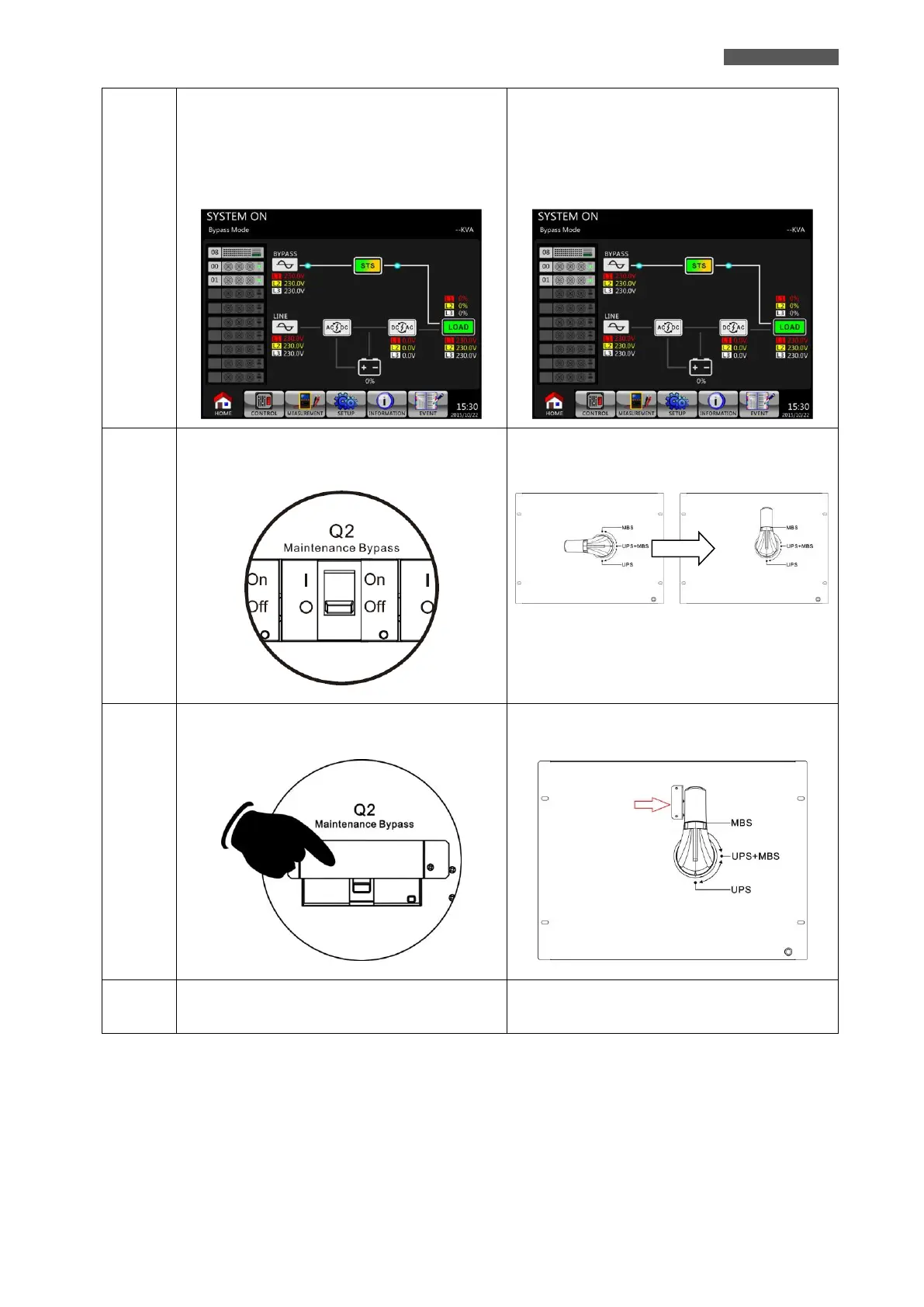
Please enter LCD SETUP Menu and choose
SYSTEM to ensure that the Bypass Mode is
Enabled. If the Bypass Mode is Disabled, you
have to set it Enabled. Then, exit the SETUP
Menu and check if the UPS operates in Bypass
Mode.
Please enter LCD SETUP Menu and choose
SYSTEM to ensure that the Bypass Mode is
Enabled. If the Bypass Mode is Disabled, you
have to set it Enabled. Then, exit the SETUP
Menu and check if the UPS operates in Bypass
Mode.
Turn OFF Maintenance Bypass Breaker as shown
below.
Switch the handle toward upside as shown below.
Lock back the mechanical lock plate as shown
below.
Lock back the mechanical lock plate as shown
below.
Turn ON the UPS as explained in chapter 11.1 “AC
Startup”.
Turn ON the UPS as explained in chapter 11.1 “AC
Startup”.













 To Next Page