ENGLISH
UPS EVO DSP PLUS Modular 83 User’s manual
11.7 UPS Installation for Parallel Rack System
This chapter explains how to install and set up a single UPS EVO DSP PLUS Modular to a Parallel Rack System.
EVO DSP PLUS Modular are designed according to high MTBF figures with increased reliability but in case of
necessity, a second EVO DSP PLUS Modular can be connected in parallel for supplying the very critical load to
increase reliability.
A maximum of 2 UPS can be connected in parallel
The 2 UPS in parallel must have all the Power Modules of the same type (all 20 KVA Modules or all 30KVA Modules).
You need to order the parallel cable for this kind of application. The parallel cable is
required for the installation and operation.
If you want to install a single UPS to Parallel Rack System by yourself, installation must
be under the supervision of authorized service personnel.
The Parallel Rack feature only supports eight Power Modules with 210KVA maximum
power in one rack. One of the eight Power Module is configured as Redundant Power
Module. The maximum power of Parallel Rack System can be (210KVA + 210KVA).
11.7.1 Input and Output Wiring
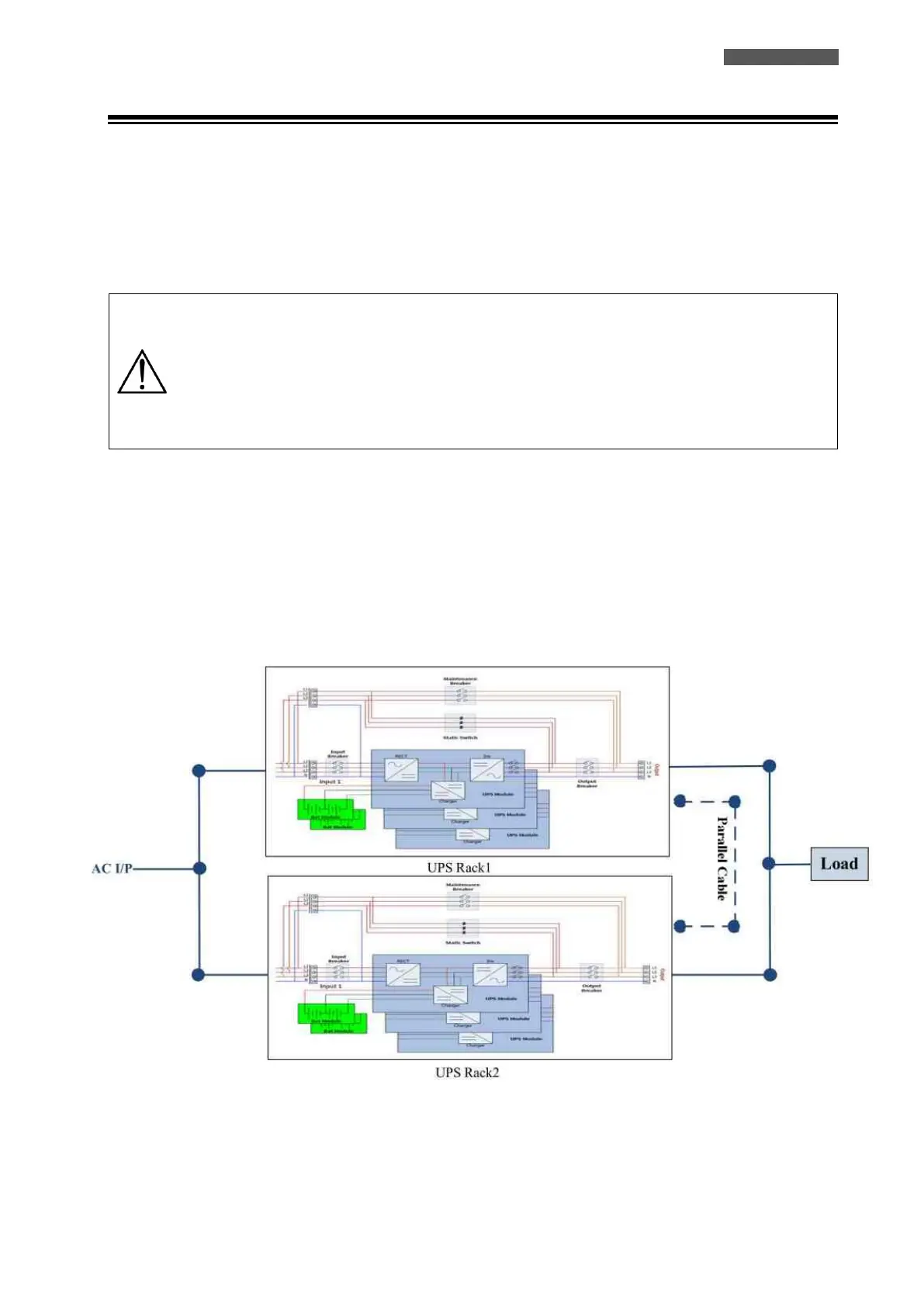
1. When install the Parallel System, the length of Input Wires (R, S, T, N) in the one of the UPS Parallel System
(named UPS Rack1) must be equal to another UPS (named UPS Rack2) Input Wires. Likewise, the length of
Output Wires (R, S, T, N) must also be in equal length. Otherwise, it will cause the Unbalance Current on
Output Load (see Figure 11.17).
2. Refer to chapter 10.3 “Wiring” about the Input and Output Wiring and Battery Wiring methods.
Figure 11.17 – Parallel System Wiring













 To Next Page