Section E – Autosampler Installation
CD14 Tester & CD AutoPlus Autosampler User Guide—75-108-800 Rev. B—31 May 2021 48 of 130
EAR99 technology subject to restrictions on cover page.
Verifying Collector Functions
This section provides instructions on how to verify that the
collector is working properly.
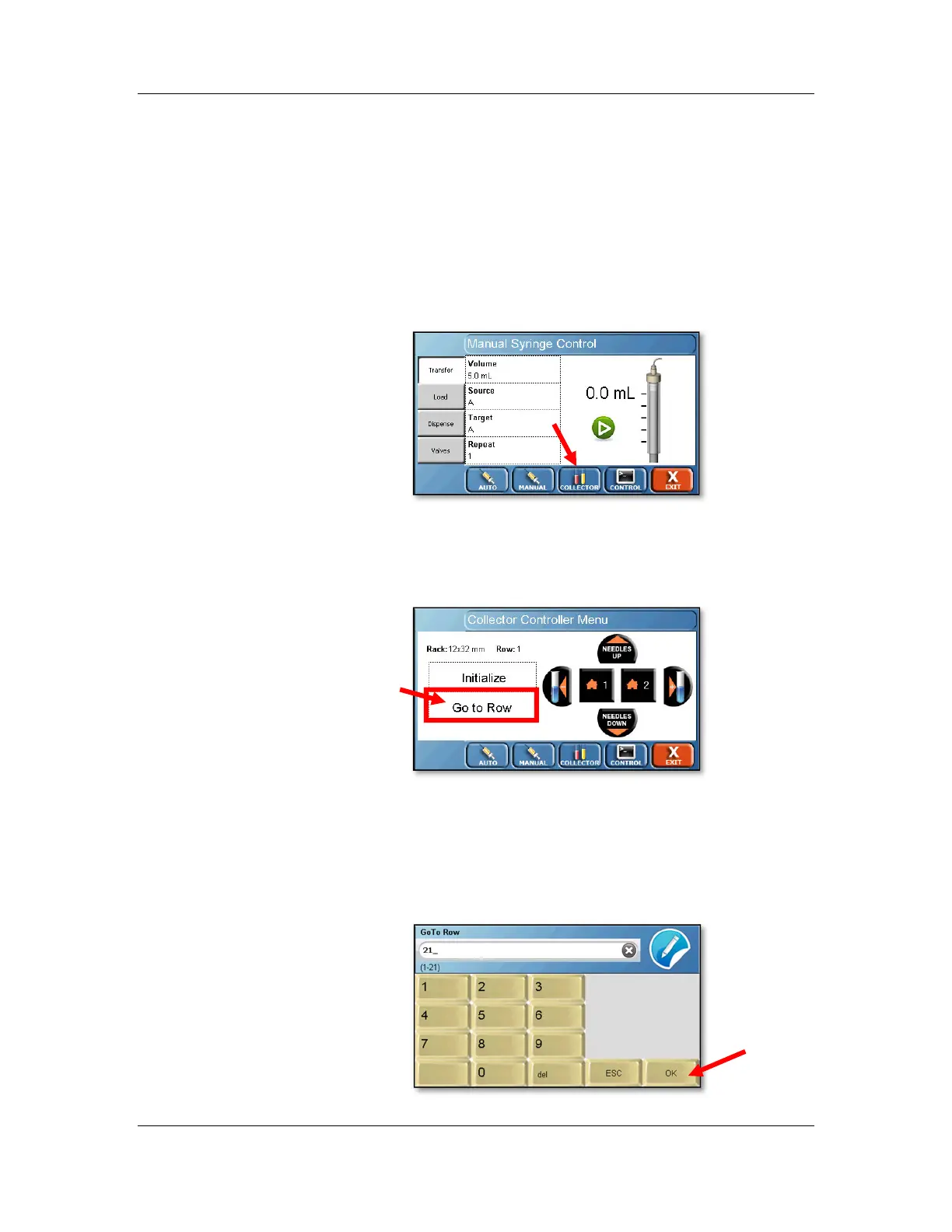
1. Starting from the screen in the previous step 5 of
“Verifying Syringe Functions”, touch the Collector
button located at the bottom of the screen. The
Collector Controller Menu will appear.
Note the type of rack installed, which appears next
to the word Rack: on the screen. Touch the Go to
Row button.
2. If a 12 x 32 rack is installed, enter “21” and touch the
OK button. If a 13 x 100 or 16 x 100 rack is installed,
enter “18” and touch the OK button. The dispense
head should move to the last row of the installed
rack.



 To Next Page