EasyManua.ls Logo

Telkom OPTICON MICRO - System Capacity Specifications

Telkom OPTICON MICRO
79 pages
Print Icon
To Next Page IconTo Next Page
To Previous Page IconTo Previous Page
Loading...
OptiCon Micro
Installation and Operation Manual
13
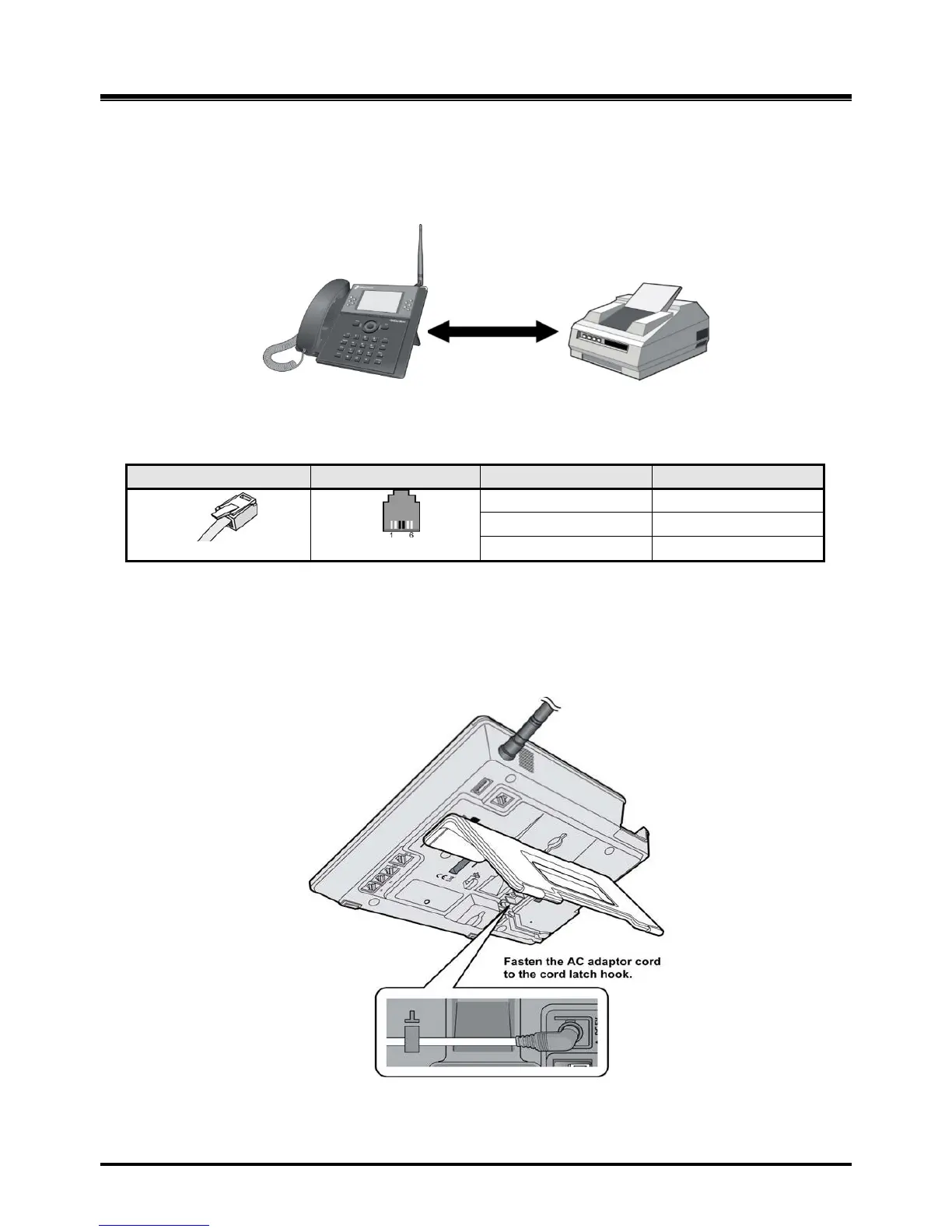
2.4.1 FAX Connection
The following figure illustrates how to connect a FAX to the LWS-BS. Please make sure that the Fax
line cord is connected to the Lightning protection Kit and the other side of the Lightning Protection
Kit to the LWS-BS.
Figure 2.4.1-1 LWS-BS and FAX
Connection
Pin Assignment
Pin Number
NO
Signal Name
1,2
N/A
3,4
TIP, RING
5,6
N/A
2.4.2 AC/DC Adapter Connection
To connect the AC/DC adapter:
1. Plug the DC outlet of the AC/DC Adapter cord into the jack on the LWS-BS.
2. Fasten the AC/DC Adapter cord to the latch hook as shown (inset
detail).
Figure 2.4.2-1 AC/DC Adapter
Connection

Table of Contents

Related product manuals