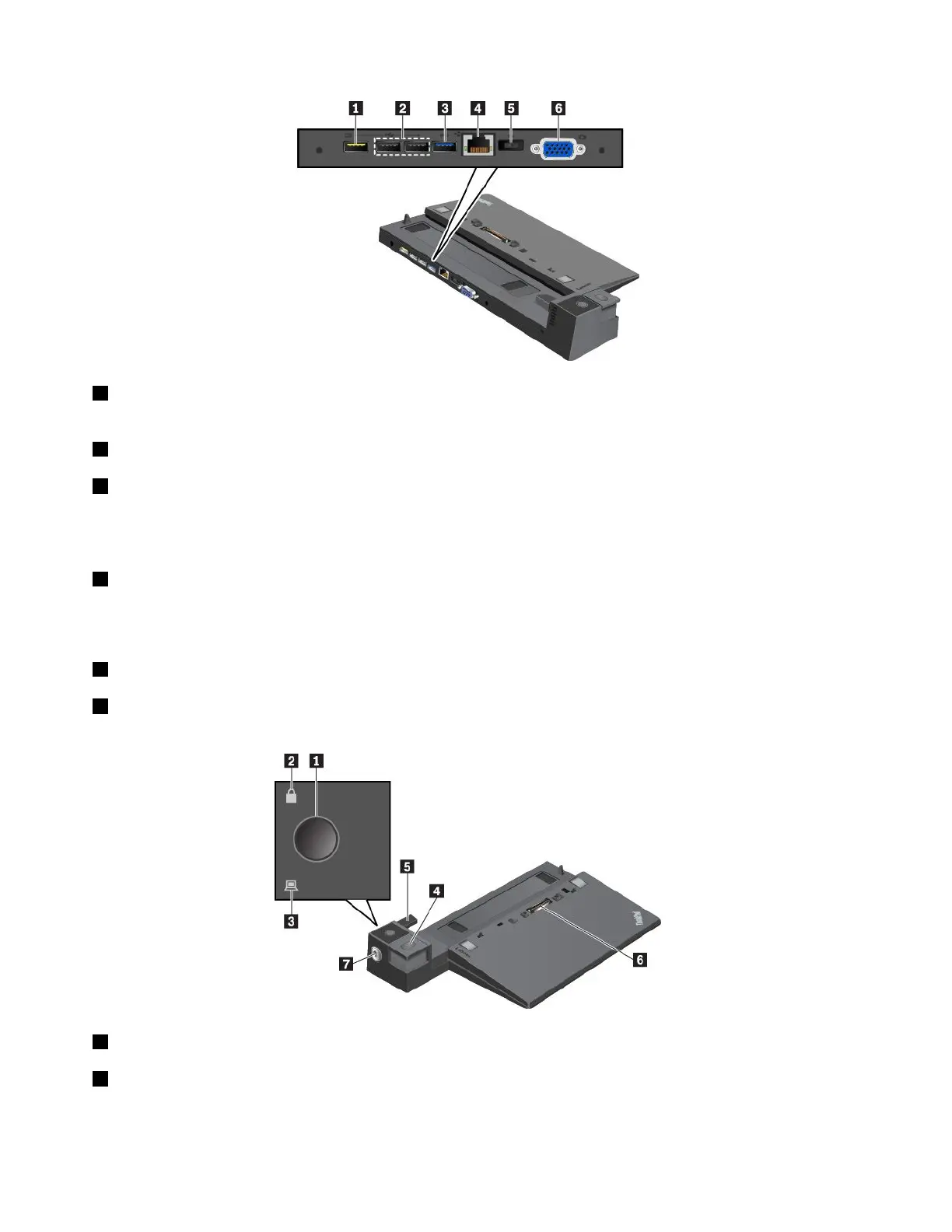
1AlwaysOnUSB2.0connector:ConnectUSB-compatibledevicesorchargesomemobiledigitaldevices
andsmartphones.
2USB2.0connectors
3USB3.0connector
ConnectUSB-compatibledevices,suchasaUSBkeyboard,aUSBmouse,aUSBstoragedevice,ora
USBprinter.
4Ethernetconnector:ConnectthedockingstationtoanEthernetLAN.
Note:Whenyourcomputerisattachedtothedockingstation,alwaysusetheEthernetconnectororthe
externalmonitorconnectoronthedockingstation.Donotusetheonesonthecomputer.
5acpowerconnector:Connecttheacpoweradapter.
6VGAconnector:ConnectthecomputertoaVGA-compatiblevideodevice,suchasaVGAmonitor.
ThinkPadProDock
1Powerbutton:Pressthepowerbuttontoturnonorturnoffthecomputer.
2Keylockindicator:Thisindicatorturnsonwhenthesystemlockisinthelockedposition.
40T470UserGuide



 To Next Page