3Dockingstatusindicator:Thisindicatorturnsonwhenthecomputerisattachedtothedocking
stationproperly.
4Ejectbutton:Presstheejectbuttontoejectthecomputerfromthedockingstation.
5Adjuster:Usetheadjusterasaguidetoalignthecomputerwiththedockingstation.
6Dockingstationconnector:Connectthedockingstationtothecomputer.
7Systemlock:Usethesystemlocktolockorunlocktheejectbutton.
•Whenthesystemlockisinthelockedposition,theejectbuttonislocked,andyoucannotattachor
detachyourcomputer.
•Whenthesystemlockisintheunlockedposition,theejectbuttonisunlocked,andyoucanattachor
detachyourcomputer.
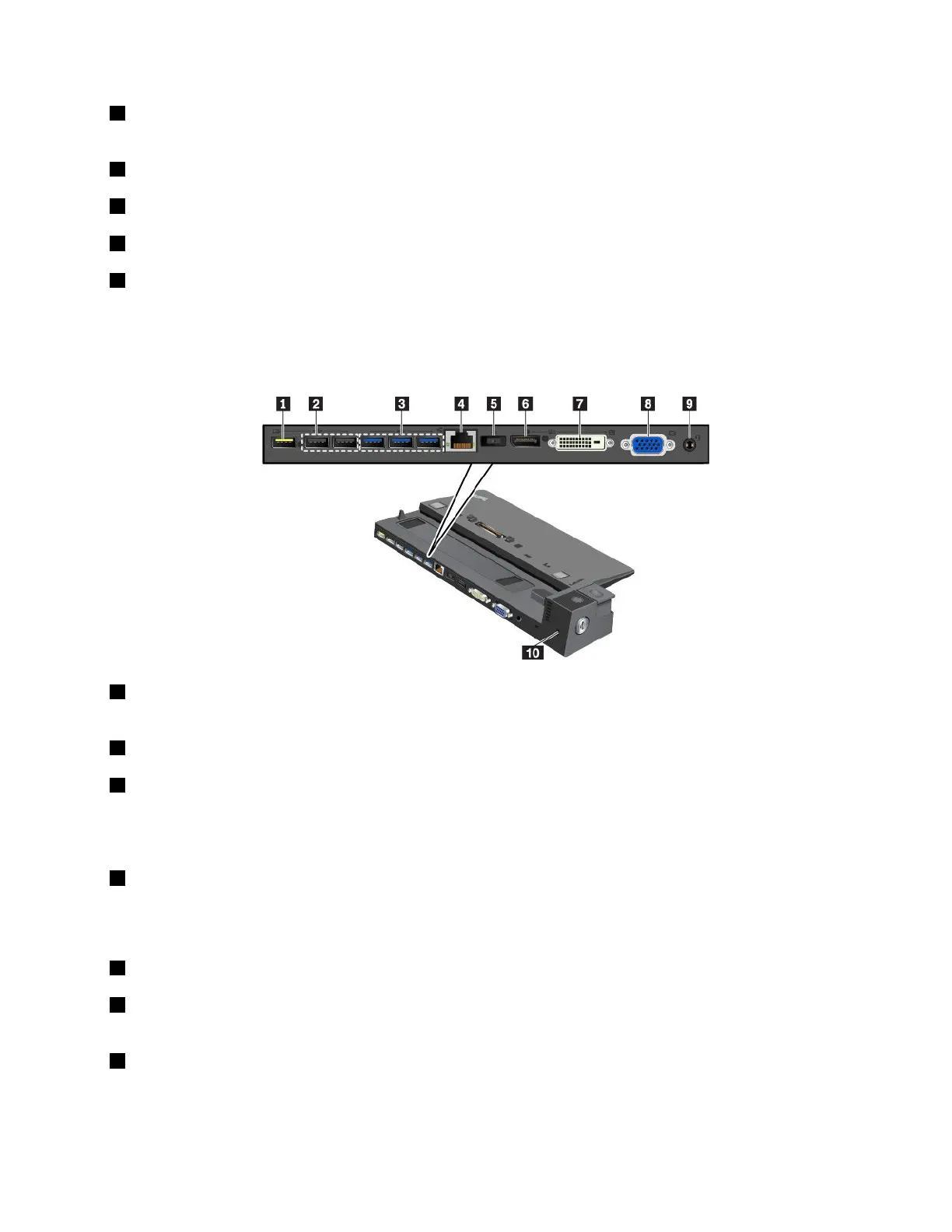
1AlwaysOnUSB2.0connector:ConnectUSB-compatibledevicesorchargesomemobiledigitaldevices
andsmartphones.
2USB2.0connectors
3USB3.0connectors
ConnectUSB-compatibledevices,suchasaUSBkeyboard,aUSBmouse,aUSBstoragedevice,ora
USBprinter.
4Ethernetconnector:ConnectthedockingstationtoanEthernetLAN.
Note:Whenyourcomputerisattachedtothedockingstation,alwaysusetheEthernetconnectororthe
externalmonitorconnectoronthedockingstation.Donotusetheonesonthecomputer.
5acpowerconnector:Connecttheacpoweradapter.
6DisplayPort
®
connector:Connectahigh-performancemonitor,adirect-drivemonitor,orotherdevices
thatuseaDisplayPortconnector.
7DVIconnector:ConnectamonitorthatsupportsDigitalVisualInterface(DVI)connection.
Note:TheDVIconnectorprovidesadigitalinterfaceonly.Thisconnectorcanonlybeusedwithacomputer
thatsupportsDVIconnection.
Chapter3.Enhancingyourcomputer41



 To Next Page