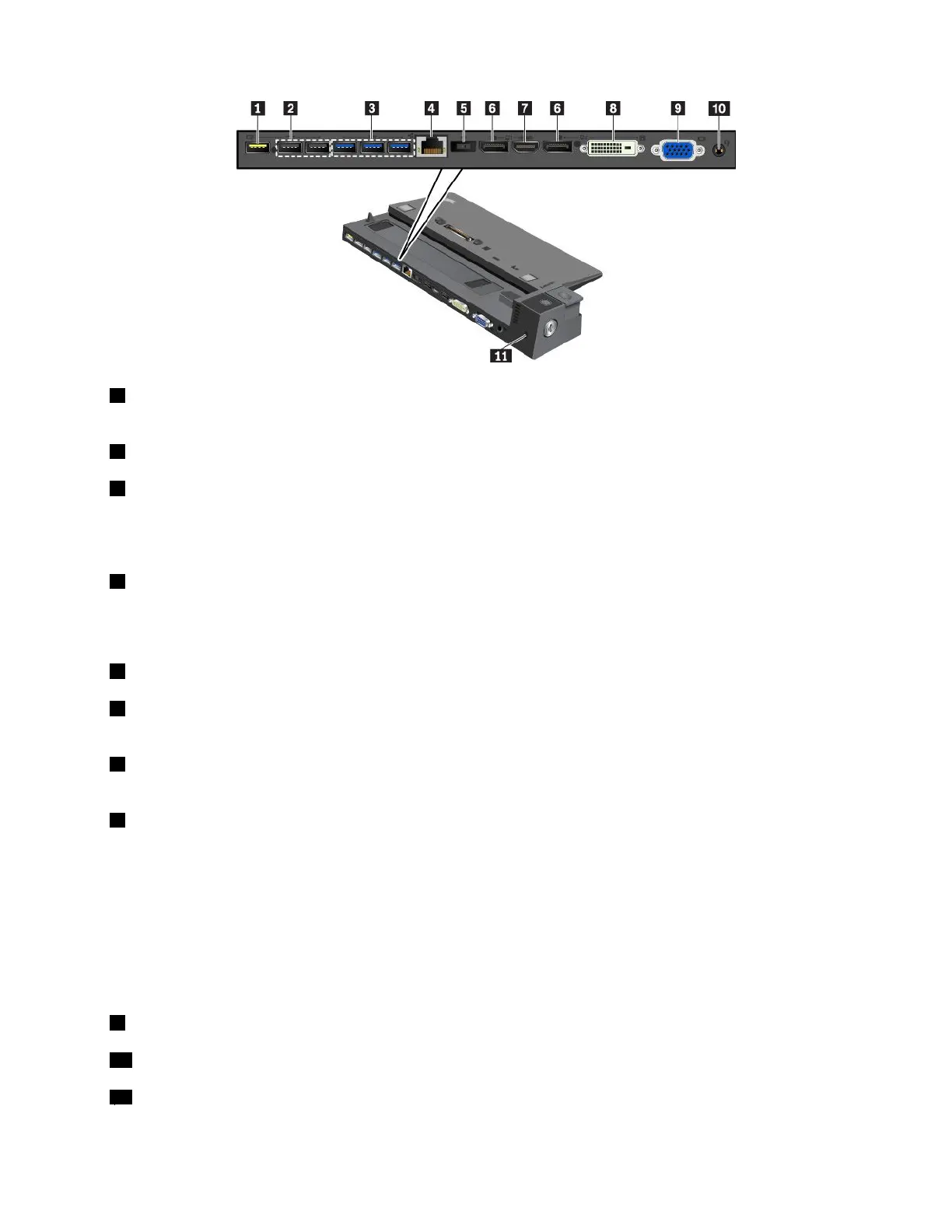
1AlwaysOnUSB2.0connector:ConnectUSB-compatibledevicesorchargesomemobiledigitaldevices
andsmartphones.
2USB2.0connectors
3USB3.0connectors
ConnectUSB-compatibledevices,suchasaUSBkeyboard,aUSBmouse,aUSBstoragedevice,ora
USBprinter.
4Ethernetconnector:ConnectthedockingstationtoanEthernetLAN.
Note:Whenyourcomputerisattachedtothedockingstation,alwaysusetheEthernetconnectororthe
externalmonitorconnectoronthedockingstation.Donotusetheonesonthecomputer.
5acpowerconnector:Connecttheacpoweradapter.
6DisplayPortconnectors:Connectahigh-performancemonitor,adirect-drivemonitor,orotherdevices
thatuseaDisplayPortconnector.
7HDMIconnector:Connectacompatibledigitalaudiodeviceorvideomonitor,suchasaDVDplayer
oranHDTV.
8DVIconnector:ConnectamonitorthatsupportsDigitalVisualInterface(DVI)connection.
Note:TheDVIconnectorprovidesadigitalinterfaceonly.Thisconnectorcanonlybeusedwithacomputer
thatsupportsDVIconnection.
ToconnectaDVImonitor,dothefollowing:
1.Turnoffthecomputer.
2.ConnecttheDVImonitortotheDVIconnector.Thenconnectthemonitortoanelectricaloutlet.
3.TurnontheDVImonitorandthenthecomputer.
9VGAconnector:ConnectthecomputertoaVGA-compatiblevideodevice,suchasaVGAmonitor.
10Audioconnector:Connectheadphonesoraheadsetwitha3.5-mm(0.14-inch),4-poleplug.
11Security-lockslot:Toprotectyourdockingstationfromtheft,lockyourdockingstationtoadesk,table,
orothernon-permanentfixture.Useasecuritycablelockthatfitsthissecurity-lockslot.
Chapter3.Enhancingyourcomputer43



 To Next Page