Note:Theoperatingspeedofthememorymodulehasdependencyonthesystemconguration.Insome
conditions,thememoryinyourcomputermightnotbeabletooperateatthemaximumspeed.
Attention:Beforeyoustartinstallingamemorymodule,touchametaltableoragroundedmetalobject.This
actionreducesanystaticelectricityfromyourbody.Thestaticelectricitycoulddamagethememorymodule.
Toreplaceamemorymodule,dothefollowing:
1.Turnoffthecomputer;thendisconnecttheacpoweradapterandallcablesfromthecomputer.
2.Closethecomputerdisplay,andturnitover.
3.Removethebattery.See“Replacingthebattery”onpage69.
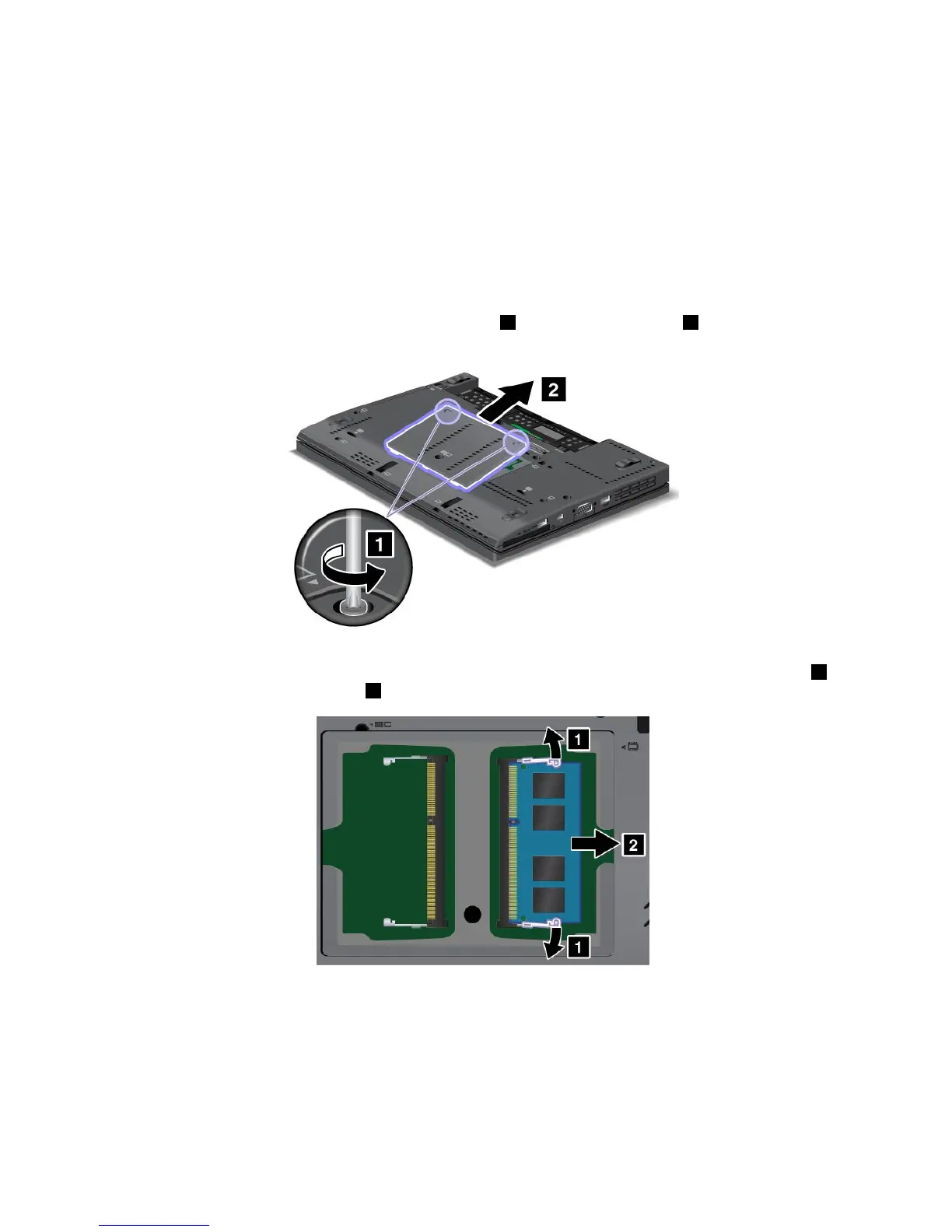
4.Loosenthescrewsthatsecurethememoryslotcover1,thenremovethecover2.
Iftwomemorymodulesalreadyareinstalledinthememoryslots,removeamemorymoduletomake
roomforthenewonebypressingoutonthelatchesonbothedgesofthesocketatthesametime1
andremovingthememorymodule2.Savetheremovedmemorymoduleforfutureuse.
5.Findthenotchonthecontactedgesideofthememorymoduleyouareinstalling.
Attention:Toavoiddamagingthememorymodule,donottouchitscontactedge.
76UserGuide



 To Next Page